
I. Setting up Live broadcast
1) Login to Live365 broadcast control panel
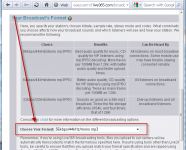
2) Select broadcast format: click My Profile, and select the desired format in the drop-down box (pic. 1).

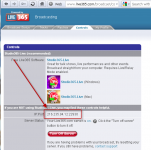
3) Switch broadcast mode to Live: click Controls and then "Switch broadcast mode" button. Check "Live" and click "Save" button. The next screen will give server connection details (pic. 2) - you'll need it in the next step.

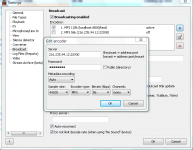
4) Run RadioBOSS, open Settings->Broadcast. Click "+", add server address from Step 3, enter password for your Live365 account in the Password field. Select the format to the same selected in the Live365 control panel on step 2. Note that MP3 and MP3 pro are not the same. (pic. 3).

5) Click "OK" and check the checkbox in the list to enable this server. Also check the "Broadcasting Enabled" option above. Click OK.
II. Sending song title
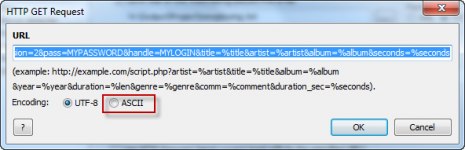
In the Settings window, click "Log files (Reports)", enable "Use HTTP Get request" option and click "+" to add a new HTTP Request. A window will appear (pic. 4).

In the URL put the following string:
Select the ASCII encoding and click OK.
See the attached "Using add_song.cgi API.txt" file for more details on add_song.cgi usage.
Filtering requests to Live 365 server.
Live365 has several restrictions, eg. you shouldn't send empty "title" or "artist" information, and if "coverURL" parameter is used, it shouldn't be empty.
The following script takes care of it:
PHP code (live365proxy.php):
To use it, upload script on your web site and make RadioBOSS do HTTP GET request to this script (instead of requesting http://tools.live365.com/cgi-bin/add_song.cgi).
The URL will look like this;
If backslashes are added to apostrophe and quote characters, in php.ini set magic_quotes_gpc=Off or add a call to set_magic_quotes_runtime(false);.
1) Login to Live365 broadcast control panel
2) Select broadcast format: click My Profile, and select the desired format in the drop-down box (pic. 1).
3) Switch broadcast mode to Live: click Controls and then "Switch broadcast mode" button. Check "Live" and click "Save" button. The next screen will give server connection details (pic. 2) - you'll need it in the next step.
4) Run RadioBOSS, open Settings->Broadcast. Click "+", add server address from Step 3, enter password for your Live365 account in the Password field. Select the format to the same selected in the Live365 control panel on step 2. Note that MP3 and MP3 pro are not the same. (pic. 3).
5) Click "OK" and check the checkbox in the list to enable this server. Also check the "Broadcasting Enabled" option above. Click OK.
II. Sending song title
In the Settings window, click "Log files (Reports)", enable "Use HTTP Get request" option and click "+" to add a new HTTP Request. A window will appear (pic. 4).
In the URL put the following string:
Note: change MYPASSWORD and MYLOGIN to your Live365 login/password.http://tools.live365.com/cgi-bin/add_song.cgi?version=2&pass=MYPASSWORD&handle=MYLOGIN&title=%title&artist=%artist&album=%album&seconds=%seconds
Select the ASCII encoding and click OK.
See the attached "Using add_song.cgi API.txt" file for more details on add_song.cgi usage.
Filtering requests to Live 365 server.
Live365 has several restrictions, eg. you shouldn't send empty "title" or "artist" information, and if "coverURL" parameter is used, it shouldn't be empty.
The following script takes care of it:
PHP code (live365proxy.php):
Code:
<?php

foreach($_GET as $key => $val)
{
  if (!(($key == 'coverURL') && ($val == '')))
    $params .= '&' . $key . '=' . urlencode($val);
}
$params = substr($params, 1);

if (($_GET['artist'] == '') || ($_GET['title'] == '') || ($_GET['album'] == ''))
  die("");

file_get_contents("http://www.live365.com/cgi-bin/add_song.cgi?" . $params);
?>The URL will look like this;
http://YOURSITE.com/live365proxy.php?version=2&pass=MYPASSWORD&handle=MYLOGIN&title=%title&artist=%artist&album=%album&seconds=%seconds
If backslashes are added to apostrophe and quote characters, in php.ini set magic_quotes_gpc=Off or add a call to set_magic_quotes_runtime(false);.
 ) you can open the quoted URL in the browser to get stats, don't forget to change LOGIN and PASS.