English Deutsch Español Русский
RadioBOSS
RadioBOSS makes automating your broadcast to the world, your business or shop professional, simple, affordable, reliable.
Read MoreDownloadBuy Now
DJSoft.Net Community Forums
September 09, 2010, 07:14:12 AM *
Welcome, Guest. Please login or register.
Did you miss your activation email?

Login with username, password and session length
News: SMF - Just Installed!
 
   Home   Help Search Login Register  
Pages: [1]
  Print  
Author Topic: Error: Unable to play! Erorr Code = 8 (No description)  (Read 1992 times)
0 Members and 1 Guest are viewing this topic.
nsingh
User
*
Posts: 1


View Profile
« on: October 08, 2008, 03:39:39 AM »

We have been using version RadioBoss 2.9.1.311 for many months without any problems.

Suddenly we get the following error in the RadioBoss log window and it will no longer play or schedule any mp3 files :

"Error: Unable to play! Erorr Code = 8 (No description)"

We have re-installed the program, rebuilt the play-lists, but no luck.

Please help !!!!!!!!!
Logged
djsoft
Administrator
User
*****
Posts: 357

353966341
View Profile WWW
« Reply #1 on: October 13, 2008, 05:55:32 AM »

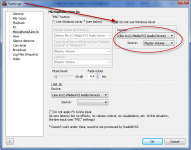
Error Code 8 means that RadioBOSS can not initialize sound card. This can happen if you changed the sound card, or deleted it's drivers (or driver can not start for some reason), turned it off in the Devece Manager, or something like this. Please check the settings in the RadioBOSS settings window which sound card is set up as Primary output, try to change it if you have multiple sound cards.
BTW, what OS do you use?
Logged

djsoft.net support / icq 353966341 / email support@djsoft.net / http://www.djsoft.net
janugget
User
*
Posts: 1


View Profile
« Reply #2 on: January 21, 2010, 03:07:14 PM »

I also started getting the "error code = 8" earlier this month and haven't been able to figure out what the problem is. We're running the standard version (3.0) on Windows XP. I checked the settings and the right sound card is selected as the output device. I checked in Windows' Device Manager and the sound card is installed and working correctly.

What other issues could be causing this error? Do I need to update to version 4.0?

Please advise. Thanks!
Logged
djsoft
Administrator
User
*****
Posts: 357

353966341
View Profile WWW
« Reply #3 on: January 23, 2010, 10:49:50 AM »

Do you tried any other software (like Winamp) - does it plays sound using this card?
You should also try the latest 4.0 version, maybe it'll solve the problem.
Please post here the results.
Thank you!
Logged

djsoft.net support / icq 353966341 / email support@djsoft.net / http://www.djsoft.net
Pages: [1]
  Print  
 
Jump to:  

Powered by MySQL Powered by PHP Powered by SMF 1.1.11 | SMF © 2006-2009, Simple Machines LLC Valid XHTML 1.0! Valid CSS!