English Deutsch Español Русский
RadioBOSS
RadioBOSS makes automating your broadcast to the world, your business or shop professional, simple, affordable, reliable.
Read MoreDownloadBuy Now

Author Topic: How to broadcast on icecast  (Read 3121 times)

0 Members and 1 Guest are viewing this topic.

nyankee

  • Posts: 116
    • View Profile
How to broadcast on icecast
« on: August 14, 2010, 12:02:15 PM »
I keep getting Connection/Encoder died. What do i need to change in the config file. I am using127.1.1.0:8000 for shoutcast. What should i use for ice cast?  can i get a step by step guide like there is one for shoutcat on this site?

djsoft

  • Administrator
  • Posts: 1622
    • View Profile
    • http://www.djsoft.net
Re: How to broadcast on icecast
« Reply #1 on: August 15, 2010, 04:28:16 AM »
For Icecast you should also enter so called "mount point".
The server address should look like: 127.0.0.1:8000/mount
Dmitry, djsoft.net support / icq 353966341 / email support@djsoft.net / http://www.djsoft.net

nyankee

  • Posts: 116
    • View Profile
Re: How to broadcast on icecast
« Reply #2 on: August 15, 2010, 12:06:28 PM »
What do i do toget listed in their directory? I got conected but i dont get listed

djsoft

  • Administrator
  • Posts: 1622
    • View Profile
    • http://www.djsoft.net
Re: How to broadcast on icecast
« Reply #3 on: August 15, 2010, 04:48:32 PM »
I don't know why this happens. Better to ask this question at Live365 forums...
Dmitry, djsoft.net support / icq 353966341 / email support@djsoft.net / http://www.djsoft.net

nyankee

  • Posts: 116
    • View Profile
Re: How to broadcast on icecast
« Reply #4 on: August 15, 2010, 08:54:59 PM »
hmm? i didnt say anything about live 365.

djsoft

  • Administrator
  • Posts: 1622
    • View Profile
    • http://www.djsoft.net
Re: How to broadcast on icecast
« Reply #5 on: August 16, 2010, 03:51:48 AM »
What do i do toget listed in their directory? I got conected but i dont get listed
"their directory" - didn't you mean Live365's directory?
Dmitry, djsoft.net support / icq 353966341 / email support@djsoft.net / http://www.djsoft.net

nyankee

  • Posts: 116
    • View Profile
Re: How to broadcast on icecast
« Reply #6 on: August 16, 2010, 01:13:52 PM »
I said I needed help setting up icecast with radioboss. I put in my computer ip adress annd port/mount. So it tells me i am connected in radioboss, but i do not appear i the icecast directory.

djsoft

  • Administrator
  • Posts: 1622
    • View Profile
    • http://www.djsoft.net
Re: How to broadcast on icecast
« Reply #7 on: August 20, 2010, 03:31:52 AM »
Google shows, that you need to add following lines to the Icecast config file (before </icecast> line):
Code: [Select]
<directory>
<yp-url-timeout>15</yp-url-timeout>
<yp-url>http://dir.xiph.org/cgi-bin/yp-cgi</yp-url>
</directory>

I didn't tried it myself, so I'm not sure if it will work.
Dmitry, djsoft.net support / icq 353966341 / email support@djsoft.net / http://www.djsoft.net

nyankee

  • Posts: 116
    • View Profile
Re: How to broadcast on icecast
« Reply #8 on: August 20, 2010, 10:10:35 AM »
Where do i input that? or replace

djsoft

  • Administrator
  • Posts: 1622
    • View Profile
    • http://www.djsoft.net
Re: How to broadcast on icecast
« Reply #9 on: August 20, 2010, 11:58:53 AM »
You should edit icecast.xml config file.
Dmitry, djsoft.net support / icq 353966341 / email support@djsoft.net / http://www.djsoft.net

nyankee

  • Posts: 116
    • View Profile
Re: How to broadcast on icecast
« Reply #10 on: August 21, 2010, 04:31:09 PM »
So do i replace anything inside the icecast.xml? or just add this to the bottom of what already is there.

djsoft

  • Administrator
  • Posts: 1622
    • View Profile
    • http://www.djsoft.net
Re: How to broadcast on icecast
« Reply #11 on: August 21, 2010, 05:07:27 PM »
Just add at the bottom before </body>.
I'd also recommend you to read documentation about Icecast configuration before making any changes.
Dmitry, djsoft.net support / icq 353966341 / email support@djsoft.net / http://www.djsoft.net

nyankee

  • Posts: 116
    • View Profile
Re: How to broadcast on icecast
« Reply #12 on: August 25, 2010, 11:35:05 PM »
Still not working. I start the server and no problem, but still does not show in directory. :( Dont you guys have a guide for icecast to work with radioboss like you do for shoutcast. I kind of surprising you are selling this, but you have not tried it out with icecast and post a step by step guide.

djsoft

  • Administrator
  • Posts: 1622
    • View Profile
    • http://www.djsoft.net
Re: How to broadcast on icecast
« Reply #13 on: August 26, 2010, 04:04:00 AM »
It has nothing to do with RadioBOSS. Radioboss just sends a stream to Icecast server, that's it.
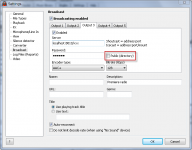
Also, in the Broadcast settings, please make sure that "Public" checkbox is checked (see picture attached).
About step by step guide... As I said, that solution was found using Google.
« Last Edit: August 26, 2010, 04:05:31 AM by djsoft »
Dmitry, djsoft.net support / icq 353966341 / email support@djsoft.net / http://www.djsoft.net

nyankee

  • Posts: 116
    • View Profile
Re: How to broadcast on icecast
« Reply #14 on: August 29, 2010, 11:53:33 AM »
I see you have localhost:8010/xxx ,  i only have localhost:8005/mount for icecast. Now am i supposed to put "/mount" or for mount you put in some number?


With Quick-Reply you can write a post when viewing a topic without loading a new page. You can still use bulletin board code and smileys as you would in a normal post.

Warning: this topic has not been posted in for at least 120 days.
Unless you're sure you want to reply, please consider starting a new topic.

Name: Email:
Verification: