Radio-Albena
Member
Broadcasting Title from File Type not sent during Multiple Actions event
Hi Dmitry,
I have a question about File Types and Broadcasting Titles.
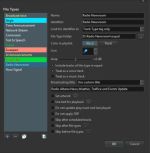
I have a File Type called Radio Newsroom with:
RadioBOSS correctly recognizes the files as this File Type — I can also see this from the File Type color in the playlist.
The files themselves are also recognized correctly and RadioBOSS shows their MP3/title information, for example Radio Albena - News while the file is playing.
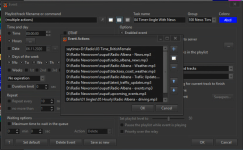
The files are played from a scheduled event using Multiple Actions, for example:
D:\Radio Newsroom\output\Radio Albena - News.mp3
D:\Radio Newsroom\output\radio_albena_news.mp3
D:\Radio Newsroom\output\Radio Albena - Weather.mp3
D:\Radio Newsroom\output\Radio Albena - Traffic Update....mp3
D:\Radio Newsroom\output\upcoming-events.mp3
The scheduler option “Send task name instead of track titles to server” is disabled.
Overlay playback is also disabled.
The problem is that while these files are playing, the custom Broadcasting Title from the File Type is not sent to the streaming server.
In AzuraCast there is no metadata/title entry at all during the News block, even though RadioBOSS itself is clearly playing and showing the file/title.
Normal music tracks before and after the event send metadata correctly.
If I enable “Send task name instead of track titles to server”, the scheduler task name is sent, but I do not want the technical scheduler name displayed publicly.
Is the File Type Broadcasting Title supposed to work for tracks played from a Multiple Actions scheduler event?
Or is there another setting required so that the file title or custom Broadcasting Title is actually sent to the streaming server?
RadioBOSS version: 7.2.5
Thanks!
Hi Dmitry,
I have a question about File Types and Broadcasting Titles.
I have a File Type called Radio Newsroom with:
- File Type folder: D:\Radio Newsroom\output
- Broadcasting title: Use custom title
- Custom title: Radio Albena News, Weather, Traffic and Events Update
RadioBOSS correctly recognizes the files as this File Type — I can also see this from the File Type color in the playlist.
The files themselves are also recognized correctly and RadioBOSS shows their MP3/title information, for example Radio Albena - News while the file is playing.
The files are played from a scheduled event using Multiple Actions, for example:
D:\Radio Newsroom\output\Radio Albena - News.mp3
D:\Radio Newsroom\output\radio_albena_news.mp3
D:\Radio Newsroom\output\Radio Albena - Weather.mp3
D:\Radio Newsroom\output\Radio Albena - Traffic Update....mp3
D:\Radio Newsroom\output\upcoming-events.mp3
The scheduler option “Send task name instead of track titles to server” is disabled.
Overlay playback is also disabled.
The problem is that while these files are playing, the custom Broadcasting Title from the File Type is not sent to the streaming server.
In AzuraCast there is no metadata/title entry at all during the News block, even though RadioBOSS itself is clearly playing and showing the file/title.
Normal music tracks before and after the event send metadata correctly.
If I enable “Send task name instead of track titles to server”, the scheduler task name is sent, but I do not want the technical scheduler name displayed publicly.
Is the File Type Broadcasting Title supposed to work for tracks played from a Multiple Actions scheduler event?
Or is there another setting required so that the file title or custom Broadcasting Title is actually sent to the streaming server?
RadioBOSS version: 7.2.5
Thanks!