Coming Soon to BroadcastVoice 👀

BroadcastVoice is learning to do more than simply generate AI announcements between songs.​


One of the features currently in development is AI Hour Close.

Anyone running an automated radio station probably knows the situation: the top-of-hour event is getting closer, but the next song in the playlist may be too long to fit properly into the remaining time.

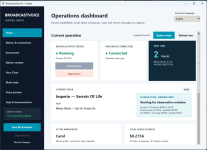
AI Hour Close is being designed to watch the upcoming RadioBOSS schedule and playlist in real time, recognize an approaching hour anchor, and calculate how much time is actually available.

Instead of blindly starting another track, BroadcastVoice can evaluate whether the upcoming music still fits naturally before the scheduled event — including a configurable tolerance for a short fade-out.

The goal is simple:

Cleaner hour transitions, less awkward timing, and smarter interaction between the AI announcer and RadioBOSS automation.

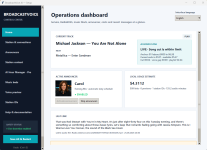
The screenshot shows the new live monitoring section already running in the BroadcastVoice dashboard.

It's still being tested and fine-tuned before it will be allowed to make any changes to the live playlist.

Coming soon… 😎
 

Attachments

  • broadcast voice.PNG
    broadcast voice.PNG
    484.1 KB · Views: 152
BroadcastVoice development update – now running on two stations

Hi all,

Here is a new development update for BroadcastVoice, my AI announcer and RadioBOSS integration project.

BroadcastVoice is now running live on both Radio Albena and Rocking Albena. Since my previous update, the project has gained a clean Windows installer, a much more complete operations dashboard and several improvements for day-to-day radio operation.

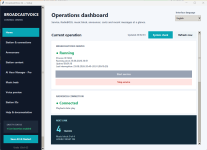
The dashboard now displays:

  • BroadcastVoice service status, start time, uptime and the last interruption
  • Live RadioBOSS connection and playback state
  • Current and upcoming tracks
  • The number of music tracks remaining before the next link
  • The currently active announcer, including profile picture and show
  • Local usage and cost estimates
  • The latest generated link and recent warnings
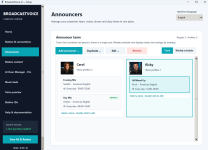
The announcer section supports multiple show profiles for the same presenter. Each profile can have its own Gemini voice, personality, instructions, music-bed preference, duty times and individual announcement schedule. RadioBOSS events can also select a specific presenter when required.

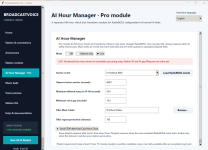
The Pro Hour Manager observes the playlist before the full-hour event and checks whether the upcoming song still fits within the permitted cut. It can safely adjust the closing sequence while leaving RadioBOSS’s own scheduled events and sweeper system in control of the final transition.

Other sections include voice previews, music-bed pools, short Station-ID generation and a complete system check for RadioBOSS, Gemini, FFmpeg, presenter files and scheduled events.

The attached screenshots are from the real working installation rather than a mock-up. It is still an actively developed private project, but it is gradually becoming a complete and practical radio tool.

I’d be interested to hear what you think of the interface and which part would be most useful in your own RadioBOSS setup.
 

Attachments

  • AI Hour Manager Pro.png
    AI Hour Manager Pro.png
    64.7 KB · Views: 80
  • announcers.png
    announcers.png
    80.2 KB · Views: 85
  • dash_1.png
    dash_1.png
    53.2 KB · Views: 82
  • dash_2.png
    dash_2.png
    85.2 KB · Views: 74
BroadcastVoice – Official Release: Now Available!
Hi everyone,

I'm pleased to announce that BroadcastVoice is officially released and now available in our online shop!

What started as a personal project for Radio Albena has grown into a complete AI-powered announcing system designed to integrate directly with RadioBOSS.

BroadcastVoice is currently in daily operation on Radio Albena. It also supports my second station, Rocking Albena, where AI announcing is temporarily paused.

Key features include:

  • Professional Windows installer with integrated licensing
  • Dashboard for monitoring and controlling AI announcing
  • Automatic announcements based on currently playing and upcoming tracks
  • Detection of track information directly from RadioBOSS
  • Configurable announcement frequency and broadcasting hours
  • Multiple AI announcers with individual voices and personalities
  • Configurable language and English accent settings
  • Background music beds for natural transitions
  • Automatic integration with RadioBOSS
  • Station ID generator
  • Scheduling and automation
  • Remote-control functionality
  • Commercial and sponsor announcements, depending on the edition
Important: News, Weather and Traffic

BroadcastVoice focuses on music announcing and radio automation. It does not generate news, weather reports or traffic updates.

These functions are provided by Radio News Studio, a separate application that automatically creates ready-to-broadcast MP3 files containing news, weather, traffic and event announcements.

Radio News Studio can be used independently of BroadcastVoice.

Developed and tested in real broadcasting

BroadcastVoice has been extensively tested during daily operation on Radio Albena.

Both applications are available separately in our online shop.

Listen live: https://radio-albena.com

Thanks to everyone who followed the project and contributed feedback along the way!
 
Back
Top