Hello,
I encountered an issue with some audio files used in my RadioBOSS library after reorganizing the disk partitions on my computer.
Previously, I had several audio files stored across both the C drive and the E drive. To organize everything better, I decided to create a new partition from the C drive, which is now the new D drive. My goal was to keep all my WAV files for RadioBOSS in a single folder: D:\Music.
To move the files, I followed these steps:
1. Initially, I copied the files from the original folder on drive C to an existing folder on drive E using the “Copy to folder” function, because the D drive had not been created yet.
2. After that, I freed up space on drive C and created the new partition (D drive).
3. Once the D drive was available, I moved the files from drive E to D:\Music using the “Move to folder” function.
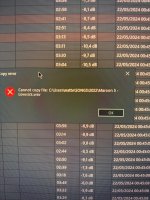
During this process, several error messages appeared. Now I noticed that some audio files appear to be empty or still point to the old path on E:, which no longer exists.
Because of this, some files in the library are no longer recognized or playable.
I would like to understand:
- whether RadioBOSS may have stored references to the old file paths;
- and if there is a way to automatically update or rebuild the library paths to D:\Music without having to manually re-add all the files.
Thank you in advance for your support.
I encountered an issue with some audio files used in my RadioBOSS library after reorganizing the disk partitions on my computer.
Previously, I had several audio files stored across both the C drive and the E drive. To organize everything better, I decided to create a new partition from the C drive, which is now the new D drive. My goal was to keep all my WAV files for RadioBOSS in a single folder: D:\Music.
To move the files, I followed these steps:
1. Initially, I copied the files from the original folder on drive C to an existing folder on drive E using the “Copy to folder” function, because the D drive had not been created yet.
2. After that, I freed up space on drive C and created the new partition (D drive).
3. Once the D drive was available, I moved the files from drive E to D:\Music using the “Move to folder” function.
During this process, several error messages appeared. Now I noticed that some audio files appear to be empty or still point to the old path on E:, which no longer exists.
Because of this, some files in the library are no longer recognized or playable.
I would like to understand:
- whether RadioBOSS may have stored references to the old file paths;
- and if there is a way to automatically update or rebuild the library paths to D:\Music without having to manually re-add all the files.
Thank you in advance for your support.