Radio-Albena
Active member
Hi Dmitry,
I have a small suggestion regarding the File Types feature in RadioBOSS.
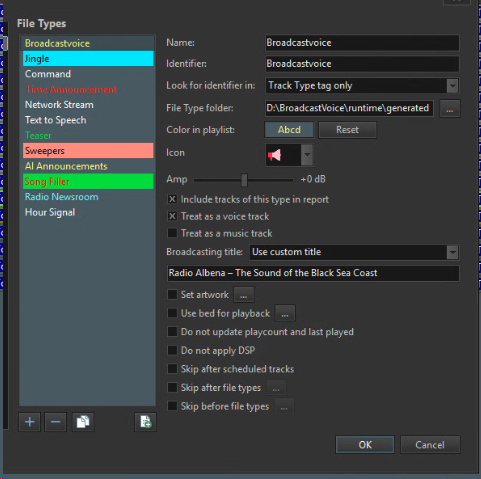
Currently, we can assign a custom color and icon to a file type based on a specific folder.
However, the color and icon only seem to apply to files directly inside that folder, not to files located in its subfolders.
Would it be possible to add an option such as:
☐ Include subfolders
When enabled, the selected file type, color, and icon would also apply to all files in the subfolders.
For example:
This would make organizing larger audio libraries much easier without having to configure every subfolder separately.
In my case, I have one main folder with eight subfolders. Currently, I would need to create nine separate File Type entries just to assign the same color and icon. An "Include subfolders" option would make this much easier.
Thanks for considering it!
Best regards,
Raymond
I have a small suggestion regarding the File Types feature in RadioBOSS.
Currently, we can assign a custom color and icon to a file type based on a specific folder.
However, the color and icon only seem to apply to files directly inside that folder, not to files located in its subfolders.
Would it be possible to add an option such as:
☐ Include subfolders
When enabled, the selected file type, color, and icon would also apply to all files in the subfolders.
For example:
- D:\Jingles\
- D:\Jingles\Station IDs\
- D:\Jingles\Sweepers\
- D:\Jingles\Christmas\
This would make organizing larger audio libraries much easier without having to configure every subfolder separately.
In my case, I have one main folder with eight subfolders. Currently, I would need to create nine separate File Type entries just to assign the same color and icon. An "Include subfolders" option would make this much easier.
Thanks for considering it!
Best regards,
Raymond