Improvements to crossfading between tracks

tiago_alves43

New member
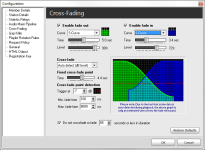
I would like to suggest an improvement to the track crossfade feature, making it similar or identical to the one used in SAM Broadcaster. This would allow us to select transition modes for the end of the current track and the start of the next—such as X-fades, S-fades, or other independent curve shapes—and enable the next track to have a fade-in that doesn't necessarily start from zero db, allowing us to choose the starting volume level. Basically, the same functionality found in SAM Broadcaster, but adapted to work seamlessly in RadioBoss.

See the examples in the images below:


Eu gostaria de sugerir uma melhoria para o crossfade entre faixas no qual ele se tornaria semelhante ou idêntico ao que é usado no SAM Broadcaster, onde poderíamos escolher os modos de transição para fim da faixa corrente e início da seguinte com crossfade em X ou em S, ou em outros 'desenhos' independentes entre si, no qual a faixa seguinte também possa ter um fade-in que não obrigatoriamente comece do zero, mas possamos escolher em qual nível ela pode iniciar. Basicamente o mesmo que o SAM Broadcaster já faz. Mas que funcionaria muito bem no RadioBoss.
Como exemplo nas imagens a seguir:


Thanks in advance
 

Attachments

  • Capture.PNG
    Capture.PNG
    40.6 KB · Views: 83
  • sambc-xfade.png
    sambc-xfade.png
    13.2 KB · Views: 78
Hallo zusammen .... Dein Wunsch " tiago_alves43 " existiert bereits nur die Grafische Darstellung wie unter Sam Broadcast gibt es nicht im Radio Boss ist dies reduziert auf reine Zahlen 😉 .

Du musst die Überblendungen auch " Cross Fade " genannt in verschiedenen Bereichen im Radio Boss einstellen um das alle " Ein.- , Ausblendungen " flüssig und für das Menschliche Ohr angenehm klingen ausführen .
Sonnst klinkt das ganze unrund den du musst ja das Mic die Musik die Einspieler die Warteschlange od. auch Externe Geräte wie " Schalplattenspier , MC " ,VHS , Mixer , Mischpulte ec. ec. immer in Einklang bringen , wichtig ist zu wissen das alles beginnt mit der Position " Überblendungen " stellst du die Grundsteuerung für die " Cross Fade " hier schon Falsch ein setzt sich das in allen anderen " Cross Fade " unter " Einstellungen " fort und kann sich sogar exponenzieren !

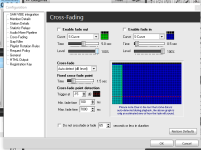
Ich gebe die mal unten ein Bild mit rein die Daten kannst du dir gerne aus der " Überblendung " übernehmen so hast du ein guten Einstieg 😊.

Diese Einstellung ist nur für uns Online Radios gut so denn für die Kommerziellen Radios kommen noch mehr Dinge dazu und somit brauchen wir schon mal als Online Radio die untere Sektion nicht wirklich siehe Feld " Kategorie " die kannst du so wie sie ist stehen lassen ..... übernehme es einfach so wie bei mir und dann kannst du dich in Ruhe durcharbeiten und Ausprobieren . Vergieß aber bitte nicht das du auch noch " Cross Fade " unter den Sektor " Einstellung " liegen hast die du Einstellen musst sonnst wird das nix mit " Hörer & Hörgenuss " .

Cross Fade = Fade IN & Fade OUT


Google Übersetzer :


Hi everyone... Regarding your request, "tiago_alves43": the feature already exists, though RadioBOSS doesn't have the visual display found in SAM Broadcaster; instead, it’s reduced to raw numbers here 😉.

You need to configure the crossfades (also known as "Cross Fade") in various sections of RadioBOSS to ensure all fade-ins and fade-outs sound smooth and pleasant to the human ear.

Otherwise, the audio won't flow well, as you have to balance the mic, music, jingles, the playlist queue, and external devices—like turntables, cassette decks, VHS players, mixers, consoles, etc.—with one another. It’s important to know that everything starts with the "Crossfades" position; if you set the basic crossfade controls incorrectly here, that error carries over to all other crossfade settings under "Settings" and can even compound!

I’ve included an image below; feel free to copy the settings from the "Crossfade" section—it’ll give you a good starting point 😊.

This setup works well for us online radio stations; commercial stations have additional requirements, so we don't really need the lower section (see the "Category" field—you can just leave that as is). Simply copy my settings, and then you can take your time working through and experimenting with them. Just don't forget that there are additional crossfade settings under the "Settings" menu that you need to configure; otherwise, you won't achieve that great listening experience for your audience.

Crossfade = Fade IN & Fade OUT

Screenshot 2026-09-21 104142.png
 
Back
Top