
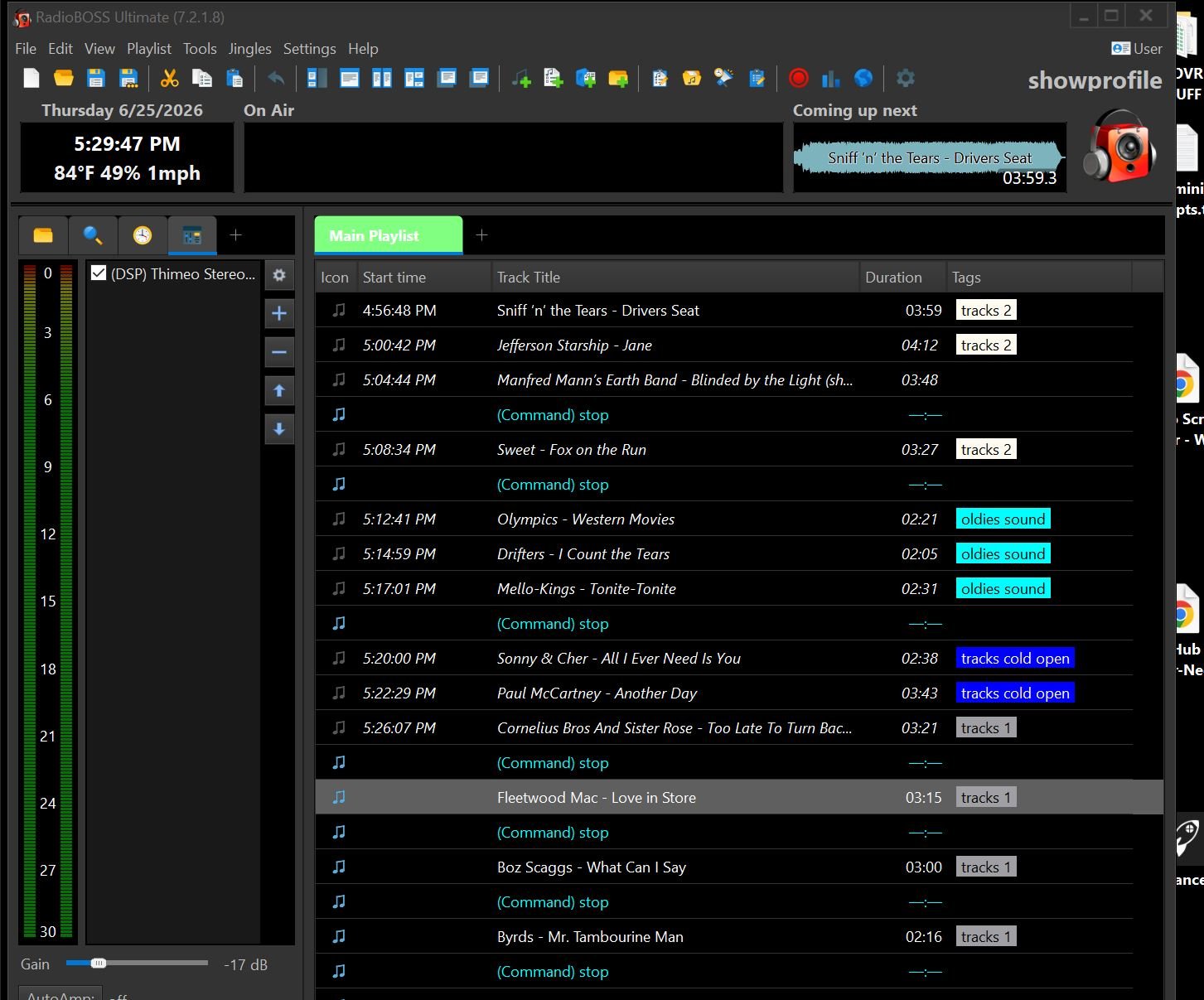
See attached pic. It shows RB stopped down for a live talk break. In the playlist, the system is set to show anything already played in italics.
As shown in the playlist, the next track is Fleetwood Mac's "Love In Store." But at the top of the window, under the toolbar, it's showing the next track as Sniff 'n' The Tears' "Driver's Seat," which was already played as the first track of the playlist.
When the playlist starts playing again, "Driver's Seat" will change to italics to show it has played. In the top window, whatever the next track in the playlist is will show normally. But upon stopping, once again, "Driver's Seat" will show up as not played in the playlist and will show as the next track in the top window.
The tracks mentioned are just examples. It happens on any playlist and any tracks. When the system is stopped anywhere in the playlist, the first track in the playlist will show as not being played and the top window shows it as the next track to play.
Thankfully, the system follows the playlist (ie: it's not restarting the playlist at the beginning) after each stopdown. But it is confusing to those on-air.
Not sure why this is happening, but I do know it started upon upgrading to 7.2.1.8. Can this be fixed in an upcoming release?
Thanks...
...joe
As shown in the playlist, the next track is Fleetwood Mac's "Love In Store." But at the top of the window, under the toolbar, it's showing the next track as Sniff 'n' The Tears' "Driver's Seat," which was already played as the first track of the playlist.
When the playlist starts playing again, "Driver's Seat" will change to italics to show it has played. In the top window, whatever the next track in the playlist is will show normally. But upon stopping, once again, "Driver's Seat" will show up as not played in the playlist and will show as the next track in the top window.
The tracks mentioned are just examples. It happens on any playlist and any tracks. When the system is stopped anywhere in the playlist, the first track in the playlist will show as not being played and the top window shows it as the next track to play.
Thankfully, the system follows the playlist (ie: it's not restarting the playlist at the beginning) after each stopdown. But it is confusing to those on-air.
Not sure why this is happening, but I do know it started upon upgrading to 7.2.1.8. Can this be fixed in an upcoming release?
Thanks...
...joe

