Unfortunately there's a problem with this window as it involves using the grid control which we were unable to make accessible yet, I'm sorry, even if other parts are accessible, the main grid that shows the preset list, will still be a problem.Hi everyone. I would like to provide feedback regarding the 'Create multiple playlists' window. This window is still only semi-accessible.
For the buttons, NVDA just says 'button' and doesn't read the specific option or label. The only options it correctly announces are: 'save playlist to', 'number playlists for each preset', and 'start number'.
Also, when the presets option is opened, it is not possible to check or uncheck the desired preset (the checked/unchecked state is not announced). The checkbox for specifying the playlist start time is readable, though.
I hope you will be able to fix these issues.

You are using an out of date browser. It may not display this or other websites correctly.
You should upgrade or use an alternative browser.
You should upgrade or use an alternative browser.
RadioBOSS 7.2 [beta]
- Thread starter djsoft
- Start date
- Status
- Not open for further replies.
alexanderbryntesen
New member
I’ve been testing the beta version a bit, and features like Dayparting and the new repeat protection rules in the Playlist Generator look very promising.
We currently use a different automation system, but we are planning to switch to RadioBOSS soon, as it looks like a very solid and flexible solution for radio automation.
One thing I’m still not completely sure about is how history and repeat protection work globally. From what I understand many of these settings seem to be tied to individual presets?
It would be very useful to have a true global history or master repeat protection layer that works across all presets, a kind of top-level controller that monitors all presets when selecting music. This would help avoid unwanted repeats of songs or artists when running complex automated schedules with many playlists and dayparts.
If a global history system already exists, I would really appreciate some clarification on how it behaves when multiple presets are active.
We currently use a different automation system, but we are planning to switch to RadioBOSS soon, as it looks like a very solid and flexible solution for radio automation.
One thing I’m still not completely sure about is how history and repeat protection work globally. From what I understand many of these settings seem to be tied to individual presets?
It would be very useful to have a true global history or master repeat protection layer that works across all presets, a kind of top-level controller that monitors all presets when selecting music. This would help avoid unwanted repeats of songs or artists when running complex automated schedules with many playlists and dayparts.
If a global history system already exists, I would really appreciate some clarification on how it behaves when multiple presets are active.
Will this be possible in this beta? Using a start time would require recreating my events, which is very cumbersome since I have presets A, B, and C that alternate daily.There's a new tool we plan to create that will allow automatically manage those "generate playlist" events, but it will be released later.
Example:
- Monday 5 am: Preset A, 6 am: Preset B
- Tuesday 5 am: Preset B, 6 am: Preset C
I'm eager to try out the new replay rules.
Have you thought about using a tool like Antigravity to help adapt such windows? I'm no programmer, but I know enough about accessibility to know that, ideally, it should be manually added, or better yet, included by default in any sdk or platform used, but sometimes judicious use of software like Antigravitycan help patch interfaces that aren't accessible, especially considering that there already is a screen reader mode that it could expand. I can appreciate that AI, if not restrained in its initial prompts, can easily go on a tangent, trying to fix things that aren't broken, but I have seen this work in other cases.Unfortunately there's a problem with this window as it involves using the grid control which we were unable to make accessible yet, I'm sorry, even if other parts are accessible, the main grid that shows the preset list, will still be a problem.

tomimatko
Active member
Same here - RB is 32-bit, Win 10.
JB Broadcast are running without any issues.
RadioBOSS 7.2.0.3 beta
Changes
x86 https://dl.djsoft.net/beta/radioboss_setup_7.2.0.3.exe
x64 https://dl.djsoft.net/beta/radioboss_setup_7.2.0.3_x64.exe
Changes
- Changed track countdown timers design
- Style: custom icons can be set for current/next/played tracks
- Track Tool: "Do not ask" option for Detect command
- Virtual Mixer: improved UI and fixed dark theme issues
- Waveform is shown in the Last Played bar
- Minor UI improvements and bugs fixed
x86 https://dl.djsoft.net/beta/radioboss_setup_7.2.0.3.exe
x64 https://dl.djsoft.net/beta/radioboss_setup_7.2.0.3_x64.exe

Radioman69
New member
Hello everyone. Would it be possible to add some lines to the Track Tool graph as a guide for the level, for example -3, -6, etc.? I've shown it a bit awkwardly in the attached image. Thank you.
It serves as a reference for making a manual adjustment.

It serves as a reference for making a manual adjustment.

xzsaimon16
Active member
I got this error after updating. RadioBOSS was restarting every so often; I closed it, and so far it’s working normally.

Guillaume
Active member
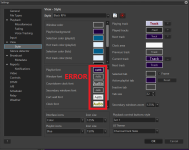
In Settings > View > Style:
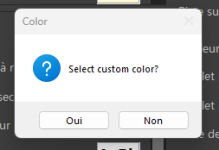
When changing the colors in one of the new frames, a message appears: “Select custom color?”
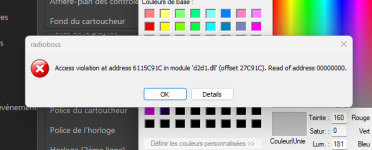
When confirming the settings, another error message appears.
I have both bug reports. I can send them to you if you wish.
When changing the colors in one of the new frames, a message appears: “Select custom color?”
Clicking "No" does nothing, and the modified color is applied.
Clicking "Yes" brings up a new color palette. Confirmation displays an error message. See screenshots.
Right-clicking does not allow me to change the fonts or background color.
When confirming the settings, another error message appears.
I have both bug reports. I can send them to you if you wish.
Attachments
Guillaume
Active member
In Settings > Playback > Miscellaneous:
The "Resampling Quality" dropdown list has changed: the numbers 0 through 4 are no longer displayed. Instead, it now shows Linear, 16-point sinc, 64-point sinc…
What do these mean? And what is the default value as indicated in the current version?
What does the new checkbox, "Use Media Foundation codecs," mean? (Is it possible to add it to the language file?)
While I'm at it, I have a question about "Smooth Seeking." I've read the help documentation (Enable smooth seeking (with short fade)), but I don't understand it. What does this feature do?
The "Resampling Quality" dropdown list has changed: the numbers 0 through 4 are no longer displayed. Instead, it now shows Linear, 16-point sinc, 64-point sinc…
What do these mean? And what is the default value as indicated in the current version?
What does the new checkbox, "Use Media Foundation codecs," mean? (Is it possible to add it to the language file?)
While I'm at it, I have a question about "Smooth Seeking." I've read the help documentation (Enable smooth seeking (with short fade)), but I don't understand it. What does this feature do?
Guillaume
Active member
A note regarding the "Generate Multiple Playlists" feature in Playlist Generator:Usually the playlists are generated automatically by the scheduled events, and you can set the Start Time there. Manual "Generate" button is for testing the template mostly, not for real world operation.
When clicking "Generate," the report always displays "Loaded tracks from the playlist window: 0."
Regardless of the number of playlists to be generated, the first playlist, which serves as the reference for the others, always displays "0." It's as if the playlist's music tracks aren't being included.
During these tests, I understand there's a bug: the playlist's music tracks aren't being included. I've tested this with dozens of scheduled, regular tracks...
And I suspect that, in the case of a scheduled event with multiple playlists (not just one), the playlist's music tracks might also not be loaded.
Could this be the case?
This issue also exists in the official version 7.1.6.2. I'd never noticed it before. I'm bringing it up again to make sure everything is working correctly.
The "Generate" button in Playlist Generator and the one in "Generate Multiple Playlists."
You explained to me that the manual "Generate" button is mainly for testing the model, not for actual use (real world operation).
I don't entirely agree. Admittedly, I mostly use this feature for testing. But sometimes it's to save playlists and/or export them.
With the arrival of the new "Dayparting" feature (which is a great new feature, by the way), I no longer see any point in saving and exporting.
The generated playlists are not 100% accurate:
- When using the main "Generate" button: the report indicates "Warning: start time is not set. Dayparting and same-time repeat protection will not work." This is normal, as there is no option to specify a time and day. Unwanted tracks, according to the "Dayparting" settings, would appear in the playlist. Conversely, music tracks that should be played would not appear. To me, this doesn't make sense. Even for testing purposes, this produces results that don't reflect reality.
- When using the "Generate" button in "Generate Multiple Playlists": loading the playlist tracks doesn't seem to work (to be confirmed). If this is fixed, or if everything works normally, this is the feature that could accommodate "Save playlist" and "Export to player."
My understanding of the "Generate" button in Playlist Generator was that I could test, save, and export. It was just as reliable and faster than creating events.
Currently, I'm hesitant. The new "Dayparting" feature is welcome. However, in this evolution, other features seem to have been "abandoned" or are no longer relevant.
Perhaps I'm mistaken.
I'm sharing my opinions to ensure, from my perspective at least, that version 7.2 is improved and reliable upon its official release.
xzsaimon16
Active member
When displaying the teaser, two timers are shown in this way.RadioBOSS 7.2.0.3 beta
Cambios
Descargar
- Se modificó el diseño de los temporizadores de cuenta regresiva de la pista
- Estilo: se pueden configurar íconos personalizados para las pistas actuales, siguientes y reproducidas
- Herramienta de seguimiento: opción "No preguntar" para el comando Detectar
- Virtual Mixer: interfaz de usuario mejorada y problemas con el tema oscuro solucionados
- La forma de onda se muestra en la barra Última reproducción
- Pequeñas mejoras en la interfaz de usuario y errores corregidos
x86 https://dl.djsoft.net/beta/radioboss_setup_7.2.0.3.exe
x64 https://dl.djsoft.net/beta/radioboss_setup_7.2.0.3_x64.exe
When moving through the Outro in the pre-production bar, instead of showing the word OUTRO, it displays “INTRO.” It should correctly display whether the marker is Intro or Outro. Even if it is combined, it should show Intro or Outro depending on where the position bar is located.
---------------------------------------------------------------------------------------------------
The Played, Now, and Next icons are all working perfectly. The only thing I would like is for the “
 ” icon to blink. Everything else is fine.
The timers in the pre-production bar do not look bad, but they appear above the mix markers and take up too much space when the font size is large, reducing the visibility of the waveform. I understand that the proposed design cannot be implemented in this version, but for the next one I believe it would be appropriate to implement these improvements.
xzsaimon16
Active member
That means that, for example, if today is Thursday and I select Sunday at 00:00 as the start date and time, will it work?Start Time means you need to select the start time and also day of the week. I'm not sure of what the solution could be so to set the start time automatically. There's a new tool we plan to create that will allow automatically manage those "generate playlist" events, but it will be released later.
Although yesterday I tested it and experienced incorrect behavior when generating the playlist, since almost no songs were selected, leaving the list nearly empty with only IDs.
Actually it's the opposite, the last played and played history is stored per-track and generating a playlist just uses this information for repeat protection.One thing I’m still not completely sure about is how history and repeat protection work globally. From what I understand many of these settings seem to be tied to individual presets?
It works like this, if you set e.g. "Do not repeat artist X minutes" it will work regardless when and why track by this artist had played before (manually added to the playlist, added from this or another preset, other ways) - the repeat protection checks what had actually played and when. The repeat protection times are set per-preset, and per-category when needed (e.g. you may want to allow hot rotation tracks to play more often than usual music).If a global history system already exists, I would really appreciate some clarification on how it behaves when multiple presets are active.
Honestly, I don't think so, there's already a lot that has been done for this version, and other things needed to be done (minor changes, bugs). This tool may be released later, before the next major update, as it's mostly a separate thing.Will this be possible in this beta? Using a start time would require recreating my events, which is very cumbersome since I have presets A, B, and C that alternate daily.
The SDK that RadioBOSS uses has poor accessibility support, so we had to create our own version for most of the controls to make them really accessible. This work is ongoing and accessible grids (same grid is used in the Ads Scheduler for example) are just a question of time.Have you thought about using a tool like Antigravity to help adapt such windows? I'm no programmer, but I know enough about accessibility to know that, ideally, it should be manually added, or better yet, included by default in any sdk or platform used
It allows selecting multiple entries in the list (previous versions allowed only one item to be selected). This way, you can remove many ads easily, not one-by-one, for example.Could you explain what you mean in Ads Scheduler:
"Multi-select for ads in the list"
Thank you for the suggestion, we'll consider it for the future.Hello everyone. Would it be possible to add some lines to the Track Tool graph as a guide for the level, for example -3, -6, etc.? I've shown it a bit awkwardly in the attached image. Thank you.
It serves as a reference for making a manual adjustment.
This looks like a bug, please click Help > Contact Support > Send bug reports so we can check what's wrong there.I got this error after updating. RadioBOSS was restarting every so often; I closed it, and so far it’s working normally.
The error doesn't reproduce here. Please send the bug reports using Help > Contact Support > Send bug reports menu command.Clicking "No" does nothing, and the modified color is applied.Clicking "Yes" brings up a new color palette. Confirmation displays an error message. See screenshots.
The default is 32-point since version 7.2 and before it was 16-point ("2" as in older versions).The "Resampling Quality" dropdown list has changed: the numbers 0 through 4 are no longer displayed. Instead, it now shows Linear, 16-point sinc, 64-point sinc…
If enabled, it will use the codecs that are integrated in Windows. This should be enabled usually, as some HLS streams will need those codecs.What does the new checkbox, "Use Media Foundation codecs," mean? (Is it possible to add it to the language file?)
When disabled seeking will simply change playback position. When enabled, it will overlap a bit of current position fading out and fade in to the new position. This is to avoid abrupt position change.While I'm at it, I have a question about "Smooth Seeking." I've read the help documentation (Enable smooth seeking (with short fade)), but I don't understand it. What does this feature do?
This option only works if the Playlist Generator was started from RadioBOSS, not separately.When clicking "Generate," the report always displays "Loaded tracks from the playlist window: 0."Regardless of the number of playlists to be generated, the first playlist, which serves as the reference for the others, always displays "0." It's as if the playlist's music tracks aren't being included.
It's legit to use it for real work, but as it doesn't support Start Time, it means Dayparting and same-time repeat protection will not work.You explained to me that the manual "Generate" button is mainly for testing the model, not for actual use (real world operation).I don't entirely agree. Admittedly, I mostly use this feature for testing. But sometimes it's to save playlists and/or export them.
Can you please provide more information on what tracks are not included? With no start time specified, the Daypart and Same-time repeat protections are simply skipped.Conversely, music tracks that should be played would not appear. To me, this doesn't make sense. Even for testing purposes, this produces results that don't reflect reality.
Nothing was abandoned, I'm not sure why did you come to this conclusion? Actually other features, especially repeat protection and random selection, were vastly improved in this version.Currently, I'm hesitant. The new "Dayparting" feature is welcome. However, in this evolution, other features seem to have been "abandoned" or are no longer relevant.
xzsaimon16
Active member
It cannot be submitted; it says there are no bugs.This looks like a bug, please click Help > Contact Support > Send bug reports so we can check what's wrong there.
- Status
- Not open for further replies.
Similar threads

- Replies
- 18
- Views
- 7K
- Replies
- 527
- Views
- 171K