
Rotator in ads scheduler

Bjorn

Member
We've noticed the rotator favours certain tracks, as we had 10 tracks in the rotator, but one of them was playing 90% of the time...

Can we have an option to not randomise, but play in order? ie. in the first instance, play item 1, then next instance, play item 2 etc. Then restart at 1. That way it's always "rotating".

Otherwise, can we use repeat protection to play another track in the rotator instead if a track has played recently?


Cheers!
 
We've noticed the rotator favours certain tracks, as we had 10 tracks in the rotator, but one of them was playing 90% of the time...
It depends on the settings (priorities, filters, etc.). When possible, it will select the tracks evenly distributed. Random or in order, all tracks will have more or less equal run times.

Can we have an option to not randomise, but play in order? ie. in the first instance, play item 1, then next instance, play item 2 etc. Then restart at 1. That way it's always "rotating".
There's In Order selection option in Category / Tracks tab.

Otherwise, can we use repeat protection to play another track in the rotator instead if a track has played recently?
Repeat protection will prevent a track from repeating, so enabling this seems reasonable. Do not set the rules too strict. That is, for 10 tracks, do not set repeat protection = total duration of 10 tracks. As this will lead to errors and/or degraded quality of track selection.
 
Okay sweet! And what happens if a track is scheduled but repeat protection blocks it? Will it schedule another track instead or will it just skip it?

Thank you!
 
Okay sweet! And what happens if a track is scheduled but repeat protection blocks it? Will it schedule another track instead or will it just skip it?
In Order and any filters/protections/constraints do not really work together. It's either In Order, or all those rules. If you enable both, it will continue checking the next track in order, until it finds the one that fits.
 
There's In Order selection option in Category / Tracks tab.
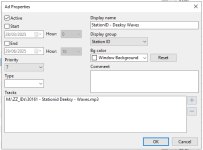
Hey mate, where can I find this? All I can see is this... I assume the tracks I've selected below would rotate randomly, not in order?


Screenshot 2025-12-28 at 12.14.25 am.png
 

Attachments

  • Screenshot 2025-12-28 at 12.13.56 am.png
    Screenshot 2025-12-28 at 12.13.56 am.png
    23.9 KB · Views: 26
Hey mate, where can I find this? All I can see is this... I assume the tracks I've selected below would rotate randomly, not in order?
Currently the Ads Scheduler works this way: it shuffles the ads list and selects all the tracks; then once all tracks are selected, it re-shuffles the list and selects again. There should be no "favorite" tracks this way as each track is used.
 
Perhaps it would be good to have the option to choose the topics in order and when it gets to the end, start again.
Essentially it works like this, but the list is shuffled first. In any case, each track is selected the same amount of times (with a minor exception - depending on how many ad blocks are there, some tracks may be selected exactly one time more than others).
 
In our case, for example, we have an announcement with two audio clips that are supposed to play alternately, one at a time, but in our experience, that almost never happens... it's always the same two clips that play, either the first or the second.
It would be excellent if we could choose how they play: randomly or sequentially.
This has already been discussed several times in this forum.
 
In our case, for example, we have an announcement with two audio clips that are supposed to play alternately, one at a time, but in our experience, that almost never happens... it's always the same two clips that play, either the first or the second.
It would be excellent if we could choose how they play: randomly or sequentially.
This has already been discussed several times in this forum.
It will severely depend on the order in which the blocks are created, and in any case, would be hard to predict. If the order matters, I think a better solution would be to create two separate ads and start them when appropriate.
 
Back
Top