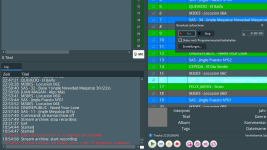
Streamarchive (Recording) From a Input Source NOT WORKS

The Streamarchive function to record the played show (NOT WORKS) in this version 7.2. From Audio mix it works but not for Input1 / Input2 etc.

 
Does it show any error messages in the Log window (bottom left corner of the main window)?
 
Please send a screenshot of the configuration. Does the input play if you add it directly to the playlist (menu Playlist > Add Line In)?
 
Here i send you the screenshoots. Same configuration i have it on v. 5.4 and 6.3.3 and it works fine. But on version 7.2 the give error.

Why this works perfectly at the old versions and not at the new version?
 

Attachments

  • RB 001.png
    RB 001.png
    288.5 KB · Views: 281
  • RB 002.png
    RB 002.png
    324.3 KB · Views: 252
  • RB 003.png
    RB 003.png
    323.7 KB · Views: 239
Here i send you the screenshoots. Same configuration i have it on v. 5.4 and 6.3.3 and it works fine. But on version 7.2 the give error.

Why this works perfectly at the old versions and not at the new version?
The same setup works here also, with the latest version. Does Line Input play if you add it to the playlist?
 
Yes it does play The Line In Input play but the error still persists when i will recording (streamarchive) What i have to do to solvent this? I need this function. At this version not work the streamarchive with the setup of my screenshots. At version 6.3.3 it works
 
We can't reproduce it here, I'm sorry. The next minor update will add an improved error message, allowing to better understand what goes wrong.
 
I installed the new version 7.2.2.0 now and the streamarchive (recording playlist) function still gives the error: 37 (data not available).
Where can i find the improved error message?
 
I installed the new version 7.2.2.0 now and the streamarchive (recording playlist) function still gives the error: 37 (data not available).
Where can i find the improved error message?
Can you please copy-paste the entire error message?
 
Here is the message. It's the same that shows at v7.2.1.8 (nothing has changed in the new version)
 

Attachments

  • Unbenannt.png
    Unbenannt.png
    139.6 KB · Views: 169
The Recording function still it's out of work. Where is the new diagnostics?
What error message does it show? The main problem is that we were never able to reproduce this, Stream Archive works as intended, and we don't see any reports of it not working from other users.
 
The error was the same Stream Archive Init failed error code: 37 (data not available). I can give you my anydesk Access and you can seen it on the fly. I use the same configuration in v5 amd 6 an there works but in 7 no! Please help

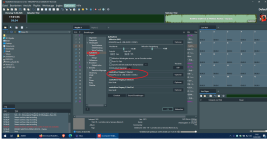
At new Version says: Stream Archive Init failed error code: 37 2 (data not available)
 
Last edited:
The error was the same Stream Archive Init failed error code: 37 (data not available). I can give you my anydesk Access and you can seen it on the fly. I use the same configuration in v5 amd 6 an there works but in 7 no! Please help

At new Version says: Stream Archive Init failed error code: 37 2 (data not available)
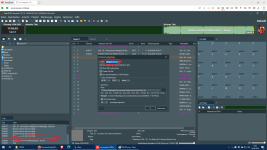
Thank you for the information, we'll check it.
 
Hello everyone!

I have also encountered exactly the same problem, and unfortunately, we have been unable to resolve it since RadioBOSS 7.2.2.

Everything worked perfectly in RadioBOSS 7.1.4, but after updating to version 7.2.2, the following error appeared when trying to record from Input 1, Input 2, or Input 3:

Stream Archive Init failed error code: 37 2 (data not available)
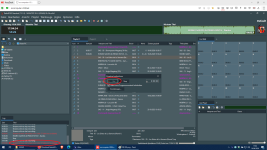
Interestingly, the exact same problem occurs when trying to start online broadcasting using one of these input channels. This makes it seem as though the entire input handling mechanism is broken.

What is particularly interesting is that it makes absolutely no difference whether the audio comes from a physical sound card input or from an input routed through a virtual audio cable. The result is always the same.

This strongly suggests that the problem is not with the audio devices themselves, but possibly with how RadioBOSS accesses or identifies Windows audio input devices.

During troubleshooting with the help of ChatGPT, we discovered something interesting.

We compared the audio device IDs stored in the RadioBOSS configuration file (system.ini) with the actual device identifiers currently reported by Windows.

The identifiers were indeed different!

It appeared that Windows had changed or reassigned the device IDs, while RadioBOSS still contained the old identifiers in its configuration.

However, even after manually replacing the stored device IDs with the current ones, the problem did not disappear. Recording and broadcasting from the input channels continued to fail exactly as before.

In the newer version, RadioBOSS 7.2.5, I am now also receiving a different error message:

Stream Recording: encoder exited with an error. Please check stream archive settings. Attempting to restart.

AAC recording starts but stops after approximately three seconds, after which RadioBOSS attempts to restart the encoder.

The only practical workaround I have found is to use RadioLogger for recording. However, I do not consider this a proper solution. It is simply a workaround that allows me to continue working while the built-in recording functionality remains broken.

Based on everything I have observed, I believe the developers should investigate how RadioBOSS accesses and initializes Windows audio input devices, particularly Input 1, Input 2, and Input 3.

It is possible that changes introduced by Windows updates, combined with changes in RadioBOSS 7.2.x, have caused compatibility problems with audio device identification or initialization.

Of course, I cannot confirm the exact technical cause, but the fact that everything worked in version 7.1.4, while both recording and broadcasting from input channels fail in newer versions, strongly suggests that something has changed in the audio input handling mechanism.

Could the developers please investigate the device enumeration, Device ID mapping, and audio input initialization mechanisms in RadioBOSS 7.2.x?

I believe this is where the problem may be located.

Thank you!
 
I would also like to add one very interesting observation.

At one point, we experienced a complete power outage, which caused the computer to shut down unexpectedly. After restarting, all RadioBOSS settings had been reset, and the program created a new default configuration.

Surprisingly, recording started working again!

However, as soon as I switched the recording source from Audio Input to Audio Mix and then back to Audio Input, the recording immediately stopped working again, with the same error as before.

This is particularly interesting because it suggests that the problem may be related to how RadioBOSS saves, restores, or reinitializes audio input devices when switching between recording sources.

In other words, recording worked with a freshly created configuration, but simply switching between Audio Input and Audio Mix caused it to fail again.

I believe this is an important clue that could help the developers reproduce and identify the bug.
 
Back
Top