
You are using an out of date browser. It may not display this or other websites correctly.
You should upgrade or use an alternative browser.
You should upgrade or use an alternative browser.
RadioBOSS 7.2 [beta]
- Thread starter djsoft
- Start date
- Status
- Not open for further replies.
Mix Start affect the Mix point position of the next track. This is described here: https://manual.djsoft.net/radioboss/en/track_tool.htmEvery time I have the mix start point set on items like jingles that start with FX sounds or songs that have a fade in/reverse transition... The mix points are not respected at all. This always troubled me... The music doesn't fade out and the mix start actually doesn't do what I think it should do. I set it the way I used to set the Mix In point in the likes of Zetta.
Yes, but this is still an early beta, so there still may be lots of other bugs.That's enough corrections for me to start using this version in the program...we'll figure out the rest as we go
The Run Now should not be affected by this - this will be corrected.At the moment, since start earlier is defined globally in Settings > Scheduler, it also affects manual actions. For example, if it’s set to 3 minutes and I click Run now on an event, the event does not start immediately but waits those 3 minutes.
It also depends on how many tracks are in the categories, for 20K tracks loading a category can take about 10 seconds.In practice, most playlists are generated almost instantly (especially hourly ones)
I wouldn't call it a regression because only new features are affected while what existed is still accessible. Accessibility issues you mentioned will be fixed.I love these new features, but I am starting to see some serious regression in terms of accessibility.
I'm not sure about this, you can set some average value in the settings to cover most of the cases. It's only needed in case when you create very different playlists e.g. on some days it's 24-hour single playlist and on others 1-hour playlists - but this still may be handled, e.g. have shorter wait time and for long playlists have two events (create and start).Because of that, it might be better if the start earlier offset was configurable per scheduler event
The event has a configured playlist start time and it's expected that the event will start as configured, not silently overriding the set start time. Also the playlist start time (when you use the Wizard) is written in the event's command. The Run Now simply executes the event command, not doing any modifications.When a playlist is generated from the Scheduler, it might not be necessary to manually enter the start time and day in the Wizard. The Scheduler already knows the exact execution time, so dayparting filters could be applied automatically based on the current day and hour at generation time.
New icons will be added. For Track List it's not possible to have a separate icon because it can't have a file type of its own - the file type is determined by the item it plays. It's a bit different for containers, I'll see if icons are possible for those.1 The "container" file type applies the color, but it does not apply the icon.Could something similar to the "WinRAR" icon be added to the icon list to represent compressed files for this file type?Also, the folder icon for the tracklist. Also, the folder icon for the tracklist.
Maybe in the future, but for now we do not plan this.2) Could an option be added to change the font for file types?
This will be included in the next update (7.2.0.2).3) I noticed that the "previous", "now", and "next" icons were added, but they are not functioning yet. Do we need to wait for a future update?
Can you please provide some more details about it?4) One observation: when I set the font color to white for the "Next Track" and "Played Tracks" elements in the playlist, the "priority over file types" option is lost, but only for the font.
The "Playing track" always has priority, otherwise it would be hard to find what track is currently playing.5) In "Playing Tracks" in the playlist, the "priority over file types" option is missing. Because I believe the priority is lost when the font color is set to white.
How did you determine this, does it play the sound that is after the Outro point?6) In Teaser, I set the intro and outro hooks correctly, but in ending is not exact as configured; it finishes a few milliseconds after the outro hook.
Looks like a bug, thank you.However, during generation I consistently get the warning:
Error: No suitable track found (rule: dayparting). Category: "Jingl"
even though the result is correct and a suitable jingle is found and used.
Currently this is not really possible as Auto Intro is only processed upon track startup, and not before. This is an automation function, and originally it's not supposed to be used in manual/presenter mode.It would be very helpful if Auto Intro events were visible in the playlist (for example as a marker or placeholder), so it’s clear when an Auto Intro is going to occur.
There are various options for this:Another issue is about Advertising and Manual Mode. I'm on a voice break, I have activated the "stop after this track" and the adverts come in just to ambush me. If the playlist is stopped. Let the adverts have the option to just queue up at the top of the playlist and wait so that they are the coming up next event
- Manual scheduler mode. In this mode, events do not start. It will show countdown, and mark the event in the Manual column if it was supposed to start, but no automatic launch.
- Ads Scheduler > Settings > Event properties, enable "Do not action event when the playlist is stopped".
Are there any error messages? What happens if you change the zoom, will it show?Sometimes when using the Track tool, this error appears in the waveform visualization.
This doesn't reproduce here, the volume slider works as usual. I'm not sure what the problem could be.When I adjust the volume to the level shown in the photo, the sound disappears in Beta version 7.2, and in 7.1.6.2, the volume gradually decreases.
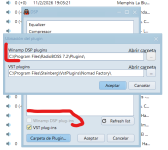
We'll grey it out too. In any case, this option is ignored in 64-bit build because there's no Winamp plugin support.Remove the reference to DSP plugins if they are no longer used
The Shuffle mode does not have repeat protection, if you need this, you should use the Track List or Playlist Generator.correct the repetition of songs in shuffle mode

xzsaimon16
Active member
You need to add the "icon" columnThe icons for file types are now being saved, but for some reason I can't see them.
View attachment 15331
xzsaimon16
Active member
Can you please provide some more details about it?
The "Playing track" always has priority, otherwise it would be hard to find what track is currently playing.
Here I demonstrate what happens when I set the color to white.
When setting the color to white, the file type color is applied.
At second 49, you can see that it prioritizes the file type color over the one set for the current song.
The selected song segment does not end exactly at the final hook point; it ends a few milliseconds after the out marker.How did you determine this, does it play the sound that is after the Outro point?
Last edited:
La mejora visual es notable, pero el punto débil está en la transmisión. Cuando necesitas obtener la dirección IP de otra emisora de radio, el búfer simplemente se congela. Probé varias configuraciones; en algunas, cargaba hasta el 91%, y en otras, al 100%, pero seguía sin reproducir. Se congelaba y tenía que cerrarlo. Esperamos con ansias una solución.

tomimatko
Active member
Suggestion regarding file type icons in the playlist
At the moment, having a separate Icons column feels a bit redundant, since there is already the # column where icons are displayed.
It might be cleaner if all icons were shown only in the # column, without an additional Icons column.
Each file type could still have its default icon. If the user changes the icon in File Types, that custom icon would be shown in the # column instead of the default one.
If the icon field in File Types is cleared again (empty Icons field), the # column would automatically revert back to the default icon.
This approach would keep the playlist view cleaner and more consistent, while still preserving full flexibility for custom icons.
At the moment, having a separate Icons column feels a bit redundant, since there is already the # column where icons are displayed.
It might be cleaner if all icons were shown only in the # column, without an additional Icons column.
Each file type could still have its default icon. If the user changes the icon in File Types, that custom icon would be shown in the # column instead of the default one.
If the icon field in File Types is cleared again (empty Icons field), the # column would automatically revert back to the default icon.
This approach would keep the playlist view cleaner and more consistent, while still preserving full flexibility for custom icons.
I thought the same thingSuggestion regarding file type icons in the playlist
At the moment, having a separate Icons column feels a bit redundant, since there is already the # column where icons are displayed.
It might be cleaner if all icons were shown only in the # column, without an additional Icons column.
Each file type could still have its default icon. If the user changes the icon in File Types, that custom icon would be shown in the # column instead of the default one.
If the icon field in File Types is cleared again (empty Icons field), the # column would automatically revert back to the default icon.
This approach would keep the playlist view cleaner and more consistent, while still preserving full flexibility for custom icons.
xzsaimon16
Active member
I agree, that’s why I suggested some ideas earlier.Suggestion regarding file type icons in the playlist
At the moment, having a separate Icons column feels a bit redundant, since there is already the # column where icons are displayed.
It might be cleaner if all icons were shown only in the # column, without an additional Icons column.
Each file type could still have its default icon. If the user changes the icon in File Types, that custom icon would be shown in the # column instead of the default one.
If the icon field in File Types is cleared again (empty Icons field), the # column would automatically revert back to the default icon.
This approach would keep the playlist view cleaner and more consistent, while still preserving full flexibility for custom icons.
But honestly, it would look better the way you’re describing it.
I already know this. The adverts don't queue up in the playlist at all. The adverts never get to be played at all. I just want them to wait in the playlist regardless there's an already playing song or not. Let the event load into the playlist not just to flash in the player and disappear. My scheduler tab is way more busier than the playlist to tell presenters what to do in there, they aren't even supposed to access it anyway.There are various options for this:
- Manual scheduler mode. In this mode, events do not start. It will show countdown, and mark the event in the Manual column if it was supposed to start, but no automatic launch.
- Ads Scheduler > Settings > Event properties, enable "Do not action event when the playlist is stopped"
Another thing, the track tool takes its time to load/freezes it always first brings an error "the application seems to be frozen" then it loads the waveform.
And why is not possible to drag and drop files between the playlist and aux players
xzsaimon16
Active member
This would be my final vision of how the icons should look.Suggestion regarding file type icons in the playlist
At the moment, having a separate Icons column feels a bit redundant, since there is already the # column where icons are displayed.
It might be cleaner if all icons were shown only in the # column, without an additional Icons column.
Each file type could still have its default icon. If the user changes the icon in File Types, that custom icon would be shown in the # column instead of the default one.
If the icon field in File Types is cleared again (empty Icons field), the # column would automatically revert back to the default icon.
This approach would keep the playlist view cleaner and more consistent, while still preserving full flexibility for custom icons.
1. That the default icons can be replaced by the user's icons.
2. For the elements with the "played" state, the "
 " icon exists and it is not necessary to create a "played" state for the user-customized or default icons.
3. For scheduled elements, the "
 " icon exists. This is the most complicated one, but I believe it can be placed in a reduced space, as shown in the screenshot. Right next to the established icon and near the lower edge, separating the established icon from the "scheduled" icon.
Or alternatively, if there is a way to overlay this icon on top of the one established by the user (I have no idea if it is possible).
Thus avoiding creating a thousand icons with this "scheduled" state.
4. I think it would look better to move the "Time Stretch" time and the queue number to the "numeral (#)" column. This to separate the icons from the texts.
Thank you, looks like a bug.When setting the color to white, the file type color is applied.
At second 49, you can see that it prioritizes the file type color over the one set for the current song.
We'll check this.The selected song segment does not end exactly at the final hook point; it ends a few milliseconds after the out marker.
- Status
- Not open for further replies.
Similar threads

- Replies
- 18
- Views
- 8K
- Replies
- 527
- Views
- 208K