RadioBOSS 7.2 [beta]

Yes for all tracks
We can't reproduce it here. The next version will give a more detailed error code to help understand why exactly it fails.

I've always used MySQL, but I recently switched to SQLite for testing purposes—it doesn't make a difference; normalization still doesn't work.
Could this have something to do with the Edge WebView runtime?
I think it's faulty on my end; performing an in-place restore from Windows 11 didn't help either.
Normalization doesn't depend on what information storage you use.

webview runtime new install no changes still no normalization
Webview is for Edge support for web browser tab; it doesn't have anything to do with normalization.
 
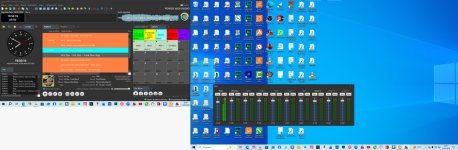
the new radio Boss is fulling to me , make a test whit virtual mixer, is espetacular , fantastic !
1779152481086.png
 

Attachments

  • radio boss na integra.jpg
    radio boss na integra.jpg
    190.4 KB · Views: 40
We can't reproduce it here. The next version will give a more detailed error code to help understand why exactly it fails.


Normalization doesn't depend on what information storage you use.


Webview is for Edge support for web browser tab; it doesn't have anything to do with normalization.
Thanks for the answer
 
Great to know, thank you!
In the new version of Radio Boss, regarding the virtual mixer, I noticed something related to two points: the microphone channel and the master channel. I observed that when configuring the microphone, I have to leave the channel open to speak, lowering the master volume and raising and lowering it as I speak. I thought the mic would turn off and on, because when I turn off the mic, the master volume is cut off, but I'm operating it by lowering the master volume and speaking normally, and it sounds just as good as on a mixing console. Another thing I think is that there should be the possibility to increase the pixel size when using it on a screen, as in my case. Please look into this. But in the end, everything is becoming good and beautiful, modern, which is what I want for Radio Boss: something better and more futuristic every day. This program is what best satisfies internet radio users. For me, I am a happy user, very happy!!!
 
In the new RadioBOSS 7.2.1.6 interface, the On Air waveform shows the mix point, but the Next Track waveform does not show any mix point, hook in/out or other track markers.

I think it would be very useful if the Next Track window could also display the mix point and hook markers, because this would help to visually check the next transition before it starts.

Right now the Next Track window only shows the waveform and duration, but not the real transition points.
 
I observed that when configuring the microphone, I have to leave the channel open to speak, lowering the master volume and raising and lowering it as I speak. I thought the mic would turn off and on, because when I turn off the mic, the master volume is cut off
The mixer doesn't control volumes automatically, it's designed so you manually adjust what's needed. For the microphone, there's another feature in Settings > Inputs to automatically lower the music level when the mic is on. But it's not done via a mixer, it's internal gain adjust.

Another thing I think is that there should be the possibility to increase the pixel size when using it on a screen, as in my case.
It should take into account the "Secondary window zoom" option as set in Settings > View > Style.
 
In the new RadioBOSS 7.2.1.6 interface, the On Air waveform shows the mix point, but the Next Track waveform does not show any mix point, hook in/out or other track markers.

I think it would be very useful if the Next Track window could also display the mix point and hook markers, because this would help to visually check the next transition before it starts.

Right now the Next Track window only shows the waveform and duration, but not the real transition points.
Yes, it is a known limitation, and will be addressed in the future updates, when RadioBOSS completely calculates the next track. For mix point, however, it also must know the next track after next (to take into account "Mix override" and "Mix start" options, voice tracking, and other things).
 
This is the white vertical selection bar. It's the one that appears when you click on the waveform.
Currently (in the latest version), the zoom is around this vertical bar. This is useful for zooming in on the area to set mix points (start/end of track).
In this beta version, the zoom is towards the middle of the waveform. When we start from the general view (the entire track) towards a more specific point on the track.
I don't see a reply to this "old" message and I don't know if you've taken it into account.
Sorry to bring this up again if you've already answered.


Track Tool > Waveform.
Overview of the entire Track.

Currently, in the Beta version, the zoom (+) is located at the center of the waveform. You have to move horizontally to reach the position of the vertical selection bar.
My wish is to have the zoom (+) around the vertical (white) selection bar, as in the latest official version (7.1.6.2). Is it possible to revert to this configuration?
 
Last edited:
In Ads Scheduler, when you click the 'Prelisten block' button, you can hear all the ads in the block, but with a mix (mix point, fade-in, and fade-out) that doesn't match what is configured in RadioBoss. Therefore, what I’m hearing isn't actually what will go on the air.
Is it possible to use the settings specified in RadioBoss?
 
My wish is to have the zoom (+) around the vertical (white) selection bar, as in the latest official version (7.1.6.2). Is it possible to revert to this configuration?
Zoom is now performed at the mouse cursor position, so that you can easily zoom the part you're interested in - this is the standard behavior for such software. You can zoom using the mouse wheel.
 
In Ads Scheduler, when you click the 'Prelisten block' button, you can hear all the ads in the block, but with a mix (mix point, fade-in, and fade-out) that doesn't match what is configured in RadioBoss. Therefore, what I’m hearing isn't actually what will go on the air.
Is it possible to use the settings specified in RadioBoss?
Mix point can't be used there as it's only one track is playing and it's not mixed with anything. Prelisten there is designed to check what the music file is, it's not supposed to take into account track configuration; prelisten in Music Library and RadioBOSS itself (in playlist and search) works the same.
 
Mix point can't be used there as it's only one track is playing and it's not mixed with anything. Prelisten there is designed to check what the music file is, it's not supposed to take into account track configuration; prelisten in Music Library and RadioBOSS itself (in playlist and search) works the same.

Maybe I didn’t explain myself correctly, but I’m talking about that button, the one marked with the arrow.
There, several commercials can be heard, in this example, there are 17.
If it mixes them with at least 2 or 3 seconds of overlap, could it at least avoid mixing them at all, so they play one after another without any mixing?

1779304170746.png
 
Back
Top