
After updating RB (Ultimate version 32-bit) to 7.2.1.8, RB refuses to start. We are currently OFF AIR.
Here's what's happening:
After clicking the RB icon, it looks like the program will start normally.
Stereo Tool processing, enabled in RB, launches.
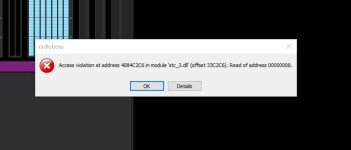
Then an error message pops up about an "access violation." (see first pic below)
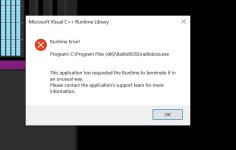
Clicking OK brings up the second error message about "improper termination." (see second pic below)
Clicking OK kills Stereo Tool and RB never starts.
If I look in Task Manager, there's an entry for RB, but all parameters are at zero. Ending the task and restarting RB still results in the above issue.
Also rebooting the PC does not help. Warm boot and cold boot produces the same result.
Please advise asap. Thanks...
...joe
Here's what's happening:
After clicking the RB icon, it looks like the program will start normally.
Stereo Tool processing, enabled in RB, launches.
Then an error message pops up about an "access violation." (see first pic below)
Clicking OK brings up the second error message about "improper termination." (see second pic below)
Clicking OK kills Stereo Tool and RB never starts.
If I look in Task Manager, there's an entry for RB, but all parameters are at zero. Ending the task and restarting RB still results in the above issue.
Also rebooting the PC does not help. Warm boot and cold boot produces the same result.
Please advise asap. Thanks...
...joe
