eLEn
New member
Hello,
I am using RadioBOSS 7.2 and I have a question regarding Hour Markers.
Example:
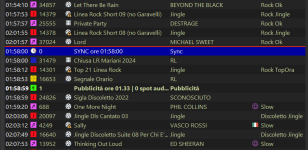
Currently RadioBOSS allows the track to play past the Hour Marker and the next track starts at about 10:00:52.
My question:
Is there a way to make RadioBOSS automatically remove or skip tracks that would cross an Hour Marker, so that playback reaches the Hour Marker exactly at 10:00:00?
I would like RadioBOSS to automatically keep only tracks that fit before the Hour Marker, without manually editing the playlist.
Is this possible with Playlist Generator, Scheduler, Rotation Playlist, or does it require scripting?
Thank you.
I am using RadioBOSS 7.2 and I have a question regarding Hour Markers.
Example:
- A track starts at 09:56:31
- Track duration is 04:24
- Therefore it ends at approximately 10:00:55
- I have an Hour Marker at 10:00
Currently RadioBOSS allows the track to play past the Hour Marker and the next track starts at about 10:00:52.
My question:
Is there a way to make RadioBOSS automatically remove or skip tracks that would cross an Hour Marker, so that playback reaches the Hour Marker exactly at 10:00:00?
I would like RadioBOSS to automatically keep only tracks that fit before the Hour Marker, without manually editing the playlist.
Is this possible with Playlist Generator, Scheduler, Rotation Playlist, or does it require scripting?
Thank you.