
Automatically remove tracks that cross the Hour Marker

eLEn

New member
Hello,


I am using RadioBOSS 7.2 and I have a question regarding Hour Markers.


Example:


  • A track starts at 09:56:31
  • Track duration is 04:24
  • Therefore it ends at approximately 10:00:55
  • I have an Hour Marker at 10:00

Currently RadioBOSS allows the track to play past the Hour Marker and the next track starts at about 10:00:52.


My question:


Is there a way to make RadioBOSS automatically remove or skip tracks that would cross an Hour Marker, so that playback reaches the Hour Marker exactly at 10:00:00?


I would like RadioBOSS to automatically keep only tracks that fit before the Hour Marker, without manually editing the playlist.


Is this possible with Playlist Generator, Scheduler, Rotation Playlist, or does it require scripting?


Thank you.
 
Is there a way to make RadioBOSS automatically remove or skip tracks that would cross an Hour Marker, so that playback reaches the Hour Marker exactly at 10:00:00?
What should it do once it reaches the 10:00:00 mark, stop playback? It will result in silence in this case.
 
Thank you for your reply.


I don't want RadioBOSS to stop playback or create silence.

My goal is for RadioBOSS to automatically select only those tracks that fit before the 10:00 Hour Marker.

In the example, the track starting at 09:56:31 with a duration of 04:24 would end at approximately 10:00:55, so I would prefer RadioBOSS not to schedule that track at all.

Instead, it could select a shorter track, a jingle, or leave enough time for the next scheduled event at exactly 10:00:00.

Is there a built-in way to make the Playlist Generator or Rotation Playlist respect Hour Markers and avoid scheduling tracks that cross them?
 
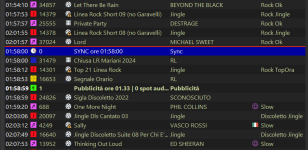
Currently, the radio station I work for has a native system command called "SYNC" that, when added to the schedule, acts on the tracks that follow it, and consequently eliminates all the tracks.
For example, I have SYNC at 11:58 AM and after SYNC 4/5/6 audio tracks from the remaining schedule. If a song that ends at 11:58:30 or 11:59 AM is already playing, SYNC will still activate at 11:58 AM to eliminate the other 4/5/6 tracks and align the schedule. If a track starts at 11:57:50 AM, for example, SYNC has some leeway to still get the song on the air, so it will activate and all the other tracks will be played around 12:00 PM.
At the moment my SYNC removes UP TO 7 audio tracks from the schedule, and therefore allows me to send the Audio Signal, News and Weather always on time, and never too early (11.57) or too late (12.05)
 
I attach a photo
 

Attachments

  • Immagine 2026-06-16 110220.png
    Immagine 2026-06-16 110220.png
    61.6 KB · Views: 19
Thank you for the explanation.


Just to clarify, are you using a Scheduler-based system where SYNC is triggered by the scheduler, or are you generating playlists in advance with a Playlist Generator?


I'm asking because in my case I use Playlist Generator with Hour Markers, and I'm trying to determine whether your SYNC function works during live playback or while building the playlist
 
On this radio, the next day's schedule is generated in advance by a playlist generator and the system will automatically broadcast it at midnight.

Additionally, SYNC can be "visual only," but it won't do anything. It will wait for the current song to finish before moving on to the next one, or it will abruptly cut the current song at the specified time.
If the user manually removes the SYNC command from the playlist, all the tracks will play consecutively without any adjustment to the time.
 
Thank you for the explanation.

Is the SYNC command a built-in feature of your automation software, or is it a custom script/plugin?

What exactly is SYNC and how is it implemented?
 
Yes, it's a native command in the software.
In my case, I didn't use any plugins or scripts.

If the RadioBOSS staff agrees, I can attach a detailed explanation showing you a new way to use this SYNC command on RadioBOSS, which I believe could be useful to many radio stations.
 
My goal is for RadioBOSS to automatically select only those tracks that fit before the 10:00 Hour Marker.
There are ways to achieve it (can be used together):

In the example, the track starting at 09:56:31 with a duration of 04:24 would end at approximately 10:00:55, so I would prefer RadioBOSS not to schedule that track at all.

Instead, it could select a shorter track, a jingle, or leave enough time for the next scheduled event at exactly 10:00:00.
This is what the Sweepers feature does.

Is there a built-in way to make the Playlist Generator or Rotation Playlist respect Hour Markers and avoid scheduling tracks that cross them?
It can only try to generate the playlist with the desired duration, but as noted above, it may not always be possible.
 
Currently, the radio station I work for has a native system command called "SYNC" that, when added to the schedule, acts on the tracks that follow it, and consequently eliminates all the tracks.
The Sweepers feature work in a similar manner. But not removing the tracks, instead, finding a track to insert that will end right before next event start (e.g. top of the hour or ad block).

If the RadioBOSS staff agrees, I can attach a detailed explanation showing you a new way to use this SYNC command on RadioBOSS, which I believe could be useful to many radio stations.
Yes why not. It just seems that this is a sort of a duplicate of the existing sweeper feature.
 
Thank you, Dmitry.

In that case, we will wait for matteolop to post the detailed explanation of the SYNC command and how it could be used in RadioBOSS.

I am very interested in learning more about this concept and how it compares to the existing sweeper functionality.
 
Good morning,
Since I have permission, I'm attaching the exact explanation from their website—already translated into English.
The next post includes a full explanation of how it works in our software.
 
What is the SYNC command used for?
29/11/2021 at 3:33:51 PM

The SYNC command allows playlist items on-air to be synchronized to a time selected by the user. This makes it possible to control the broadcast of events that must occur at a specific time, preventing delays in the schedule.

The command can operate in three modes:

Wait for the currently playing item to end

Used to synchronize the playlist with the actual broadcast time.

When Xautomation encounters a SYNC command in the playlist slots, it checks whether the current playback is ahead of or behind the time specified in the SYNC command.

If the playlist is ahead of schedule, the SYNC command is ignored.
If the playlist is behind schedule, all items between the currently playing element and the SYNC command are removed.
Play at exact time

Used to ensure that the next item starts exactly at the time specified in the SYNC command.

The behavior is similar to the previous mode. The only difference is that if the playlist is behind schedule, the currently playing track is immediately interrupted and playback resumes with the item following the SYNC command.

This mode is useful when you want to interrupt a web stream or external event and resume normal playlist playback.

Display only

For speaker/presenter information only.

In this mode, the SYNC command does not remove any items. Instead, it creates a NOTE that serves only as an indicator for the live presenter or operator, informing them whether the playlist is running ahead of or behind schedule.

IMPORTANT

It is recommended to place several "sacrificial" items before a SYNC command to prevent the playlist from being too far ahead of the desired time.

For example, if you have a SYNC command set for 6:00 PM, you should schedule enough tracks before the SYNC command to cover at least until 6:20 PM.

This way, only the tracks that are actually in excess will be automatically removed when the scheduled SYNC time is reached.
 
In that case, we will wait for matteolop to post the detailed explanation of the SYNC command and how it could be used in RadioBOSS.

I am very interested in learning more about this concept and how it compares to the existing sweeper functionality.
From reading the description, it does about the same thing the sweepers do, but differently. In RadioBOSS you configure the events and there you can set how the event will run, e.g., can it wait (and how much) or it must run at the exact time, apply sweepers or not, and so on. Their approach is to configure markers in the playlist and let everything adjust to it.

That is, in RadioBOSS - scheduler controls the playlist, in that other software playlist controls what plays and when. Both are valid ways to work, it's just a matter of style.

What you want to do (make a song end right before top of the hour) can be done with sweepers. For best results, as sweepers require proper calculation of track durations, please also see this: https://www.djsoft.net/community/threads/precise-start-time-and-duration-calculation.4598/
 
Back
Top