

Radio-Albena
Member
Hello everyone,
During the last few weeks I have been working on a new free desktop application for RadioBOSS called Broadcast Scheduler.
Tested with RadioBOSS 7.2.2.0 (64-bit)
The idea was simple:
When a RadioBOSS scheduler grows over time, it becomes increasingly difficult to get a clear overview of all scheduled events.
Broadcast Scheduler reads the original RadioBOSS scheduler profile (.sdl) and displays the complete weekly schedule in an easy-to-read calendar and event list.
The application is read-only. It never modifies your RadioBOSS configuration or scheduler.
I use RadioBOSS every day for my own station and wanted a better way to review my scheduler before making changes.
The goal is not to replace RadioBOSS.
Instead, Broadcast Scheduler is intended to be an additional tool that helps verify scheduler configurations and provides a much clearer overview of an entire week.
The project is completely open source (MIT License).
GitHub:
https://github.com/mixnetwork1959/BroadcastScheduler
There you will also find:
I would really appreciate any feedback from other RadioBOSS users.
Ideas, feature requests and bug reports are always welcome.
Thank you!
— Raymond Ummels
During the last few weeks I have been working on a new free desktop application for RadioBOSS called Broadcast Scheduler.
Tested with RadioBOSS 7.2.2.0 (64-bit)
The idea was simple:
When a RadioBOSS scheduler grows over time, it becomes increasingly difficult to get a clear overview of all scheduled events.
Broadcast Scheduler reads the original RadioBOSS scheduler profile (.sdl) and displays the complete weekly schedule in an easy-to-read calendar and event list.
The application is read-only. It never modifies your RadioBOSS configuration or scheduler.
Current Features
- Weekly calendar
- Event list
- Search and group filter
- Previous / Today / Next Week navigation
- Automatic detection of simultaneous scheduled events
- Original RadioBOSS event colors
- Event details (double click)
- Automatic scroll to the current time
- Fast scheduler analysis
Why I created it
I use RadioBOSS every day for my own station and wanted a better way to review my scheduler before making changes.
The goal is not to replace RadioBOSS.
Instead, Broadcast Scheduler is intended to be an additional tool that helps verify scheduler configurations and provides a much clearer overview of an entire week.
Open Source
The project is completely open source (MIT License).
GitHub:
https://github.com/mixnetwork1959/BroadcastScheduler
There you will also find:
- Installation Guide
- User Guide
- FAQ
Feedback
I would really appreciate any feedback from other RadioBOSS users.
Ideas, feature requests and bug reports are always welcome.
Thank you!
— Raymond Ummels
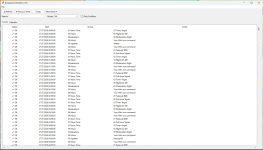
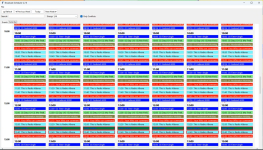
 Broadcast Scheduler v4.4.0 – Theme System