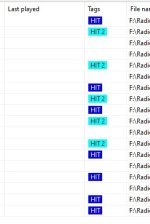
Logically, the playlist should alternate tracks like: HIT → HIT 2 → HIT → HIT 2 → etc.
The categories are selected in random order, then the rules are checked, if it can't find a track from that category, there will be an error.
If you want categories interchanged, you can add them directly into the rotation. But in random-weighted selection, it may select one category two or more times in a row.
Even if I add a third library that has no tag filter and no constraints, sometimes two tracks with the same tag are still placed one after another
I set up a similar testing preset. Category1 has tracks with "Tag1", Category2 has tracks with "Tag2", each category has a single constraint rule defined: do not select the same tag:
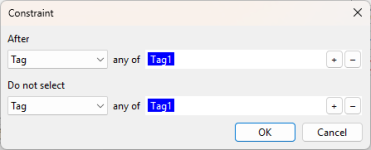
(the same setup is for Category2, for Tag2).
With a setup like this, we're basically telling the playlist generator, that a category can't be selected two times in a row. And this is what in fact happens:
Code:
Creating playlist...
Error: No suitable track found (rule: constraints). Category: "Category2"
> 3 errors.
Total time spent: 00:00
Completed. Playlist duration: 1:01:35
Because of a random nature of selection, sometimes there are lots of errors:
Code:
Creating playlist...
Error: No suitable track found (rule: constraints). Category: "Category1"
Error: No suitable track found (rule: constraints). Category: "Category2"
Error: No suitable track found (rule: constraints). Category: "Category1"
> 1 errors.
Error: No suitable track found (rule: constraints). Category: "Category2"
Error: No suitable track found (rule: constraints). Category: "Category1"
> 1 errors.
Error: No suitable track found (rule: constraints). Category: "Category2"
Error: No suitable track found (rule: constraints). Category: "Category1"
> 1 errors.
Error: No suitable track found (rule: constraints). Category: "Category2"
Error: No suitable track found (rule: constraints). Category: "Category1"
Total time spent: 00:00
Completed. Playlist duration: 1:04:57
I had ran the test multiple times, and the number of errors varies, but in the end it had never created a playlist with constraints violated. The resulting playlist looks like this always:
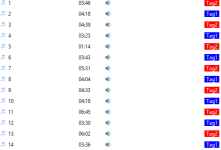
This is due to how the selection works: first, it will select a category based on its weight. Then, it selects a track from it - or, if a track can't be selected, it logs an error, and skips the category. Then is selects another category randomly, based on weights, and tries to take a track from there, and so on.