RadioBOSS 7.2 [beta]

Do not play tracks at the same time as yesterday :

One of the best new features in version 7.2 for me, thank you.
It's very useful for music tracks like Top Charts and Hits that rotate daily.

However, for other tracks that reappear in the playlist after two days or more, there's no option.
I think it would be important to consider all types of categories in this new feature.

A year ago, I (and other users) requested this type of option based on the track's last play.
That is, not playing the track at the same time it was last played. The response seemed favorable for integrating this option in this form. Will it be implemented?

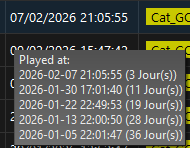
See screenshot: a track is playing almost at the same time even though it belongs to a category scheduled for different times of the day.
 

Attachments

  • RepeatTheTime.png
    RepeatTheTime.png
    11.3 KB · Views: 20
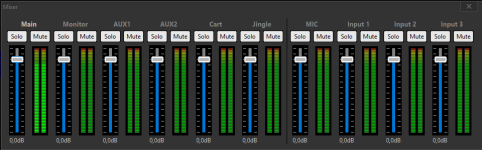
Virtual Mixer Board: an interesting and useful option.

The virtual console display in Dark mode lacks aesthetic appeal in my opinion (Virtual Mixer.png): there's insufficient spacing between each channel strip, and the separation between them isn't pronounced enough.
It creates a uniform block, and it's not immediately clear whether the fader corresponds to the left or right VU meter.

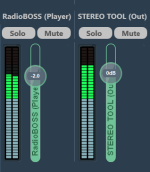
Suggestion – see screenshot based on VoiceMeeter (Fader Gain - Name.png):
  • Move the fader and VU meter closer together. This will allow for better focus on the desired channel strip.
  • The fader bar: wider, with customizable channel strip text displayed horizontally and vertically for quick identification.
  • Text: the ability to rename each channel strip. Aux 1, Aux 2, Input 1, Input 2… This isn't very user-friendly when multiple sources need to be managed quickly.

Is it possible to add the text "Virtual Mixer Board" to the translation file?
 

Attachments

  • Fader Gain - Name.png
    Fader Gain - Name.png
    18.6 KB · Views: 25
  • Virtual Mixer.png
    Virtual Mixer.png
    19.7 KB · Views: 25
Playlist Generator – "Create Multiple Playlists" window

I've added several presets to the list.
When I click "generate," two lines appear in the log for each preset, and I'd like some clarification on them:

  • "Warning: start time is not set. Dayparting and same-time repeat protection will not work." This is normal. Where do I set the scheduled start time? The same thing happens when you click on "create event". Update: Issue resolved in version 7.2.0.2 with the "Specify playlist start time" option.
Is it possible, according to the ISO 8601 international timestamping standard, to display the days of the week from Monday to Sunday?​

  • "Loaded tracks from the playlist window: 0." During my tests, several tracks were in the playlist, so why is "0" displayed? It's as if the tracks in the playlist were ultimately not taken into account.
 
The event has a configured playlist start time and it's expected that the event will start as configured, not silently overriding the set start time. Also the playlist start time (when you use the Wizard) is written in the event's command. The Run Now simply executes the event command, not doing any modifications.
Since version 7.2.0.1, the generate command has regained its original functionality and has even been improved to include a new feature.

Suggestion:

  • Is it possible to display this duration in the Wizard? This would be a useful indicator, as it can be difficult to remember what has been set in the parameters.
  • Or, preferably: is it possible to allow the duration to be selected directly in the scheduled event assistant (Wizard)? Depending on the playlist, the choice of the duration to generate earlier varies.

The line "Start the playlist when it is ready" could be replaced with "generate the playlist X minutes earlier." X would be a field to indicate the duration.​
The tooltip (?) would have the following explanation: "To ensure timely playback," enter the duration to generate the playlist before the scheduled event time in the field. The second sentence should be retained.​


This would simplify the ordering process by using the wizard and avoid having to go into the settings.

I think this simplification would provide better visibility into the configured settings, even though it remains an average value that covers most cases.

In the wizard, the list of days of the week appears from Sunday to Saturday in the "Specify playlist start time" option. Is it possible, according to the international timestamping standard ISO 8601, to display the days of the week from Monday to Sunday?
 
Currently this is not really possible as Auto Intro is only processed upon track startup, and not before. This is an automation function, and originally it's not supposed to be used in manual/presenter mode.
While maintaining the current functionality of Auto Intro, is it possible to display it in the "Next Track" window as it currently appears: a rectangle with a cross on the right that allows you to delete the Auto Intro? This would provide visibility into what will potentially start with the music track in the playlist. When in manual/presenter mode, We'll have time to be able to remove the Auto Intro.
 

Attachments

  • Auto Intro - Rectangle.png
    Auto Intro - Rectangle.png
    36.4 KB · Views: 18
Time Stretch – Markers (Suggestion)
Add time stretch start and end markers. The Time Stretch function operates between these two markers. The end marker would have an option to specify the desired time (Response during Beta 7.1 – suggestion approved for future versions).
What is the situation today?

Time Stretch – Always apply
In the latest version 7.2.0.2, the "Always apply" option is a welcome addition, thank you!
And I can confirm, it works well. This forces the maximum and minimum speed settings.

Time Stretch – Manual Adjustments (Suggestion)
Add an option for manual adjustments: right-click on the Playlist track, set the speed change, and display the track's end time, taking into account the playback speed change (Answer during Beta 7.1: manual adjustments were not included in the initial design of Time Stretch).
Is this an option planned for a future update?

You also mentioned that there are still some known issues, for example, Time Stretch doesn't work correctly with certain Playlist items (unknown duration) and doesn't properly handle Auto Intro or vocal tracks.

Time Stretch - Personal Opinion
As an Ultimate user, up until version 7.2.0.1, I was disappointed with the major 7.2 update.
I was expecting some improvements to Time Stretch, which I had praised when it was introduced in Beta 7.1.

In version 7.2.0.2, I finally see two improvements, one of which is quite interesting. Thank you for your interest in Time Stretch.

Unfortunately, this is a feature that, for the past year, hasn't seemed to generate much enthusiasm among RadioBOSS Ultimate users. On the forum, aside from the Beta 7.1 discussion, there has only been one thread that happily echoed one of my suggestions.
So, somewhat reluctantly, I'm asking if you plan to update the Time Stretch feature during this Beta 7.2, which improves the on-air experience.

For example, a weather forecast at 8:30 AM is an auditory reference point that serves as a clock for the listener.

Being on time on the radio means respecting your listeners. Broadcasting a weather forecast at the precise time without having to cut music tracks, making a rushed change to the music programming, or adding promotional spots and sweepers that unnecessarily clutter the program is a mark of quality.
For your information, a Time Stretch of +3.42% means gaining one minute in a 30-minute music segment.
 
MISCELLANEOUS

Weather – Error (response : 429)
According to the log, "Weather" is not updating correctly. It's very occasional, especially after a restart. What does error 429 correspond to?
In version 7.2.0.2, the error no longer appears at startup.

Translate: In Settings > Scheduler. Is it possible to add the phrase "Start 'generate' command events earlier than the set start time (minutes)" to one of the language files in order to translate this phrase?

Dayparting: The user interface has been improved, thank you. Is it possible to add "Preset" options to the language file?

Track Tool: In the waveform view, the "ctrl+" and "ctrl-" shortcuts no longer allow you to zoom in and out fully in one go. Is this an improvement? Because in the current Beta 7.2 version, these shortcuts allow you to zoom in and out incrementally. It's a bit slow, and you have to hold down the keys to get the zoom to its maximum. Is it possible to create a shortcut to have the same zoom levels as before? Or does another keyboard shortcut already exist for this?
Thank you for adding this: "Advanced options: millisecond precision for Track Tool, shift Mix Point"
 
It does ignore accented characters, that is, á = à = a, etc.
This option is not working in RadioBoss 7.2 and I think this option should be moved to another location or set as the default.
We tried to reproduce it here but it never happened, I'm not sure what can be done about it at this point. What if you scroll it left/right?
It hasn't happened again.
RadioBOSS 7.2.0.2 beta

Changes

  • Added second additional work zone window
I think that instead of adding another additional zone, it would have been better to divide the existing additional zone, as well as the main interface.

------------
A minor bug: when a track moves position (up or down) in the playlist, the song marked as "next" has a sort of flicker that momentarily loses the set color and font.
 
It doesn’t look bad. It’s logical and clean.
I wouldn’t place the time exactly at the very beginning and end, but slightly offset, because the start and end of a track are important. This keeps it clear and avoids obscuring start/end markers or mix points.
 

Attachments

  • Untitled-1.png
    Untitled-1.png
    23.8 KB · Views: 22
I have this concept, taking a bit of the idea from “jazler soho.”

I don’t know what the other users think about this design.


With intro mark
1771425821388.jpeg


Without intro mark
1771425817542.png
 
We do like the idea of the timers being inside the play bar. Time played on the left, and time left on the right. But then I’m sure there’d be issues with it hiding the intro markers etc. if the font is larger. Otherwise maybe just the time left instead of both?
One possibility is to just make the On Air and other bars a bit taller so that they have more space inside to fit the timers. We're trying different approaches there and the next release will probably have something done about it.

It would be interesting to see if the vertically stacked option would work like “tomimatko” suggested. But that would be a major change…
We tried it but doesn't look good in practice, timers with different (larger) font look weird at the top, while other text there ("On air", "Next track", etc.) has smaller font.

Events in Manual mode... Amazing 👍 the queue is on point... Thanks.
Thank you!

Second additional work zone can't open from the menu, only on the toolbar button.
Yes, this will be fixed.

And just a suggestion can't one work zone just have different panels like in Radioboss main...instead of just having a bunch of tabs or additional work zones
A separate window offers more flexibility, you can place them horizontally/vertically, zones can have different size, etc.
 
However, for other tracks that reappear in the playlist after two days or more, there's no option.
I think it would be important to consider all types of categories in this new feature.
Do you mean this feature should be extended to check more days, not only yesterday?

That is, not playing the track at the same time it was last played.
This is what "Do not play track at the same time..." option does, or am I misunderstanding something?

See screenshot: a track is playing almost at the same time even though it belongs to a category scheduled for different times of the day.
If you don't want this track to play at this time at all, you should use the new feature - Dayparting, in Track Tool or Music Library you can set what hors/days of the week a track is allowed to play. This works both for the Playlist Generator and Track Tool.

The virtual console display in Dark mode lacks aesthetic appeal in my opinion (Virtual Mixer.png): there's insufficient spacing between each channel strip, and the separation between them isn't pronounced enough.
I also see a bug that background colors are not right, there should be no black background around meters. Spacing will also be improved, thank you for the suggestion.

Is it possible, according to the ISO 8601 international timestamping standard, to display the days of the week from Monday to Sunday?
Currently it uses the format set in operating system, based on this, Monday or Sunday will be first day of the week. It's the same in Ads Scheduler and other places with days of the week.

"Loaded tracks from the playlist window: 0." During my tests, several tracks were in the playlist, so why is "0" displayed? It's as if the tracks in the playlist were ultimately not taken into account.
It loads the tracks after the playing track. Maybe nothing was played or last track was playing, or the playlist was in Shuffle mode, maybe there are also other exceptions.
 
I think this simplification would provide better visibility into the configured settings, even though it remains an average value that covers most cases.
This is against the UI design guidelines, because it will require opening an event editor, then call Wizard, select Generate a playlist, then change the setting - not an expected workflow. Now it resides where it's easy to find, in Settings > Scheduler.
 
While maintaining the current functionality of Auto Intro, is it possible to display it in the "Next Track" window as it currently appears: a rectangle with a cross on the right that allows you to delete the Auto Intro? This would provide visibility into what will potentially start with the music track in the playlist. When in manual/presenter mode, We'll have time to be able to remove the Auto Intro.
Noted for the future versions. The problem here is that now it only processes Auto Intro when a track starts/about to play (when preloading) and not in advance. This will require a major internal change and lots of testing (to process Auto Intro earlier) and we can't afford it for this version.

In the wizard, the list of days of the week appears from Sunday to Saturday in the "Specify playlist start time" option. Is it possible, according to the international timestamping standard ISO 8601, to display the days of the week from Monday to Sunday?
It should use the system's days of the week order. I'll add this as a bug.
 
Add time stretch start and end markers. The Time Stretch function operates between these two markers. The end marker would have an option to specify the desired time (Response during Beta 7.1 – suggestion approved for future versions).
What is the situation today?
This is still in the queue. Presently, it allows selection to operate up to next hour, or hour after next.

Add an option for manual adjustments: right-click on the Playlist track, set the speed change, and display the track's end time, taking into account the playback speed change (Answer during Beta 7.1: manual adjustments were not included in the initial design of Time Stretch).
Is this an option planned for a future update?
It's still not planned, I'm sorry, Time Stretch is intended to be an automatic feature. What is the use case for manual speed adjustments?


You also mentioned that there are still some known issues, for example, Time Stretch doesn't work correctly with certain Playlist items (unknown duration) and doesn't properly handle Auto Intro or vocal tracks.
Those issues still exist.

In version 7.2.0.2, I finally see two improvements, one of which is quite interesting. Thank you for your interest in Time Stretch.
Internally, the feature was reworked almost completely to allow different target hour and also allow to easily add more new features in the following updates.

Being on time on the radio means respecting your listeners. Broadcasting a weather forecast at the precise time without having to cut music tracks, making a rushed change to the music programming, or adding promotional spots and sweepers that unnecessarily clutter the program is a mark of quality.
Agreed. Now it supports different Target hours, and then support for "Time stretch marker" will also be added. For now we have to work with the things already in the dev queue.
 
Weather – Error (response : 429)
According to the log, "Weather" is not updating correctly. It's very occasional, especially after a restart. What does error 429 correspond to?
In version 7.2.0.2, the error no longer appears at startup.
It means rate limitation. On startup, if location is configured, RadioBOSS will retrieve weather data. If you restart it often e.g. for testing, you may see this error. It doesn't mean much in this case as it already has up to date weather data.

Translation strings you refer to will be added.

Track Tool: In the waveform view, the "ctrl+" and "ctrl-" shortcuts no longer allow you to zoom in and out fully in one go. Is this an improvement? Because in the current Beta 7.2 version, these shortcuts allow you to zoom in and out incrementally. It's a bit slow, and you have to hold down the keys to get the zoom to its maximum. Is it possible to create a shortcut to have the same zoom levels as before? Or does another keyboard shortcut already exist for this?
Track Tool's zoom range has been extended a lot in this release. Now "Ctrl-" zooms so that whole track is visible, and "Ctrl+" zooms in, similar to "max zoom" in older versions, while allowing to manually zoom in further (which was not possible at all previously).
 
This option is not working in RadioBoss 7.2 and I think this option should be moved to another location or set as the default.
There's no option for this because it's configured to always ignore those. So I think more information is needed:
  • What database do you use (SQLite or MySQL)
  • What is the search string
  • What tracks it finds/fails to find.
I think that instead of adding another additional zone, it would have been better to divide the existing additional zone, as well as the main interface.
A separate window offers more flexibility, you can place them horizontally/vertically, zones can have different size, etc.

A minor bug: when a track moves position (up or down) in the playlist, the song marked as "next" has a sort of flicker that momentarily loses the set color and font.
Interesting, it's not reproduced here, do you move it with a mouse?
 
It doesn’t look bad. It’s logical and clean.
I wouldn’t place the time exactly at the very beginning and end, but slightly offset, because the start and end of a track are important. This keeps it clear and avoids obscuring start/end markers or mix points.
Yes, this is similar to what we're working on now.

I have this concept, taking a bit of the idea from “jazler soho.”

I don’t know what the other users think about this design.
This looks good. One thing is that 'elapsed' timer is now missing. Moving the title out of the bar looks interesting, this way waveform and markers are more visible. Problem will be long track titles. Currently they become multi-line, and with this design it's not that easy.
 
There's no option for this because it's configured to always ignore those. So I think more information is needed:
  • What database do you use (SQLite or MySQL)
  • What is the search string
  • What tracks it finds/fails to find.
I use SQLite. It doesn’t work for me like in previous versions. Here are two examples of a search differentiated by the accent on the letter “a”.
1771437533508.png
Captura de pantalla 2026-02-18 185539.png

Interesting, it's not reproduced here, do you move it with a mouse?
Yes, I use the mouse.
 
This looks good. One thing is that 'elapsed' timer is now missing. Moving the title out of the bar looks interesting, this way waveform and markers are more visible. Problem will be long track titles. Currently they become multi-line, and with this design it's not that easy.
The elapsed time timer can be seen right next to the position bar, and it should slide along with this position bar. I think it’s correct to display it there. And when the timer reaches the intro mark, it should switch to the color set for the intro.

1771438120763.png


For long text, you could try using three dots (…) so that when hovering the mouse over it, the full name is shown. Or add a quick access button to display the full title in these cases. I’ll create a couple more concepts to show some possible solutions.
 
Back
Top