RadioBOSS 7.2 [beta]

Esto se ve bien. Un problema es que ahora falta el temporizador de tiempo transcurrido. Sacar el título de la barra parece interesante; así, la forma de onda y los marcadores son más visibles. El problema serán los títulos de pista largos. Actualmente, ocupan varias líneas, y con este diseño no es tan fácil.
He creado un par de conceptos para abordar los problemas que ocurren cuando los textos son demasiado largos.

Algunas posibles opciones podrían ser las siguientes:
1771441019641.png


Agregué tres puntos (...) para que el texto no desbordara el cuadro, incluyendo un pequeño ícono (botón) para expandir el texto cuando sobrepasa el contenedor.

El texto se puede expandir de esta manera ( ver captura de pantalla 2 ), o de otra manera, como usando una ventana emergente, o de la manera tradicional pasando el mouse sobre el texto para mostrar una información sobre herramientas.
1771441698165.jpeg


Otra opción es desplazar el texto con un efecto de marquesina (no infinito) o un efecto de desplazamiento de texto. Creo que se podrían explorar más opciones.
 
Last edited:
He creado un par de conceptos para abordar los problemas que ocurren cuando los textos son demasiado largos.

Algunas posibles opciones podrían ser las siguientes:View attachment 15353

Agregué tres puntos (...) para que el texto no desbordara el cuadro, incluyendo un pequeño ícono (botón) para expandir el texto cuando sobrepasa el contenedor.

El texto se puede expandir de esta manera ( ver captura de pantalla 2 ), o de otra manera, como usando una ventana emergente, o de la manera tradicional pasando el mouse sobre el texto para mostrar una información sobre herramientas.View attachment 15355

Otra opción es desplazar el texto con un efecto de marquesina (no infinito) o un efecto de desplazamiento de texto. Creo que se podrían explorar más opciones.


I apologize, I forgot to translate it into English.
(Each numbered item corresponds to the translation of each line.)


1 I have created a couple of concepts to address the issues that occur when texts are too long.


2 Some possible options could be the following:


3 I added three dots (...) so that the text does not overflow the box, including a small icon (button) to expand the text when it exceeds the container.


4 The text can be expanded in this way (see screenshot 2), or in another way, such as using a pop-up window, or in the traditional way by hovering the mouse over the text to display the tooltip.


5 Another option is to scroll the text using a marquee effect (non-infinite) or a text scrolling effect. I think more options could be tested.

-------------------------------------------------------------------------------------------------------------------------------------------------------

Here is another additional concept.
1771442897893.jpeg
 
Last edited:
Revised... Although the labels "On Air" etc. could also be on the side like @xzsaimon16 has done. Then that could free up more space for a larger font.

View attachment 15362

And then you could have this for the intro bar like this:

View attachment 15363
View attachment 15364

Just an idea! I'm sure it's much more complex to achieve than a little photoshop job.
It looks great.


Taking a couple of your ideas and making use of the available space, I created a more advanced and complex concept.
1771449422418.jpeg

1771449076724.jpeg


I used the empty space in the top-right corner to display the time and date.


This allows us to use the labels “PREV”, “NOW”, and “NEXT”, saving vertical space that can be put to even better use if necessary.


I added an intro marker similar to yours, but with some additional details. I would like to see the word “INTRO” blinking, but when it’s a combined intro and outro, I can’t think of anything better than using the text “INTRO + OUTRO”.


This concept is more complex, but it feels pleasant and different, giving us the information in a compact and complete way. Obviously, the final design doesn’t have to be exactly the same, but contributing ideas is always worthwhile.
 
Last edited:
Both designs look great. Rotating Prev, Now, Next is a great idea. I agree with the proposals for the Intro.
The only thing I didn’t like is the new location of the time panel - where it is now looks cleaner than in that design.
 
Do you mean this feature should be extended to check more days, not only yesterday?

This is what "Do not play track at the same time..." option does, or am I misunderstanding something?
From your responses, I get the impression that I'm the one who doesn't quite understand how this new option works 😲

Let's take the following example:​

It's Thursday, February 19th.​
The "Do not play tracks at the same time as yesterday" box is checked (Playlist Generator > Settings).​
Then, I click on "" to set the number of minutes before and after. In this example, 90 minutes for "Before" and 90 minutes for "After".​
On Wednesday, February 18th, track A is broadcast three times during the day:​
6:00 AM, 12:00 PM, and 6:00 PM. 6:00 PM is the time of the last time track A is played for Wednesday, February 18th.​

I interpreted this new function as follows:

For Thursday, February 19th, track A can be played:
  • Before 4:30 AM and after 7:30 AM;
  • Before 10:30 AM and after 1:30 PM;
  • Before 4:30 PM and after 7:30 PM.

My understanding was as follows:
  • A track that was only played yesterday (Wednesday, February 18th) cannot be added to today's playlist (Thursday, February 19th) 90 minutes before or after yesterday's time (hence the word "yesterday" in the option description).
  • If track B was last played on or before Tuesday, February 17th, this option will not work.

And according to your last response, this new option will only take into account the last time a track was played:
  • Track A was last played on Wednesday, February 18th at 6:00 PM. Therefore, this track can only be added to the playlist before 4:30 PM and only after 7:30 PM. Unfortunately, this won't take into account the other plays during the day, namely 6:00 AM and 12:00 PM. And that's a problem…
  • Track B was last played on Tuesday, February 17th (or earlier) at 3:00 PM. Therefore, this track can only be added to the playlist before 1:30 PM and only after 4:30 PM.
Or am I still misunderstanding? :unsure:

I propose:
  • A "Yesterday" option: All moments played only the previous day are taken into account. As I initially understood.
  • A "Last time" option (or a sub-option of "Yesterday"): If a song wasn't played the previous day, only the last time it was played should be considered. Or the last two times played, which would be even better depending on the playlist rotation. Perhaps add an option to select the number of times played...
The goal is to stop or significantly reduce the listener's negative thought: "This radio station always plays this song at the same time."

If you don't want this track to play at this time at all, you should use the new feature - Dayparting, in Track Tool or Music Library you can set what hors/days of the week a track is allowed to play. This works both for the Playlist Generator and Track Tool.
This example illustrated my desire to consider the last played time.
The music track's broadcast times correspond to the correct category. However, this music track was played three times consecutively within the hour of 10 PM.
That's far too many "last plays" at the same time, especially since this music track belongs to a category that is scheduled for the morning, midday, or afternoon. And of the last five times played, this music track was played between 5:01 PM and 10:49 PM.

Currently it uses the format set in operating system, based on this, Monday or Sunday will be first day of the week. It's the same in Ads Scheduler and other places with days of the week.
It might be a bug. In the new "Dayparting" option, the list of days of the week does indeed appear from Monday to Sunday, according to my operating system.

It loads the tracks after the playing track. Maybe nothing was played or last track was playing, or the playlist was in Shuffle mode, maybe there are also other exceptions.
I don't know. It's strange; I'm using very simple test playlists.

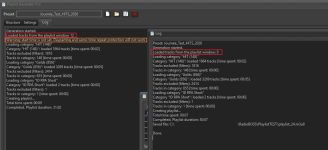
Here's one of my latest tests with a single rotation (See the screenshot):
  • The rotation is generated directly by clicking "Generate." This displays the 12 music tracks in the playlist. Incidentally, it displays "Warning: start time is not set. Dayparting and same-time repeat protection will not work." I think this is the same problem you fixed in update 7.2.0.2 with "Generate multiple playlists." Perhaps you could add the Dayparting options to the "Settings" tab of the Playlist Generator?
  • The rotation is generated from "Generate multiple playlists," and it displays 0. I notice that this time the rotation is generated 22% faster: 7 seconds instead of 9 seconds. Yet, it's the same playlist, and it was generated 15 seconds after the other one.

 

Attachments

  • PlaylistGenerator_SoloVsMultiple.png
    PlaylistGenerator_SoloVsMultiple.png
    55.4 KB · Views: 1
It's still not planned, I'm sorry, Time Stretch is intended to be an automatic feature. What is the use case for manual speed adjustments?
Usage scenario: Live radio broadcast + One host and one reporter + Music tracks + Commercial breaks + Jingles + Auto Intro disabled + No voice track​

Time Stretching only applies to music tracks. These are the only elements whose playback speed can be adjusted to allow other segments (host, reporter, commercials) to play/speak at their scheduled times.
Therefore, Time Stretching is manually applied to each music track between segments. The new duration of the music track is displayed immediately so the user can factor it into their duration calculations.
It would be a significant improvement to be able to define Time Stretch for each individual music track.

Alternatively, and within the framework of automatic Time Stretch configuration, a new file type called "Virtual Track" will be created.
These Virtual Tracks would be inserted manually between music tracks or via the Playlist Generator to define each event.
The duration of each Virtual Track could be defined. They are deleted immediately upon playback to advance to the next track.

The creation and configuration of Virtual Tracks would be done manually in the music library and via the Track Tool.
A new icon will be created for adding Virtual Tracks, similar to the icons for inserting files, playlists, etc.
This is essentially a block whose duration is defined by the user at the time of creation.
They would only function within playlists. They would not be usable in the Cart Wall or AUX (which would be of no use).

This would allow for future adaptation to new features such as time stretch markers.​
Agreed. Now it supports different Target hours, and then support for "Time stretch marker" will also be added. For now we have to work with the things already in the dev queue.
(y) Thank you for continuing to develop Time Stretch
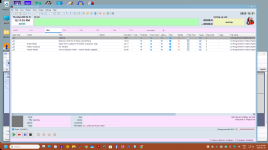
 
I use SQLite. It doesn’t work for me like in previous versions. Here are two examples of a search differentiated by the accent on the letter “a”.
The same thing: SQLite and I get a similar result regarding the letter "a" / "à".
This is not the same in the search results. And I use the mouse.
 
It appears that in this beta version there is no indication that the Relay is active. In previous versions, the Relay status was displayed in the On Air window. Currently, no information is shown to indicate whether the Relay is connected or disconnected.

1771472155018.png
 
Back
Top