In order to allow tracks that are not completely tagged to be chose, could all files with no specified genre, for example, have the internal label of "unknown?" This way, you could be organized, and strategically leave room for the improperly tagged outliers to have there place.Playlist Generator: additional repeat protection rules (Genre, Year, etc.) now skip tracks with empty field value
- Playlist Generator: same time next day repeat protection - fixed bug: midnight case was not processed correctly sometimes
- Playlist Generator: fixed - repeat protection didn't work sometimes for tracks loaded from playlist/last playback time from tag
- Playlist Generator: fixed several repeat protection bugs involving multiple playlist creation
- Styles: added option to control if active playlist tab color has priority over custom tab color
- Extract artist/title from file name (when tag is not present) is improved to support more options (e.g., long dash)
- Fixed: containers did not have a playlist icon
- Fixed: occasional crash during playback

You are using an out of date browser. It may not display this or other websites correctly.
You should upgrade or use an alternative browser.
You should upgrade or use an alternative browser.
RadioBOSS 7.2 [beta]
- Thread starter djsoft
- Start date
- Status
- Not open for further replies.

Kris
New member
and create separate players?Thank you, will be fixed in the next update.
I'm not sure sending track titles from cart wall is a useful thing to do. Currently it looks like very situational and not something what many users will be benefit from, I'm sorry.
Tracks without tags/incomplete tag are allowed to be chosen by default - unless you disable them using the filters. The new change in this version is that tracks with incomplete tags are processed differently for Repeat Protection. That is, one track with empty genre field will no longer prevent choosing another track with empty genre field.In order to allow tracks that are not completely tagged to be chose, could all files with no specified genre, for example, have the internal label of "unknown?" This way, you could be organized, and strategically leave room for the improperly tagged outliers to have there place.
There are different cases, IIRC, -1 is when it tried to detect, but failed, and error box when it wasn't able to open the file at all. I don't think this message should be translated, maybe in the future if this message becomes more informative.It appears when the BPM cannot be found when I click the "Detect" button in the Track Tool.
Is this new? Previously, the field displayed "-1".
Can you please provide more details? RadioBOSS already supports additional players in Overlay Playback (scheduler) and AUX playlists.and create separate players?

tomimatko
Active member
Where is this?Extract artist/title from file name (when tag is not present)

patrick.de-bruyn
Active member
RadioBOSS 7.2.1.5 beta
- Styles: added option to control if active playlist tab color has priority over custom tab color
- Thank you
patrick.de-bruyn
Active member
Normalizing titles does not work in TrackTool, neither in the playlist nor in the database
No error message appears in the database when processing under “Extras”
In TrackTool, a message appears stating: “Could not analyze loudness for this file, Code 1”
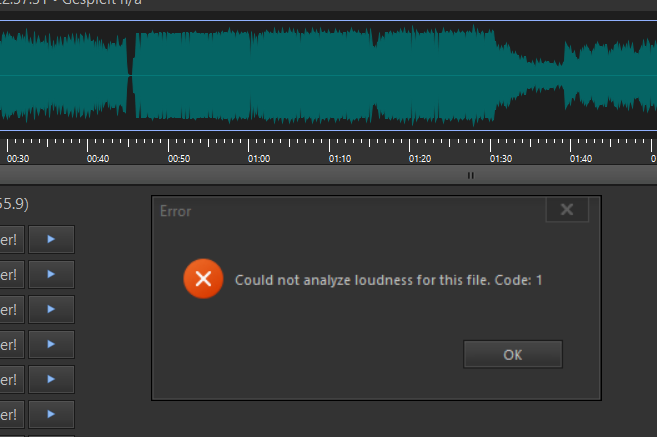
No error message appears in the database when processing under “Extras”
In TrackTool, a message appears stating: “Could not analyze loudness for this file, Code 1”
patrick.de-bruyn
Active member
Where is this?
It's processed in certain cases, when a file doesn't have tag information, e.g., for Artist/Title column in Music Library, in the Playlist Generator for repeat protection, and anywhere else.Where is this?
This doesn't reproduce here. Does it happen for all the music tracks?Normalizing titles does not work in TrackTool, neither in the playlist nor in the database
No error message appears in the database when processing under “Extras”
In TrackTool, a message appears stating: “Could not analyze loudness for this file, Code 1”
tomimatko
Active member
OK, I understand. I didn’t even know this option existed, and it makes things much easier because I don’t have to keep entering the data manually in Track Tool in Music Library.It's processed in certain cases, when a file doesn't have tag information, e.g., for Artist/Title column in Music Library, in the Playlist Generator for repeat protection, and anywhere else.
If this option is available only in the Info Box, it would be useful to add it to the Music Library right-click context menu as well. In the Library track list, I can immediately see which tracks do not have tags because they are greyed out. Then I could simply right-click the track, select the option, and solve the problem quickly and elegantly.
tomimatko
Active member
I was thinking about Auto Intro a bit more.
Would it be possible for Auto Intro to be determined not only when the current track actually starts, but already based on the next track that is coming up?
It would also be very useful if this information could be displayed in the “Coming Up Next” window (just like in On Air window). That way, I would have a much better overview of what is going to happen next, instead of being surprised by Auto Intro every time.
It would also be useful to have an “X” disable button in the “Coming Up Next” window, so if I see that the Auto Intro is not suitable for the next track, I could turn it off before the track starts.
Would it be possible for Auto Intro to be determined not only when the current track actually starts, but already based on the next track that is coming up?
It would also be very useful if this information could be displayed in the “Coming Up Next” window (just like in On Air window). That way, I would have a much better overview of what is going to happen next, instead of being surprised by Auto Intro every time.
It would also be useful to have an “X” disable button in the “Coming Up Next” window, so if I see that the Auto Intro is not suitable for the next track, I could turn it off before the track starts.

Guillaume
Active member
The answer to a question similar to yours:I was thinking about Auto Intro a bit more.
Would it be possible for Auto Intro to be determined not only when the current track actually starts, but already based on the next track that is coming up?
It would also be very useful if this information could be displayed in the “Coming Up Next” window (just like in On Air window). That way, I would have a much better overview of what is going to happen next, instead of being surprised by Auto Intro every time.
It would also be useful to have an “X” disable button in the “Coming Up Next” window, so if I see that the Auto Intro is not suitable for the next track, I could turn it off before the track starts.
djsoft: "Noted for the future versions. The problem here is that now it only processes Auto Intro when a track starts/about to play (when preloading) and not in advance. This will require a major internal change and lots of testing (to process Auto Intro earlier) and we can't afford it for this version." (February 18, 2026)
patrick.de-bruyn
Active member
Yes for all tracksThis doesn't reproduce here. Does it happen for all the music tracks?
Hello everyone, in one of the Beta versions my Radio Boss was constantly increasing and decreasing the volume on its own. It stopped after the updates, but now it's back in version 7.2.1.5 and it's very annoying. How could I fix this?
Knowing that I'm not using any compressor or gain control, just the Radio Boss and the Behringer UMC 404HD sound card, precisely to avoid bugs.
Thank you in advance for your help.
Knowing that I'm not using any compressor or gain control, just the Radio Boss and the Behringer UMC 404HD sound card, precisely to avoid bugs.
Thank you in advance for your help.
patrick.de-bruyn
Active member
djsoft said:
This doesn't reproduce here. Does it happen for all the music tracks?
I've always used MySQL, but I recently switched to SQLite for testing purposes—it doesn't make a difference; normalization still doesn't work.
Could this have something to do with the Edge WebView runtime?
I think it's faulty on my end; performing an in-place restore from Windows 11 didn't help either.
This doesn't reproduce here. Does it happen for all the music tracks?
It doesn't matter which database I use.Yes for all tracks
I've always used MySQL, but I recently switched to SQLite for testing purposes—it doesn't make a difference; normalization still doesn't work.
Could this have something to do with the Edge WebView runtime?
I think it's faulty on my end; performing an in-place restore from Windows 11 didn't help either.
patrick.de-bruyn
Active member
webview runtime new install no changes still no normalizationdjsoft said:
This doesn't reproduce here. Does it happen for all the music tracks?
It doesn't matter which database I use.
I've always used MySQL, but I recently switched to SQLite for testing purposes—it doesn't make a difference; normalization still doesn't work.
Could this have something to do with the Edge WebView runtime?
I think it's faulty on my end; performing an in-place restore from Windows 11 didn't help either.
If you call Track Properties in Music Library for a track with no tags, the Artist/Title fields in the editor will be pre-filled with what was extracted from the filename.Then I could simply right-click the track, select the option, and solve the problem quickly and elegantly.
Do you mean start based on the Mix point?Would it be possible for Auto Intro to be determined not only when the current track actually starts, but already based on the next track that is coming up?
This is on the to-do list, and I think was discussed in this beta thread as well. For this to work it will have to process the next track in full, presently it's not like this, so displaying this info means lots of internal changes - probably will be done in the next major update.It would also be very useful if this information could be displayed in the “Coming Up Next” window (just like in On Air window). That way, I would have a much better overview of what is going to happen next, instead of being surprised by Auto Intro every time.
I think once the Auto Intro is processed for the next track, this option will also be available.It would also be useful to have an “X” disable button in the “Coming Up Next” window, so if I see that the Auto Intro is not suitable for the next track, I could turn it off before the track starts.
- Status
- Not open for further replies.
Similar threads

- Replies
- 18
- Views
- 8K
- Replies
- 527
- Views
- 194K