Do you use the latest RadioBOSS 7.2? If so please check if Track Tool shows an error message.it works with the 7.1.6.2 version with the same Tracks in tracktool and in music library so there are NO File access problems and so the core issue must be in the 7.2 version

You are using an out of date browser. It may not display this or other websites correctly.
You should upgrade or use an alternative browser.
You should upgrade or use an alternative browser.
RadioBOSS 7.2 [beta]
- Thread starter djsoft
- Start date
- Status
- Not open for further replies.

TBN Radio
Member
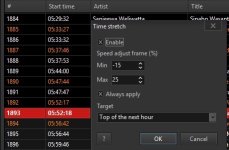
It applies, but around the top of the hour it completely changes and the tracks don’t end up on the hour. I’m testing with processed tracks and the playlist generator. No commands or network streams are in the playlist, I’m testing with jingles and songs only. The jingles and songs are generated by the playlist generator and all tracks are processed in the music library with mix points and trim silence. In the stable version, I noticed a difference in the speed of the tracks when they reached the top of the hour and ended up without any issues. However, in the Beta version, I haven’t encountered tracks playing according to the stretching percentage.I think more information is needed. Does it apply time stretch but actual playback ends at a wrong time? Or it doesn't apply speed change at all?
A lot of bugs were fixed in this version, so if anything, it should work better than before. Do you have any special items in the playlist, e.g. Track List, network streams or commands? It won't properly work with those.

patrick.de-bruyn
Active member
yes i do use the latest version 7.2.1.6Do you use the latest RadioBOSS 7.2? If so please check if Track Tool shows an error message.
The same files in the playlist and normalizing them with TrackTool doesn't work.
When I manually change the level there to, say, 13 dB and click “Normalize,” it automatically sets it to 0.0 dB, even if I set the target level to -13 dB.
There are no error messages in TrackTool.
patrick.de-bruyn
Active member
This seems to be a bug
Where can i change it iff i dont want the Date there
2 times wednesday?
What is that date good for ?
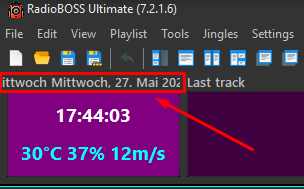
Where can i change it iff i dont want the Date there
2 times wednesday?
What is that date good for ?
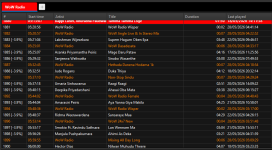
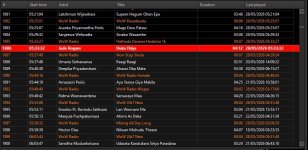
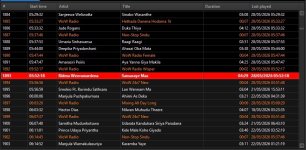
Can you please make 2-3 screenshots of how this happens: closer to hour start, at about a middle, and closer to the end.It applies, but around the top of the hour it completely changes and the tracks don’t end up on the hour. I’m testing with processed tracks and the playlist generator. No commands or network streams are in the playlist, I’m testing with jingles and songs only. The jingles and songs are generated by the playlist generator and all tracks are processed in the music library with mix points and trim silence. In the stable version, I noticed a difference in the speed of the tracks when they reached the top of the hour and ended up without any issues. However, in the Beta version, I haven’t encountered tracks playing according to the stretching percentage.
RadioBOSS re-calculates time stretch after each track (it had always worked like this) to improve precision.
It should show something. Please click the down arrow near the Normalize button and uncheck the "Do not ask" option, click OK. Then click Normalize button, what happens after it?yes i do use the latest version 7.2.1.6
The same files in the playlist and normalizing them with TrackTool doesn't work.
When I manually change the level there to, say, 13 dB and click “Normalize,” it automatically sets it to 0.0 dB, even if I set the target level to -13 dB.
There are no error messages in TrackTool.
It shows the day of the week and then date in system format. Looks like your system format also includes day of the week, that results in double display. Added to the list of bugs.This seems to be a bug
Where can i change it iff i dont want the Date there
2 times wednesday?
What is that date good for ?
patrick.de-bruyn
Active member
changed it in the windows settings to short date without day then it is okIt should show something. Please click the down arrow near the Normalize button and uncheck the "Do not ask" option, click OK. Then click Normalize button, what happens after it?
It shows the day of the week and then date in system format. Looks like your system format also includes day of the week, that results in double display. Added to the list of bugs.
patrick.de-bruyn
Active member
the same it normalizes to 0.0 no matter what the settings areIt should show something. Please click the down arrow near the Normalize button and uncheck the "Do not ask" option, click OK. Then click Normalize button, what happens after it?
No error messages
patrick.de-bruyn
Active member
So, I did a little testing.Do you use the latest RadioBOSS 7.2? If so please check if Track Tool shows an error message.
It should show something. Please click the down arrow near the Normalize button and uncheck the "Do not ask" option, click OK. Then click Normalize button, what happens after it?
I launched the latest RadioBOSS 7.1.6.2 version,
opened the Mysql library, created a new table, and imported a folder of songs.
Under “Extras” > “Edit,” I set the volume for these songs to -13 dB.
I added these songs from the folder to the playlist in RadioBOSS 7.1.6.2 via drag and drop.
The correct volume is displayed in the playlist.
Now I’ve also added the same files to a playlist in the current beta version via drag and drop... NO VOLUME LEVELS ARE DISPLAYED
When I do the same thing with the library from the current beta version, it only shows errors.
Also, the levels that were set using the other library from 7.1.6.2 aren't displayed.
Both are using the same MySQL database.
So, from my perspective, there must be a bug somewhere in the library or in the beta version of the normalization tool.
TBN Radio
Member
SureCan you please make 2-3 screenshots of how this happens: closer to hour start, at about a middle, and closer to the end.
RadioBOSS re-calculates time stretch after each track (it had always worked like this) to improve precision.
Attachments
TBN Radio
Member
Another thing I realised is that sometimes it calculates and ends up on the top of the hour. For example, two hours or three hours might end at a minute or three minutes later. Occasionally speeds are adjusted and then the timer ends on the top of the hour. It’s a bit strange. I tried adjusting the maximum speed up and down to see where it should definitely end on the top of the hour but it doesn’t. There’s something in there. I hope this helps.Sure

Guillaume
Active member
There's a problem at 5:32:45 when sending the track "Hethada Danena Hodama 1k". A 43-second element was inserted (a pause, a stop...).Another thing I realised is that sometimes it calculates and ends up on the top of the hour. For example, two hours or three hours might end at a minute or three minutes later. Occasionally speeds are adjusted and then the timer ends on the top of the hour. It’s a bit strange. I tried adjusting the maximum speed up and down to see where it should definitely end on the top of the hour but it doesn’t. There’s something in there. I hope this helps.
Were you listening to the playback at that point?
Or, the previous track, "Sinabo Wasanthe", had a stretch value of -25%. It's as if your maximum value (+25%) was swapped with your minimum value.
Did you notice that the playback was very slow for that track?
Some subsequent tracks may have had very significant negative stretch values, or there may have been pauses, stops...
The track "Nilwan Muhudu Theere" was scheduled for 6:00 in the first screenshot. And it was scheduled for 6:03:32 in your last screenshot.
That's a significant discrepancy.
I noticed that the track numbers are shifted by two places (but you might have deleted two tracks well before the one currently playing. No problem).
Finally, have you noticed any very slow playback speeds or "stops" while listening?
I've been using Time Stretching for several weeks with the latest beta versions. I haven't encountered any problems similar to yours.
TBN Radio
Member
Thanks for the reply. I was listening to the playback. Ah! Regarding the Deleted Tracks - Every 10 minutes and 35 minutes of the hour a scheduled track plays, like the Dance Track of the Hour and the Bollywood Track of the Hour + a Commercial Promotion advertisement at 30 minute of the hour with a scheduled Jingle. I couldn’t mention that! Even though it should adjust after the scheduled track ends and resume playback from the playlist, but it doesn’t. What do you think?
I tried switching off the scheduled tracks for a period of 2 hours and it worked for the 1st hour but then it didn’t for the second hour. I’m curious about the cause of this problem.
I haven’t noticed any stops or very slow playback speeds!
I tried switching off the scheduled tracks for a period of 2 hours and it worked for the 1st hour but then it didn’t for the second hour. I’m curious about the cause of this problem.
I haven’t noticed any stops or very slow playback speeds!
Last edited:
We'll check it again, but for now I'm not sure what the problem is. Maybe you changed normalization algorithm - please check in RadioBOSS Settings > General, Advanced settings. In Audio section normalze algorithm should be set to 0 to use EBU R128.the same it normalizes to 0.0 no matter what the settings are
No error messages
Probably but for now we can't reproduce it. Will be checked again. Thank you for the details.So, from my perspective, there must be a bug somewhere in the library or in the beta version of the normalization tool.
The settings seem to be OK but for some reason it's stopping applying time stretch. Please open Settings, General. Click Advanced Settings button and enable Logging > Main Player debug log, restart RadioBOSS. After this happens again, in the menu click Settings, Open Settings Folder. Open the Log folder and send the mainplayer.log to support@djsoft.net or attach it here.Sure
Checking the logs should help understand why it's failing sometimes.Another thing I realised is that sometimes it calculates and ends up on the top of the hour. For example, two hours or three hours might end at a minute or three minutes later. Occasionally speeds are adjusted and then the timer ends on the top of the hour. It’s a bit strange. I tried adjusting the maximum speed up and down to see where it should definitely end on the top of the hour but it doesn’t. There’s something in there. I hope this helps.
This will trigger re-calculation for time stretch of course, as the playlist contents had been changed.Thanks for the reply. I was listening to the playback. Ah! Regarding the Deleted Tracks - Every 10 minutes and 35 minutes of the hour a scheduled track plays, like the Dance Track of the Hour and the Bollywood Track of the Hour + a Commercial Promotion add at 30 minute of the hour with a Jingle. I couldn’t mention that! Even though it should adjust after the scheduled track ends and resume playback from the playlist, but it doesn’t. What do you think?
And it passes all our tests here. Looks like playlist edits by scheduled events/manual changes cause this.I've been using Time Stretching for several weeks with the latest beta versions. I haven't encountered any problems similar to yours.
RadioBOSS 7.2.1.7 release candidate
Changes
x86 https://dl.radioboss.app/radioboss_setup_7.2.1.7.exe
x64 https://dl.radioboss.app/radioboss_setup_7.2.1.7_x64.exe
Changes
- Fixed bugs; minor improvements
x86 https://dl.radioboss.app/radioboss_setup_7.2.1.7.exe
x64 https://dl.radioboss.app/radioboss_setup_7.2.1.7_x64.exe
TBN Radio
Member
I have emailed you the mainplayer.log file, as the forum doesn't allow that file type to be attached here. Thank YouThe settings seem to be OK but for some reason it's stopping applying time stretch. Please open Settings, General. Click Advanced Settings button and enable Logging > Main Player debug log, restart RadioBOSS. After this happens again, in the menu click Settings, Open Settings Folder. Open the Log folder and send the mainplayer.log to support@djsoft.net or attach it here.
Checking the logs should help understand why it's failing sometimes.

pety
Active member
From youtube. Video I guessIf the Date is also active, it will be taken into account. In your case it seems that the event is scheduled to run on one day only (Days of week unchecked, Date is checked).
I did a quick test and it doesn't confirm, does it happen for all mp4 files? Is it video or audio file?
- Status
- Not open for further replies.
Similar threads

- Replies
- 18
- Views
- 8K
- Replies
- 527
- Views
- 202K