Scheduled Tracks Do Not Work

Flashback

New member
I scheduled several tracks to play in determined hours during the day, but Radio Boss keeps playing them at any time of the day, even if they are scheduled to play at night only. What am I doing wrong?
 
It's not an specific event. I scheduled songs to play at night and dawn, but they play in the morning or afternoon and I don't want them to play that time. Which part of the event should I send to you?
 
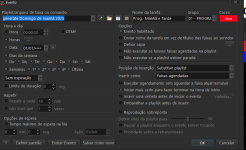
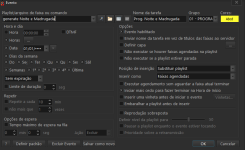
the time / date setting somthing like this

1789563295800.png

1789563337229.png
 
I scheduled several tracks to play in determined hours during the day, but Radio Boss keeps playing them at any time of the day, even if they are scheduled to play at night only. What am I doing wrong?
This means the event is not configured properly. You can send a screenshot of an event so we take a look at it. Typically, this is caused when "Repeat every" option is enabled, making event run a lot of times.
 
So, here they are!
 

Attachments

  • Screen shot Radio Boss 1.png
    Screen shot Radio Boss 1.png
    54.3 KB · Views: 36
  • Screen shot Radio Boss 2.png
    Screen shot Radio Boss 2.png
    52.9 KB · Views: 38
  • Screen shot Radio Boss 3.png
    Screen shot Radio Boss 3.png
    10.4 KB · Views: 36
  • Screen shot Radio Boss 4.png
    Screen shot Radio Boss 4.png
    10.4 KB · Views: 29
First if you want to play them every night, set date off, disable weeks also. Days of the week all is OK
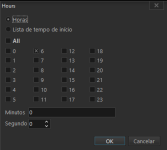
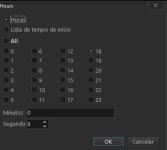
Your settings start the event at 6, but it never stops, the same for 18 hour.

You need to load new tracks at the hour these tracks are not allowed to play.
For exmaple the selected tracks start at 6 or 18 and you wnat to play then for only 1 hour you need to laod new tracks at 7 eg.19 hour or if you do not want to play there any tracks send a stop command
so in thies case start at 6 next hours start other events with other tracks same for 18

The settinge now sttart the event at 6 and play whole day untill 18 where you set the new event, the event from 18 runs whole night until 6 in the morning
 
So, here they are!
With this setup, it will start one event once at 6:00:00 and another at 18:00:00, no other runs will occur. You can check the Logs (bottom left corner) for lines like "Schedule: ..." - those indicate when an events start.
 
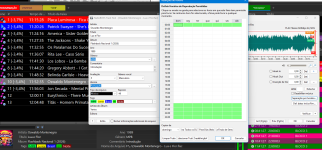
Here I am again. Take a look at the pictures below. This is what happens. I schedule the song to play from 8 pm to midnight, but it is scheduled to play at 11:52 in the morning.
 

Attachments

  • Picture One about schedule.png
    Picture One about schedule.png
    227.4 KB · Views: 8
  • Picture Two about schedule.png
    Picture Two about schedule.png
    103.4 KB · Views: 8
The Dayparting settings mostly look correct, but there are two things to check.

First: in your screenshot, 00:00 is also marked green. If you want the song to play only from 20:00 until midnight, 00:00 should not be selected, otherwise the song is also allowed between 00:00 and 00:59.

Second, and more importantly: the fact that the song is scheduled at 11:52 AM suggests that Dayparting is not being applied when the playlist is generated. RadioBOSS needs to know the expected playlist start time and day of week in order to apply these restrictions correctly.

Please check how the playlist is generated. If it is generated manually, or if the Scheduler event does not provide the proper start time, the Dayparting restriction may be ignored.

Try generating the playlist through the Scheduler/Wizard with the correct start time, then check whether the song is still placed at 11:52 AM.

 
Back
Top