Hi, I need to create a clock following these instructions. Feel free to give me your suggestions and how you would do it.
In summary, these are the audio elements I need to insert into the music clock:
Jingles + vocal station (on the song's intro, but it must be short, maximum 3 seconds, and I'll do it via autointro, which will pull them from a folder containing only short vocal stations)
Sweeper (same as Jingles / so I'll duplicate it)
Sonic Logo (same as Jingles and Sweeper)
Vocal station (as soon as the song currently playing ends, another song will start, with nothing in between, and there will only be a spoken line on the intro, which must be longer, minimum 4 seconds and maximum 15 seconds, so similar to "Jingle").
I imagine I should use TAGs and AutoIntro. Right?
Being a very active radio station, I always move songs from one folder to another via MusicLibrary, and as a result, it would be incredibly cumbersome to assign tags each time, which would then be associated with the use of AutoIntro.
This is because, as I said, PLG Pro must read files from MusicLibrary, and each item in the clock has a different MusicLibrary folder associated with it.
I would like the vocal stations that start from AutoIntro and that will always and only play over the intro of the songs, to depend on what precedes the song.
So:
I hope you understand.

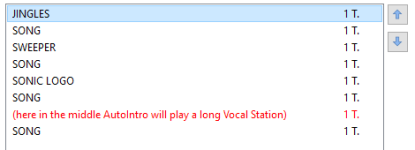
(I leave an example of how it looks on PLG Pro)
(If needed, I can send you a demo file to give you a better understanding of the result you want to see on air.)
In summary, these are the audio elements I need to insert into the music clock:
- Jingles
- Sweeper
- Sonic Logo
- Station
Jingles + vocal station (on the song's intro, but it must be short, maximum 3 seconds, and I'll do it via autointro, which will pull them from a folder containing only short vocal stations)
Sweeper (same as Jingles / so I'll duplicate it)
Sonic Logo (same as Jingles and Sweeper)
Vocal station (as soon as the song currently playing ends, another song will start, with nothing in between, and there will only be a spoken line on the intro, which must be longer, minimum 4 seconds and maximum 15 seconds, so similar to "Jingle").
I imagine I should use TAGs and AutoIntro. Right?
Being a very active radio station, I always move songs from one folder to another via MusicLibrary, and as a result, it would be incredibly cumbersome to assign tags each time, which would then be associated with the use of AutoIntro.
This is because, as I said, PLG Pro must read files from MusicLibrary, and each item in the clock has a different MusicLibrary folder associated with it.
I would like the vocal stations that start from AutoIntro and that will always and only play over the intro of the songs, to depend on what precedes the song.
So:
- Jingle starts > match Short Station.
- Sweeper starts > match Short Station.
- Sonic Logo starts > match Short Station.
- Song starts preceded by another song > match Long Vocal Station over the intro.
I hope you understand.
(I leave an example of how it looks on PLG Pro)
(If needed, I can send you a demo file to give you a better understanding of the result you want to see on air.)