RadioBOSS 7.2 [beta]

I think the “Start generate commands earlier” option should be moved from Settings > Scheduler to Scheduler Wizard > Generate a playlist, and it should be configurable per event.
This will likely be be added in the future, an option e.g. "Override global setting" but not in this beta because there are lots of other things that need to be done for this version.

And one more suggestion regarding Generate:
Would it be possible to add a log entry when the playlist has actually finished generating?
Yes, presently it will only show when it has finished with error, but not success.
 
I ran into a problem: it seems to ignore the no-repeat rule, since some songs had already been played, for example, 2 hours earlier—some even just a few minutes before. This happens even though the protection time to prevent them from being selected is set to 10 hours, 12 hours, etc.
It depends on when the playlist is generated and what the Start Time is. For example, if today is Thursday and you create a playlist for Sunday then repeat protection rules, even if set for like 12-hours as in your case, will not apply, because it's 36+ hours between those days.
Playlist Generator considers playlist's start time or repeat protection.

If you only set the start time and do not set start day, it's also taken into account, assuming the playlist will start later today (but calculating the time difference).

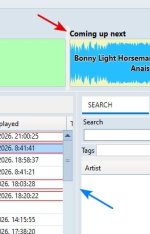
think it would also be good to display the icons in separate columns (The best option for us is this one, but only if you want to keep the file type icons.). It would also make sense to replace the “file type” icons with the played icons.
We'll consider this, thank you.

Another thing is that we need an option that was previously mentioned: “double-click to mark as next track.” It helps us a lot by allowing a faster and more dynamic selection compared to using the queue.
There's an option in Settings > Control: Mouse double click function. Another option may be added: "Add track to playback queue" what do you think? For now, you can add a track to the queue by selecting it and pressing Q.

We won't be adding another single-queue option just for setting the next track as it's a duplication of existing feature and having multiple conflicting next track options is not good.
 
No track is being considered. The line « Loaded tracks from the playlist window » indicates "0".
It means that the Playlist Generator was not started from within RadioBOSS. What happens if you generate the same preset, but from the scheduler?

Further thinking of this, it still may be added as an override of a global option.
 
The resize splitter between tracks doesn’t look correct.
It looks fine only in the Default theme — in other themes it’s not
 

Attachments

  • 2026-02-25_212137.jpg
    2026-02-25_212137.jpg
    23.1 KB · Views: 23
It depends on when the playlist is generated and what the Start Time is. For example, if today is Thursday and you create a playlist for Sunday then repeat protection rules, even if set for like 12-hours as in your case, will not apply, because it's 36+ hours between those days.
Playlist Generator considers playlist's start time or repeat protection.

If you only set the start time and do not set start day, it's also taken into account, assuming the playlist will start later today (but calculating the time difference).
As I understand it, do I need to create many more generate command events for each day of the week? Because I don’t see any other option that would work the way I want.

Honestly, I don’t fully understand how to implement dayparting in my case unless it’s by adding many events for each day of the week, which would require more work.

The events in my current workflow are only three (at the 59th minute of every hour) to generate the playlist and one to load it (at minute 00 of every hour).

In my case, would the missing piece be an option to use the current time? Or could an option be added to configure the estimated start time to something like: “in xx minutes,” “in xx hours,” etc.?

There's an option in Settings > Control: Mouse double click function. Another option may be added: "Add track to playback queue" what do you think? For now, you can add a track to the queue by selecting it and pressing Q.

We won't be adding another single-queue option just for setting the next track as it's a duplication of existing feature and having multiple conflicting next track options is not good.
I think adding tracks to the queue with a double-click this way is fine.


However, if we accidentally add a track we don’t want, how can we remove it and select the correct one more quickly? Right now, we have to open the queue manager, delete the track, and then search and add the correct one, which feels like too many steps when speed is essential.


For example, if there are only a few seconds left and I select the wrong next track, the current method (adding to the queue) makes me lose too much time.
 
The resize splitter between tracks doesn’t look correct.
It looks fine only in the Default theme — in other themes it’s not
Thank you, will be fixed.

Honestly, I don’t fully understand how to implement dayparting in my case unless it’s by adding many events for each day of the week, which would require more work.
There's "generate multiple playlists" option that you may use to reduce the number of the events. In this case, "Start time" for each subsequent playlist is increased, e.g.
First playlist: start time is as set in the parameters.
Second playlist: start time = set start time + first playlist duration.
And so on.

However, if we accidentally add a track we don’t want, how can we remove it and select the correct one more quickly? Right now, we have to open the queue manager, delete the track, and then search and add the correct one, which feels like too many steps when speed is essential.
Quickest ways are: press Alt+Q or right-click a track and select "Remove from playback queue". It's actually a very rare case when you need to use the queue manager.

Adding to the queue by double click will be possible soon.

For example, if there are only a few seconds left and I select the wrong next track, the current method (adding to the queue) makes me lose too much time.
This is a very special/rare case, and still it's pretty easy to handle: you first add the correct track to the queue and then remove unwanted track with Alt+Q, 1-2 seconds is enough to do it.
 
Existe la opción "Generar varias listas de reproducción" para reducir el número de eventos. En este caso, se aumenta la hora de inicio de cada lista de reproducción subsiguiente, por ejemplo:
Primera lista de reproducción: la hora de inicio es la establecida en los parámetros.
Segunda lista de reproducción: hora de inicio = hora de inicio establecida + duración de la primera lista de reproducción.
Etcétera.
Bueno, intenté que funcionara sin tener que crear tantos eventos adicionales, y para mí es complejo, ya que inevitablemente tengo que crear muchos más. Actualmente, tengo cuatro: tres para generar y uno para cargar.


El uso de múltiples listas de reproducción, aunque evita agregar tantos eventos, sigue siendo complejo porque tengo que crear muchos eventos de "carga".


Entonces, ¿no sería mejor añadir una opción para definir el tiempo estimado como un número aproximado de minutos u horas tras la generación? Obviamente, en función del momento en que se activa el comando de generación.


Por ejemplo:


Evento: la creación de una lista de reproducción comienza a las 12:59 y el tiempo de reproducción estimado es 1 minuto después (13:00).
También podrían ser más minutos, una hora, dos horas, etc.


Algo como esto sería la línea de comandos:
ejecutar PlaylistGeneratorPro.exe "-preset=PATRON 2" "-out=D:\PARA RADIO\Data Base Radio boss\PLAYLIST\PLAYLIST.m3u8" "-starttime=00:01:00 después" "-startday=hoy "

o

ejecutar PlaylistGeneratorPro.exe "-preset=PATRON 2" "-out=D:\PARA RADIO\Data Base Radio boss\PLAYLIST\PLAYLIST.m3u8" "-starttime=00:01:00 después"

Honestamente, no estoy seguro de cuáles serían los pros y los contras o cuán lógico es este enfoque. In my case, it would work for me, since I generate and play using two separate commands. I wouldn’t need to create more events than I already have. I’m not sure what others might think or how it would work for other users.

 
Last edited:
Back
Top