
RadioBOSS 7.2 [beta]

stil dousnt normalize tracks at all
What error message does it show?


In the tracktool no error messages it just dousnt do anything
Data base see Pic... all titles give error, no matter they are from disc C or any other Disc and No Writhe protection

1779444490484.png
 
In the tracktool no error messages it just dousnt do anything
Data base see Pic... all titles give error, no matter they are from disc C or any other Disc and No Writhe protection
Neither of this reproduce here. Normalization works in both Music Library and in Track Tool.

In the Music Library you can click the View Errors button to see the details.

As for the error messages, Track Tool does a quick skip if a track doesn't exist (or a file is unreadable), with no error message. We'll fix it (add an error message). But the core issue seems to be file access problems.
 
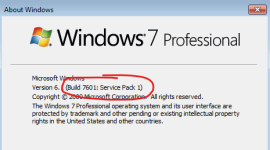
Those system requirements are for RadioBOSS 7.1, which is presently the latest stable version. I did a quick test on a testing Windows 7 machine, and it runs fine there. Does version 7.1 work for you?
About RadioBOSS 7.2 it also runs on Windows 7 machine, but there are some UI issues, apart from that, it's working.
Are there any error messages when you try to run either version? I'd also like to point out that it will only run if Service Pack 1 is installed. You can check it in Winver application (press Ctrl+R enter winver and press Enter).
 

Attachments

  • image_2026-05-23_232410796.png
    image_2026-05-23_232410796.png
    16.5 KB · Views: 17
In this latest version, it doesn't save the files I add by dragging them to the screen until the end of the session, and it also doesn't save the audio files I delete. When I restart the program, the deleted audio files are still there, and the newly added audio files don't appear. The previous version worked correctly. I use my purchased license.
 
Last edited:
I noticed the Time Stretching feature isn’t working properly in the latest update. It used to work well and I’ve copied the same settings to the Beta version. However, when I set “Always Apply” it seems to end the last track of the hour a minute or two later than the new hour begins.
 
In this latest version, it doesn't save the files I add by dragging them to the screen until the end of the session, and it also doesn't save the audio files I delete. When I restart the program, the deleted audio files are still there, and the newly added audio files don't appear. The previous version worked correctly. I use my purchased license.
Do you mean the playlist contents is not saved? There were no changes made regarding this in the past few years :) So I think the problem is that you disabled automatic profile saving (see the Profile menu).
 
I noticed the Time Stretching feature isn’t working properly in the latest update. It used to work well and I’ve copied the same settings to the Beta version. However, when I set “Always Apply” it seems to end the last track of the hour a minute or two later than the new hour begins.
Maybe it's not able to adjust the speed as needed (due to percentage limits), or track duration is not determined (did you prescan the tracks to set cue in/out, mix, start mix points?).
 
Maybe it's not able to adjust the speed as needed (due to percentage limits), or track duration is not determined (did you prescan the tracks to set cue in/out, mix, start mix points?).
Yes, everything is done! I’ve also tried raising it to higher percentages but it sometimes works and often doesn’t.
 
The "Week Days" column in the Scheduler does not reflect the days in the Event
 

Attachments

  • Scheduler Column_WeekDays.png
    Scheduler Column_WeekDays.png
    36 KB · Views: 19
The MP4 files (tracks) play, but the duration isn't displayed. Track Tool displays these files correctly, and the duration is shown correctly next to the STOP button. Is it possible to display the duration in the playlist as well? Thank you!
 
Neither of this reproduce here. Normalization works in both Music Library and in Track Tool.

In the Music Library you can click the View Errors button to see the details.

As for the error messages, Track Tool does a quick skip if a track doesn't exist (or a file is unreadable), with no error message. We'll fix it (add an error message). But the core issue seems to be file access problems.
it works with the 7.1.6.2 version with the same Tracks in tracktool and in music library so there are NO File access problems and so the core issue must be in the 7.2 version

The errorlog in 7.2 library only say there is an error
D:\###Musik\Hits Nederland Nov 24\Adam Port - Move.mp3
normalize error

D:\###Musik\Hits Nederland Nov 24\Alex Warren - Carry You Home.mp3
normalize error

D:\###Musik\Hits Nederland Nov 24\Bankzitters - Bro Code.mp3
normalize error

D:\###Musik\Hits Nederland Nov 24\Benson Boone - Beautiful Things.mp3
normalize error
 
Last edited:
Back
Top