Clock in RB 7.2.1.8

patrick.de-bruyn

Active member
Now that we have the option to place a clock in the side panels or additional workspaces, we no longer need the clock in the top-left corner—only the weather data is still relevant there, unless we could place that somewhere else as well.
A feature to hide the “old” clock would be a good option :-)
 
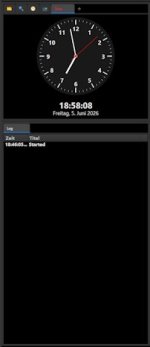
The clock is a nice feature, but to shrink it, you have to drag the "Log window" up accordingly.
The "Log window" is certainly important, butshrinking the clock shouldn't requirepushing it
up to cover three-quarters of the left side panel.
 

Attachments

  • RB_Clock_Groß.jpg
    RB_Clock_Groß.jpg
    13.1 KB · Views: 5
  • RB_Clock_Klein.jpg
    RB_Clock_Klein.jpg
    10.3 KB · Views: 5
Now that we have the option to place a clock in the side panels or additional workspaces, we no longer need the clock in the top-left corner—only the weather data is still relevant there, unless we could place that somewhere else as well.
A feature to hide the “old” clock would be a good option :-)
This window is pretty small, I don't think there's a reason to hide it. And it will conflict with weather display (to get the weather display it would be needed to enable this box).
 
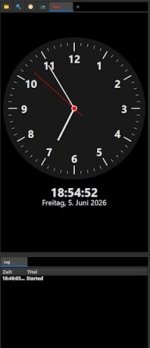
The clock is a nice feature, but to shrink it, you have to drag the "Log window" up accordingly.
The "Log window" is certainly important, butshrinking the clock shouldn't requirepushing it
up to cover three-quarters of the left side panel.
The clock is aligned to be in the upper part of the box. Both your screenshots look fine.
 
This window is pretty small, I don't think there's a reason to hide it. And it will conflict with weather display (to get the weather display it would be needed to enable this box).
I solved it for myself by changing the text color of the time to match the background color :-)
 
Back
Top