RadioAI pro v75.x

RudVveen

New member
Mooie en topuitbreiding voor je radio-uitzendingen! volledig gestuurd naar jou eigen behoeften , en AI stemmen bij openai en gemini en ondersteund 10 talen (zie website)

https://radioaiprov75.bss.design
 

Attachments

  • Radio AI Pro v75.png
    Radio AI Pro v75.png
    1.7 MB · Views: 14
Mooie en topuitbreiding voor je radio-uitzendingen! volledig gestuurd naar jouw eigen behoeften , en AI stemmen bij openai en gemini en ondersteund 10 talen (zie website)

https://radioaiprov75.bss.design
"A great and top-tier expansion for your radio broadcasts! Fully tailored to your own needs, featuring AI voices from OpenAI and Gemini, and supporting 10 languages (see website)."
 

Attachments

  • Radio AI Pro v75.png
    Radio AI Pro v75.png
    1.7 MB · Views: 14
check this one
 
Hello,
an interesting application.
Is it also compatible with RadioBoss Cloud?
"Hello, and thank you for the compliment! Radio AI Pro currently works flawlessly with RadioBOSS Desktop via the local API, but there is no out-of-the-box support for RadioBoss Cloud at this time. This is because the AI presenter rapidly generates local MP3 files, and a Cloud server cannot directly access your local hard drive to load those files into the playlist. For Cloud compatibility, an FTP upload feature would need to be developed in the future."
you can testing free 7 days "see website"
 
  1. Update !!! Oct 25, 2026 - New in Version 75

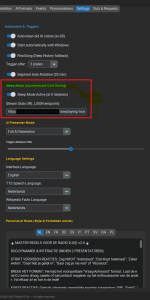
    In the main Radio AI Pro v75 application, Sleep Mode acts as an automatic cost saver for your virtual DJ whenever there are no listeners.

    Here is how it works in version 75:
    • The Listener Check: As soon as RadioBOSS or the internal timer signals that it is time for a new AI presentation, the application first checks the live listener count on your stream.
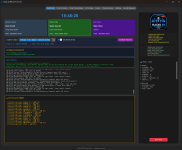
    • Log Display: If the counter is at 0, the director still determines which format is scheduled (e.g., MORNING_41), but immediately aborts the action. You will see this reflected in your LAST 20 Director FORMATS log screen as -> [💤 SLEEP] behind the format name, exactly as seen in your very first screenshot.
    • Direct Cost Savings: Because the action enters sleep mode, the application does not connect to the APIs. At that moment, you pay nothing to OpenAI or Gemini for text generation, and you consume zero voice characters for the audio.
    • Seamless Broadcasting: Since the app declines to create and deliver a new mp3 voice file, RadioBOSS will simply blend the current music in the playlist smoothly without any DJ interruptions.
  2. As soon as the first listener tunes back in, the status in your log for the next presentation automatically switches back to [✅ YES], and the virtual DJ immediately resumes its work.
 

Attachments

  • Sleep mode screen 1.png
    Sleep mode screen 1.png
    84.8 KB · Views: 2
  • Screen Daschboard.png
    Screen Daschboard.png
    224.3 KB · Views: 2
Back
Top