Please write in English.La mejora visual es notable, pero el punto débil está en la transmisión. Cuando necesitas obtener la dirección IP de otra emisora de radio, el búfer simplemente se congela. Probé varias configuraciones; en algunas, cargaba hasta el 91%, y en otras, al 100%, pero seguía sin reproducir. Se congelaba y tenía que cerrarlo. Esperamos con ansias una solución.

You are using an out of date browser. It may not display this or other websites correctly.
You should upgrade or use an alternative browser.
You should upgrade or use an alternative browser.
RadioBOSS 7.2 [beta]
- Thread starter djsoft
- Start date
- Status
- Not open for further replies.
But in this case, the "Scheduled" item state and played/unplayed will be lost, as all track will have their file type icons. This is the main problem.It might be cleaner if all icons were shown only in the # column, without an additional Icons column.
Each file type could still have its default icon. If the user changes the icon in File Types, that custom icon would be shown in the # column instead of the default one.
This sounds reasonable but one question remains what to do with the "scheduled" track state, if the default icons are replaces, it would be hard to tell if an item is scheduled or not.I thought the same thing
Yes, agreed.2. For the elements with the "played" state, the "" icon exists and it is not necessary to create a "played" state for the user-customized or default icons.
Interesting. If the default options are changed so that played tracks have their icon, it could actually work. Drawing a small "clock" does sound like a solution, and avoids a problem of creating many states of the same icon.3. For scheduled elements, the "" icon exists. This is the most complicated one, but I believe it can be placed in a reduced space, as shown in the screenshot. Right next to the established icon and near the lower edge, separating the established icon from the "scheduled" icon.
Or the Icon column can be avoided. Currently it works like this: whatever column is the first, it gets the icons. You can try moving the column e.g. Track Title to be the first, and the icon will be there. I think this behavior should be preserved. The Icon column can be removed, being replaced by how you proposed.4. I think it would look better to move the "Time Stretch" time and the queue number to the "numeral (#)" column. This to separate the icons from the texts.

Radio Souvenir
Member
Hello,
I no longer have the number of listeners in the statistics.
Is there a setting I need to change?
Have a good day.
I no longer have the number of listeners in the statistics.
Is there a setting I need to change?
Have a good day.
Radio Souvenir
Member
Hello,
I no longer have the number of listeners in the statistics.
Is there a setting I need to change?
Have a good day.
Attachments

xzsaimon16
Active member
There is no error message. When I zoom in, nothing happens; it still looks completely white. It happens sometimes, not always. I don't know what the reason is.Are there any error messages? What happens if you change the zoom, will it show?
Excellent! Yes, I think it's the best solution to avoid so much work creating states for the icons.Interesting. If the default options are changed so that played tracks have their icon, it could actually work. Drawing a small "clock" does sound like a solution, and avoids a problem of creating many states of the same icon.
I understand; yes, I think it's better to keep it that way. I believe a reasonable solution to the icon issue was achieved. Thank you.Or the Icon column can be avoided. Currently it works like this: whatever column is the first, it gets the icons. You can try moving the column e.g. Track Title to be the first, and the icon will be there. I think this behavior should be preserved. The Icon column can be removed, being replaced by how you proposed.
One additional detail: the "
 " icon should blink, and when paused, it should display the "
 " icon.
Exactly, a small overlay clock is a great idea.Interesting. If the default options are changed so that played tracks have their icon, it could actually work. Drawing a small "clock" does sound like a solution, and avoids a problem of creating many states of the same icon.
Question: In the new option to not play a track at the same time as yesterday, does it already ignore global settings? (For jingles, for example)

xzsaimon16
Active member
In RadioBOSS version 7.2.0.1, “Search: ignore accent/diacritic characters” does not work.

southernfm
Active member
This would be great if possible, otherwise, we will upgrade - This is a BIG win for us.Well, it could be moved to Advanced, but certainly not to Standard. Standard already offers lots of features, if more features are added there, we'll have to raise prices.
A few things/bugs I've noticed:
- The "Remove Time Stretch" option when you right click doesn't seem to do much... And it's visible even when no stretch is applied.
- The new current playing track countdown clock is really confusing for us, and makes the screen odly preportioned. Is it possible to have an option to put it back along the bottom as before?
- Really like the waveform on the coming up next tab. Maybe an option to change the colour of the waveform per section however? For our less advanced presenters with vision issues, they will mistake the playing track as the one on the right, as the waveform is the same colour as the current playing track. Would be good to be able to grey it out. I would also like to be able to see the waveform on the last played track for consistency/even UI.
- New tabs look great - personally, I did like the rounding previously, so maybe you can round the new ones? Might just be my personal preference.
- The stetch value doesn't appear on the current playing track. It also only seems to want to stretch the "music" file type - Maybe an option in the "File Types" menu to allow stretch to apply?
Suggestions:
- Be able to set the stretch value per track in the track tool. So you can speed up a certain track. Maybe have percentage, as well as new time value after stretch is applied. It would be good for the preview in the track tool to apply the stretch too.
- What would also be great is to be able to create a custom "Time Marker" that can be inserted into the playlist. You could set the time marker for 1:20pm, and it would stretch everything above it to match that time marker (respecting the percentage). It could be a wider feature that also greys out/disables tracks from playing so that the time marker is respected. For example, if the playlist is meant to end at 1:23:30, it could the last 3 minute song, and then stretch the playlist to remove 30 seconds. It could also be expanded to add songs if running under time. Just an idea, not critical to this update.
- Lock down the mixer with UAC. I want to avoid presenters getting curious and turning down the volume. I've had to lock down windows volume because we had instances where they would just mute the output.
- Lock down stretch settings with UAC
- Consolidate all the view menus into one. It's become really confusing, and hard to find where each setting is. There is the "view" dropdown, then "Customise", as well as some items in the playlist "dropdown" (both at the top and in each tab), as well as the style/view menu within settings. Having this all combined would be amazing. I like what has been done with the customise window however.
- Be able to have a different colour for the icons of tracks that have been played. Again, just to make it very clear to our users. Same way we can update the font/colour style for the title of a played track.
- Auto detect feature is great - However it would be easier for us to be able to click the button to run all 3, and have a separate button to customise what we want to detect. It saves us having to have a menu open each time if we always want the same things detected...
Thanks again for all the work you and the team have done with this.
southernfm
Active member
I believe this is the same issue I have described in here:I already know this. The adverts don't queue up in the playlist at all. The adverts never get to be played at all. I just want them to wait in the playlist regardless there's an already playing song or not. Let the event load into the playlist not just to flash in the player and disappear. My scheduler tab is way more busier than the playlist to tell presenters what to do in there, they aren't even supposed to access it anyway.
Another thing, the track tool takes its time to load/freezes it always first brings an error "the application seems to be frozen" then it loads the waveform.
And why is not possible to drag and drop files between the playlist and aux players
https://www.djsoft.net/community/threads/urgent-ads-scheduler.12153/page-2#post-56022
southernfm
Active member
How are you enabling this played state icon? The custom icon I have set remains. I would however prefer an option to customise the played state icon per file type. It will just be too confusing for our presenters otherwise if the icons change to a completely different icon, instead of just a greyed out version. Especially if both columns get condensed into one, it will be harder to tell what the track was as the icon is different.For the elements with the "played" state, the "
In the statistics window, you can hover the listener count - in the tooltip it will show you an error message why stats can't be retrieved. If it simply shows 0 without errors, it means that's the value that the server returns.I no longer have the number of listeners in the statistics.
Is there a setting I need to change?
Some servers require configuring statistic relays: https://manual.djsoft.net/radioboss/en/statistic-relays.htm
We tried to reproduce it here but it never happened, I'm not sure what can be done about it at this point. What if you scroll it left/right?There is no error message. When I zoom in, nothing happens; it still looks completely white. It happens sometimes, not always. I don't know what the reason is.
Maybe in the future, currently the icons are static and any blinking will require additional work - I'm not sure if we can afford it at this pointOne additional detail: the "
 First icon improvements, then we'll see.
This is "repeat protection" so it's also affected by the repeat protection options. That is, it won't be applied to categories with "Ignore repeat protection rules" enabled.Question: In the new option to not play a track at the same time as yesterday, does it already ignore global settings? (For jingles, for example)
The problem with position below is that it pushes the whole UI down, introducing a lot of unusable free space. That's why the timers were moved from there.Good evening, is it possible to have playback time position in addition to having right and left as well as the position as it was before?
If you want to create similar rules, they can be copied in the list.For the auto intro function, it's possible to create presets and save them with a name.
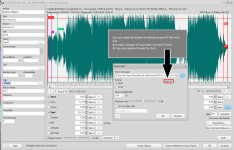
I'm not sure if it's usable (and most people will see it as "Delete voiceover assignment for a track" not deleting from disk), you can click the ... button and delete it from the Open Dialog.Great VT delete button to Tracktool (for clean VT sub directory) see photo
We'll check if this is a bug.The "Remove Time Stretch" option when you right click doesn't seem to do much... And it's visible even when no stretch is applied.
As I answered to the other user, having countdown there pushes down everything. Do you find left/right positions both not suitable for you? When the position is at the bottom, and the font is large (as it is now) the UI looks unbalanced.The new current playing track countdown clock is really confusing for us, and makes the screen odly preportioned. Is it possible to have an option to put it back along the bottom as before?
Currently you can configure the background color of the box, this should be enough to see, also the "Next Track" label at the top should helpReally like the waveform on the coming up next tab. Maybe an option to change the colour of the waveform per section however? For our less advanced presenters with vision issues, they will mistake the playing track as the one on the right, as the waveform is the same colour as the current playing track. Would be good to be able to grey it out. I would also like to be able to see the waveform on the last played track for consistency/even UI.
About the Last Track, it may be only "cosmetic" improvement as I don't see any practical use for it, the track had already played.
They are also rounded in this version too but not so prominent. Rounding them more could make it look like out of place, as the rest of the UI is not round either.New tabs look great - personally, I did like the rounding previously, so maybe you can round the new ones? Might just be my personal preference.
Yes, this is by design, Time Stretch is only applied after the currently playing track up to the end of the hour.The stetch value doesn't appear on the current playing track. It also only seems to want to stretch the "music" file type - Maybe an option in the "File Types" menu to allow stretch to apply?
The "Playback speed" slider will be added in one of the next updates.Be able to set the stretch value per track in the track tool. So you can speed up a certain track. Maybe have percentage, as well as new time value after stretch is applied. It would be good for the preview in the track tool to apply the stretch too.
The next Time Stretch update will allow to span it over more than one hour. But for custom positions, I'm not sure, it's already complex enoughWhat would also be great is to be able to create a custom "Time Marker" that can be inserted into the playlist. You could set the time marker for 1:20pm, and it would stretch everything above it to match that time marker (respecting the percentage). It could be a wider feature that also greys out/disables tracks from playing so that the time marker is respected. For example, if the playlist is meant to end at 1:23:30, it could the last 3 minute song, and then stretch the playlist to remove 30 seconds. It could also be expanded to add songs if running under time. Just an idea, not critical to this update.
Those UAC rules will be added.
- Lock down the mixer with UAC. I want to avoid presenters getting curious and turning down the volume. I've had to lock down windows volume because we had instances where they would just mute the output.
- Lock down stretch settings with UAC
This is why the Workspace > Customize was added. All options that were scattered around in the menus/settings window are now in one place. You can see that View menu became like 10 times smaller. The Workspace window is about "what you see and where" while the rest of the settings in View menu or View section in the Settings menu is about "what does it show".Consolidate all the view menus into one. It's become really confusing, and hard to find where each setting is. There is the "view" dropdown, then "Customise", as well as some items in the playlist "dropdown" (both at the top and in each tab), as well as the style/view menu within settings. Having this all combined would be amazing. I like what has been done with the customise window however.
You can assign different background and font color, and soon a custom icon can also be selected for it.Be able to have a different colour for the icons of tracks that have been played. Again, just to make it very clear to our users. Same way we can update the font/colour style for the title of a played track.
Do you mean avoid the window where it asks what options to set? If so then there has to be a way to show it again. Anyway, for batch processing (setting those points) it would be easier to use the Process Tracks feature: https://manual.djsoft.net/radioboss/en/process-tracks.htmAuto detect feature is great - However it would be easier for us to be able to click the button to run all 3, and have a separate button to customise what we want to detect. It saves us having to have a menu open each time if we always want the same things detected...
You can enable the "Events - legacy behavior for "do not start event..." option (set to True) in this case it will load the event but do not play.I already know this. The adverts don't queue up in the playlist at all. The adverts never get to be played at all. I just want them to wait in the playlist regardless there's an already playing song or not. Let the event load into the playlist not just to flash in the player and disappear. My scheduler tab is way more busier than the playlist to tell presenters what to do in there, they aren't even supposed to access it anyway.
Waveform loading happens in the background and can't freeze the UI. Can you please click the "Send bug report" button when it freezes for the next time?Another thing, the track tool takes its time to load/freezes it always first brings an error "the application seems to be frozen" then it loads the waveform.
It is possible, you can drag them by the icon. Alternatively, you can copy-paste them.And why is not possible to drag and drop files between the playlist and aux players
- Status
- Not open for further replies.
Similar threads

- Replies
- 18
- Views
- 8K
- Replies
- 527
- Views
- 208K