RadioBOSS 7.2 [beta]

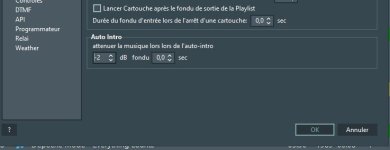
The defined duration doesn't seem to be respected when Track B doesn't have an Intro: the Bed's volume drops very quickly. There's a slight difference between a Fade Out at 0 seconds and a Fade Out at 5 seconds. But it's very fast for a Fade Out at 5 seconds.
I think this is because there's no room for it to fade out. That is, let's say the bed is playing and there's 1 second until the VT (and bed) end, and bed fade out is triggered - there's no room at this point to execute a 5 second fade out, as it only has 1 second of playback time left.

The behavior should be different at the beginning of the action: the Voice Track should ignore the outro of Track A. The Voice Track should play after the "End" of Track A.
It calculates VT start so that it will end at the following track's (Track B) Intro point. It may or may not be after the Track A's end. I don't think it should introduce silence between the tracks in this case. If you want it to always start VT's on track end, set the "Default Outro" to like 0.01 second (a value of zero is ignored) this will effectively make it work as you describe. The "Ignore outro" should be checked off of course otherwise the "Default outro" will not work.

I would like to know if the "trigger bed based on reading level" option will be added in this Beta version or later. Or is it no longer possible?
Not in this beta, I'm sorry.
 
I now realise the 5 seconds I set seems to be the time it takes for the bed to fade out *after* the next track is triggered.
Yes, because it now "knows" that the bed is supposed to stop. But not before. And if there's no room to execute the fade out, it won't be executed (please see the previous reply).

Desired result: if fade out is set at 5.0 seconds (or whatever time the user prefers), when there is 5.0 seconds left before the end of the voice track, the music bed begins to fade out such that by the end of the voice track the music bed's volume level is zero and the presenter can then smoothly cut to a
Due to the internal design, it doesn't calculate this in advance. On a side note, I don't think there's a practical application for the 5-second bed fadeout, as well as using voice tracks while not having Intro points for music tracks.
 
On a side note, I don't think there's a practical application for the 5-second bed fadeout
To the contrary - actually this is extremely common in radio broadcasts - for presenters to lower the music bed volume on the broadcast console before transitioning to the next item. It just sounds smoother and the transition sounds more natural. Maybe others can weigh in here. Admittedly, it is a matter of personal preference for those who prefer it. What I am suggesting is for this functionality to be replicated when using voice tracks - that we can get our voice track music beds to fade to zero before the next item starts. I would encourage your team to seriously consider it.
 
You need to verify that everything is configured correctly. Do repeats only occur across different playlists?
No, it's random and occasional: no specific day or time. It's mostly about artists, not songs.

In your case, maybe try unchecking the "Take into account expected track start time"? When unchecked, it will consider as if all tracks in the playlist window have just been played.
I think that's the source of my problem: the box is checked.

With the new Start Time thing, if you have it set, you need to ensure it's set correctly for all playlists, and also that playlists actually start at this defied start time.
I did configure it.

And I deduce a hypothetical behavior based on these steps:
  • Artist A was scheduled to play at 12:03 PM when the playlist was generated at 11:45 AM, with a theoretical start time of 12:00 PM.
  • But this Artist A, was already in the player and was actually scheduled to play at 12:23 PM.
  • The "Take into account expected track start time" box is checked.
Artist A, who was already in the player, could not be taken into consideration because the new Playlist theoretically starts earlier?


If the "Take into account expected track start time" box is checked, and the parameters have been correctly configured ("Maximum number of playlist tracks to check" and "Maximum number of minutes to check"), shouldn't Artist A be included in the newly generated playlist?

Does the "Start Time" setting override the consideration of tracks that will actually be played afterward? In other words, does it assume the new playlist will start at the time specified in the event?


Another question:
Am I misinterpreting the parameters in the "Take into account expected track start time" line and the two parameters above it ("Maximum number of playlist tracks to check" and "Maximum number of minutes to check")?​
Currently, I interpret it as follows: the expected start time of each track in the player is taken into account based on this limit:​
The time of the future playback of each track indicated in the player is taken into account according to this limit: this is based on the number "X maximum" of Tracks in the player over a duration "X maximum".​

Thank you in advance for all this information.

 
Last edited:
To the contrary - actually this is extremely common in radio broadcasts - for presenters to lower the music bed volume on the broadcast console before transitioning to the next item. It just sounds smoother and the transition sounds more natural. Maybe others can weigh in here. Admittedly, it is a matter of personal preference for those who prefer it. What I am suggesting is for this functionality to be replicated when using voice tracks - that we can get our voice track music beds to fade to zero before the next item starts. I would encourage your team to seriously consider it.
I was referring to using the 5-second fade out, this seems unnecessarily long for the beds/voice tracks. In a typical use case, even the 5 second fading will work as well - it just needs room to perform this fade (meaning, the next track should have at least 5 seconds Intro).
 
No, it's random and occasional: no specific day or time. It's mostly about artists, not songs.
I'm not sure how it can be random as repeat checking is fully deterministic (compare timestamps, and compare strings - artist names). At this point I don't see any ways of "fixing" it because we can't confirm the problem exists.

I think that's the source of my problem: the box is checked.
It should also work with the box checked, but when it's unchecked, it's more reliable but at the same time may exclude some tracks that could have been taken.

  • Artist A was scheduled to play at 12:03 PM when the playlist was generated at 11:45 AM, with a theoretical start time of 12:00 PM.
  • But this Artist A, was already in the player and was actually scheduled to play at 12:23 PM.
  • The "Take into account expected track start time" box is checked.
Artist A, who was already in the player, could not be taken into consideration because the new Playlist theoretically starts earlier?
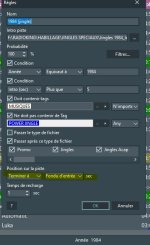
The "Consider tracks in the playlist" option should have handled this track. About start time, it also needs to have the correct week day. If it's not the same as today, the repeat protection for tracks in the playlist will not work.

If the "Take into account expected track start time" box is checked, and the parameters have been correctly configured ("Maximum number of playlist tracks to check" and "Maximum number of minutes to check"), shouldn't Artist A be included in the newly generated playlist?
If you're going to replace the tracks in the playlist, maybe the option to consider playlist tracks should be turned off?

Currently, I interpret it as follows: the expected start time of each track in the player is taken into account based on this limit:The time of the future playback of each track indicated in the player is taken into account according to this limit: this is based on the number "X maximum" of Tracks in the player over a duration "X maximum".
Yes, it uses the Start Time in the playlist as expected start time (considers as if the track had already played at this time) and limits the number of minutes (from currently played track up to specified limit). This is then shifted by the amount of time based on playlist's start time.
 
I'm not sure how it can be random as repeat checking is fully deterministic (compare timestamps, and compare strings - artist names). At this point I don't see any ways of "fixing" it because we can't confirm the problem exists.
Ok, thank you for the information.

It should also work with the box checked, but when it's unchecked, it's more reliable but at the same time may exclude some tracks that could have been taken.
Ok, thank you for confirming that it works when the box is checked.

The "Consider tracks in the playlist" option should have handled this track. About start time, it also needs to have the correct week day. If it's not the same as today, the repeat protection for tracks in the playlist will not work.
I checked for Friday. The "startday=5" specified in the event command corresponds to the correct day.
A note about Sunday: is "startday=0" in the event command normal? Shouldn't it be "7"?

If you're going to replace the tracks in the playlist, maybe the option to consider playlist tracks should be turned off?
My question was poorly translated (the translator didn't recognize the double negative in my language)... Sorry.
But I found the answer thanks to one of your previous replies.
 
Bug reporting issue

Our bug reporting system had incorrectly marked certain reports as spam/unallowed and rejected them. If you had sent the bug reports recently, we may have not received them. Please send them again using the menu command: Help > Contact Support > Send bug reports.
 
At some point during this cycle, r the slider indicating the output volume pre-effect stopped reporting a value, NVDA just says slider when tabbing across it. The arrow keys and page up/down make changes of no longer seeing this value is a regression.
 
Back
Top