

Guillaume
Active member
Auto Intro
In Playlist > Auto Intro > select a rule (Rule) > The "Must not contain tags" checkbox
The background of the rectangle displaying the selected tags is a different color for all display styles: light gray. This stands out in the "Black" style. Is it possible to correct the background of this rectangle for aesthetic reasons and consistency with the other elements?
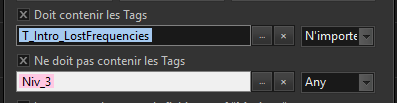
Is it possible to add "All" and "Any" to the translation file for this "Must not contain tags" line? (Or, if possible, assign the same keys as the line above.)
-------------------------------------//------------------------------------
Translation
Music Library > Tools > Track properties
Is it possible to add "Prelisten", "Prev", and "Next" to the language file?
In Playlist > Auto Intro > select a rule (Rule) > The "Must not contain tags" checkbox
The background of the rectangle displaying the selected tags is a different color for all display styles: light gray. This stands out in the "Black" style. Is it possible to correct the background of this rectangle for aesthetic reasons and consistency with the other elements?
Is it possible to add "All" and "Any" to the translation file for this "Must not contain tags" line? (Or, if possible, assign the same keys as the line above.)
-------------------------------------//------------------------------------
Translation
Music Library > Tools > Track properties
Is it possible to add "Prelisten", "Prev", and "Next" to the language file?


