

Roland
New member
Hi all, I have written a hobby project for our radio station in Delphi, which is allready in use for over one year:
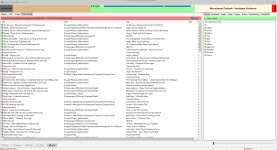
Remote Playlist Editor Software with Voicetracking (64 Bit Version only).
Connects to a RadioBOSS installation via RadioBOSS API and also SQL database. For accessing Audio-/Playlist-Files I'm using FTP/FTPS/SFTP.
Presenters can record voice tracks from any location and insert them into any upcoming playlist – regardless of what is currently on air.
Key features:
• Remote voice tracking: record directly into any FTP directory, not just the current OnAir playlist
• Remote editing of playlists and OnAir queue
• Real-time display of current track, next track and relay status
• Full keyboard operation and TTS speech guidance for blind users
• Cue Point Editor: waveform display, 10 cue points, LUFS normalization, database integration
• Tag Editor: edit metadata, calculate BPM, automatically find release year (MusicBrainz/iTunes)
• Song search in RadioBOSS media library with repeat-play filter
• Insert RadioBOSS control commands into playlists or execute directly
• Preset system: save and load directory configurations for different shows
• Supports FTP (active/passive), FTPS (SSL) and SFTP (libssh2)
• Integrated help system (F1), context-sensitive
• Currently available in five languages: German, English, French, Spanish, Turkish
As I said first: it is just a hobby project in let me say "beta-state" without any warranty!
If somebody is interested in beta-testing, I have attached the current version 1.0.118 (dated 2026-07-04) as zip File.
I have posted this here because I'm just looking for getting more user feedback for optimizing, you are also especialy invited djsoft-team!
I am not going to sell this project, it is just a great support to our radio station and maybe also for other people broadcasting by RadioBOSS!
Remote Playlist Editor Software with Voicetracking (64 Bit Version only).
Connects to a RadioBOSS installation via RadioBOSS API and also SQL database. For accessing Audio-/Playlist-Files I'm using FTP/FTPS/SFTP.
Presenters can record voice tracks from any location and insert them into any upcoming playlist – regardless of what is currently on air.
Key features:
• Remote voice tracking: record directly into any FTP directory, not just the current OnAir playlist
• Remote editing of playlists and OnAir queue
• Real-time display of current track, next track and relay status
• Full keyboard operation and TTS speech guidance for blind users
• Cue Point Editor: waveform display, 10 cue points, LUFS normalization, database integration
• Tag Editor: edit metadata, calculate BPM, automatically find release year (MusicBrainz/iTunes)
• Song search in RadioBOSS media library with repeat-play filter
• Insert RadioBOSS control commands into playlists or execute directly
• Preset system: save and load directory configurations for different shows
• Supports FTP (active/passive), FTPS (SSL) and SFTP (libssh2)
• Integrated help system (F1), context-sensitive
• Currently available in five languages: German, English, French, Spanish, Turkish
As I said first: it is just a hobby project in let me say "beta-state" without any warranty!
If somebody is interested in beta-testing, I have attached the current version 1.0.118 (dated 2026-07-04) as zip File.
I have posted this here because I'm just looking for getting more user feedback for optimizing, you are also especialy invited djsoft-team!
I am not going to sell this project, it is just a great support to our radio station and maybe also for other people broadcasting by RadioBOSS!
 Feedback PAULO ROBERTO!
 .
.

