RadioBOSS 7.2 [beta]

Bug 1
When I completely collapse (close) the Top part of the window (the section with last track, now playing, next track, etc.) by dragging it with the mouse, and then disable the Tool bar in Layout, I can no longer expand the top window again.
It behaves as if the top section becomes locked and cannot be restored.

Bug 2
If I don’t touch the Tool bar itself, but instead disable all buttons and then enable them again, the Top window becomes empty, the content (last track, now playing, next track, etc.) disappears completely.
Even restarting RadioBOSS does not fix the issue, so at the moment I am left without that section.

 

Attachments

  • 2026-03-18_182008.jpg
    2026-03-18_182008.jpg
    55 KB · Views: 46
That's only when you have the Scheduler tab visible, otherwise it will only be seen in the Status bar in the corner as [MAN] in the scheduler cell.
Yes, as you mentioned, it’s a bit inconvenient because when the Manuals window is open, it is only visible if the Scheduler tab is selected. Maybe you could move the (MAN) indicator to the left side to make it more noticeable, since on the right it tends to get lost next to the Silence and Scheduler indicators. I would even rename it to MANUAL so it’s immediately clear at first glance what it refers to.
 
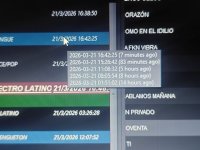
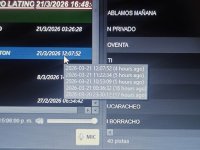
I’ve been having problems because songs repeat too often when I use the Generate command and set a start time for a playlist. It is now repeating many songs that have already played recently, which is not correct because I have anti-repeat rules enabled. If I do not enable the start time option, it works correctly.


Here are two screenshots so you can see.
 

Attachments

  • photo_2026-03-21_21-53-21.jpg
    photo_2026-03-21_21-53-21.jpg
    207.7 KB · Views: 18
  • photo_2026-03-21_21-53-25.jpg
    photo_2026-03-21_21-53-25.jpg
    237.9 KB · Views: 16
I’ve been having problems because songs repeat too often when I use the Generate command and set a start time for a playlist. It is now repeating many songs that have already played recently, which is not correct because I have anti-repeat rules enabled. If I do not enable the start time option, it works correctly.


Here are two screenshots so you can see.
1774127428784.png

I set the start right now
 
RadioBOSS 7.2.0.7 beta

Changes

  • Render playlist to a file: fixed issues with voice tracks
  • Improved fading for voice track and file type beds
  • Fixed Mix Start processing when playing track was deleted (e.g., scheduled event with the "Replace playlist option")
  • Fixed track start time calculation after the playlist is replaced with a scheduled event
  • Fixed various UI bugs
  • Minor improvements
Download
x86 https://dl.djsoft.net/beta/radioboss_setup_7.2.0.7.exe
x64 https://dl.djsoft.net/beta/radioboss_setup_7.2.0.7_x64.exe
 
Yes, as you mentioned, it’s a bit inconvenient because when the Manuals window is open, it is only visible if the Scheduler tab is selected. Maybe you could move the (MAN) indicator to the left side to make it more noticeable, since on the right it tends to get lost next to the Silence and Scheduler indicators. I would even rename it to MANUAL so it’s immediately clear at first glance what it refers to.
It's the Status Bar and it actually does show the status of the scheduler, which is a standard UI practice :) Renaming it to MANUAL does sound like a good idea - and it'll be more prominent this way.

I’ve been having problems because songs repeat too often when I use the Generate command and set a start time for a playlist. It is now repeating many songs that have already played recently, which is not correct because I have anti-repeat rules enabled. If I do not enable the start time option, it works correctly.
I think more information is needed to check this. How often are the playlists generated, and when they actually start (that is, how correct is "now" because if you start them like 2 hours later, it will break a lot of things). How long are the playlists. Check the log file (you can send it to us) - Settings, Open Settings Folder, open Log subfolder, the file is named playlistgenerator.log. Check if there are any errors and that the start time is actually correct.
 
Creo que se necesita más información para verificar esto. ¿Con qué frecuencia se generan las listas de reproducción y cuándo se inician realmente? (Es decir, ¿qué tan preciso es "ahora"? Porque si se inician dos horas después, causará muchos problemas). ¿Cuánto duran las listas de reproducción? Revise el archivo de registro (puede enviárnoslo): Configuración, Abrir carpeta Configuración, abrir subcarpeta Registro, el archivo se llama playlistgenerator.log. Verifique si hay algún error y que la hora de inicio sea correcta.
Se generan a los :59 de cada hora para que puedan cargar a los :00 de cada hora (1 minute after).
Esto se realiza las 24 horas del día, los 7 días de la semana, lo que significa que cada hora se genera una nueva lista de reproducción.


Sin embargo, hay un detalle importante: en el video se ve la fecha 29/03/2026, una semana después de que se generara esta lista de reproducción a las 19:50 de hoy, domingo 22/03/2026. Esto me lleva a concluir que las opciones "starttime: now" y "startday: now" no funcionan. Les mostraré el vídeo.


No hay errores por nuestra parte.
 

Attachments

Last edited:
Back
Top