Bug report: Issues with title display and fade rules after updating to 7.2.1.8

Flashh

New member
Hi.
I have recently updated RadioBOSS from version 7.1.6.8 to the latest version 7.2.1.8, and I am experiencing two major issues since the update.Here are the details:
Title Display Bug: The titles of the "Previous" and "Next" tracks are displaying incorrectly in the top information panel. The formatting or the text itself seems corrupted/wrong compared to how it worked in the previous version.
Fade Rules Broken: All of my previously configured crossfade and fade rules are completely broken/messed up. The transitions between songs do not sound correct anymore.Is there any way to restore or revert the fade rules to the old system/behavior from version 7.1.x?
Thank you.
 
Title Display Bug: The titles of the "Previous" and "Next" tracks are displaying incorrectly in the top information panel. The formatting or the text itself seems corrupted/wrong compared to how it worked in the previous version.
Can you please send a screenshot of how it looks?

Fade Rules Broken: All of my previously configured crossfade and fade rules are completely broken/messed up. The transitions between songs do not sound correct anymore.Is there any way to restore or revert the fade rules to the old system/behavior from version 7.1.x?
The fades are more or less processed the same way as always, there were a few fixes to handle some special cases. Is there a specific crossfade rule that doesn't work? Please provide more details when it's not working right.
 
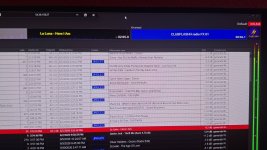
Please see the attached screenshot.
The "Next Track" display in the top information panel is incorrect. It shows "CLUBFLASHH radio FX 01", while the actual next track in the playlist is "Junior Jack - Thrill Me (Such A Thrill)".
This issue occurs frequently and the Next Track information does not always match the upcoming track in the playlist.
Thank you.
Regarding the fade issue, I often notice that jingles start playing over the currently playing song or over a song that is just ending.
Before updating to version 7.2.1.8, this never happened with the same fade configuration. The transitions were working correctly and jingles were properly separated from the music.
It does not happen every time, but it occurs frequently enough to be noticeable.
 

Attachments

  • Messenger_creation_5048CF97-9025-487D-B192-5AF97CB32641.jpg
    Messenger_creation_5048CF97-9025-487D-B192-5AF97CB32641.jpg
    347.2 KB · Views: 6
The "Next Track" display in the top information panel is incorrect. It shows "CLUBFLASHH radio FX 01", while the actual next track in the playlist is "Junior Jack - Thrill Me (Such A Thrill)".
What track is actually playing next, the one that's shown in the playlist, or the one shown in the Next Track box?

Regarding the fade issue, I often notice that jingles start playing over the currently playing song or over a song that is just ending.
What are the crossfade settings for jingles and for the preceding track? Jingles should use the "Override previous track mix point" to prevent overlapping with the music.
 
The actual next track is the one shown in the playlist.
In the screenshot, the next item in the playlist is "Junior Jack - Thrill Me (Such A Thrill)", but the Next Track box incorrectly shows "CLUBFLASHH radio FX 01".
When playback reaches that point, "Junior Jack - Thrill Me (Such A Thrill)" starts playing next, not the jingle shown in the Next Track box.
 
Back
Top