Nomenclature of playlists generated by the Ads Scheduler

Altec

Active member
Hello Dmitriy,

I would like to ask you something quite simple but necessary and not possible at the moment.

Would it be possible to generate playlists with the Ads Scheduler using the following nomenclature:

%y%m%d_%h_%m_INTERNALADS

Example :

251219_10_12_INTERNALADS.m3u8

1766144654494.png


This would make RadioBoss compatible and missible with my external advertising spot management solutions.

Best Regards

Altec
 
I would like to ask you something quite simple but necessary and not possible at the moment.
I'm not sure why is it not possible? If you specify the playlist format file name as on your screenshot, it will create the file names as you need.
 
I have the same request, but it is not working.
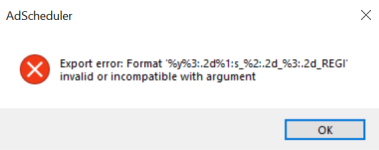
The software does not seem to want to interpret the date : %y%m%d

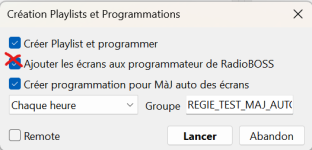
It should also be noted that if you want to program the screens (spot) yourself in order to create complex screens, RadioBoss will always try to insert them into the programmer itself by default.
 

Attachments

  • Capture d'écran 2025-12-30 110520.png
    Capture d'écran 2025-12-30 110520.png
    23.2 KB · Views: 26
Last edited:
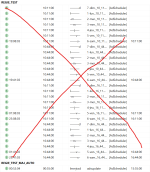
For my part, I work with complex screens using both internal and external playout systems through an on‑demand call solution such as %yyyy%mm%dd_%h_%m_regie1.m3u8 and %yyyy%mm%dd_%h_%m_regie2.m3u8... This generates many errors in the studios when there are no ads in the m3u8 files, even though this is not actually an error — it simply means that there is no advertising to broadcast.Perhaps there could be a way to exclude these errors when working in this mode, so that the studios are not flooded with unnecessary error messages.
 

Attachments

  • Capture d’écran 2026-01-02 094246.jpg
    Capture d’écran 2026-01-02 094246.jpg
    29.6 KB · Views: 31
I see, the Ad Scheduler has limited support for the templates. Currently, it only supports those variables: %n, %d, %h, %m. We'll extend this in the next update to allow specifying a year, a month, etc.
 
This is good news.
Thank you for listening and for your help.

I wanted to bring up something I've noticed while managing ad screens manually.

When we set up ad slots from different providers (like Regie A, Regie B, etc.), we use playlist files named something like:
%yyyy%mm%dd_%h_%m_regie_A.m3u8
%yyyy%mm%dd_%h_%m_regie_B.m3u8

Sometimes, if a provider doesn’t send any ads for a certain slot, the .m3u8 file ends up empty. When RadioBoss tries to play it, it sees the empty file and logs it as an error in the reports.

But really, this isn’t an error – it just means there were no ads from that provider at that time. It would be great if RadioBoss could recognize that an empty playlist isn’t necessarily a playback error, but just a normal "no ads to play" situation. Maybe adding a note or a different status for this would help clean up the reports and reduce false alerts.

On a related note, it would also be really useful for our billing and reporting if we could generate separate playback reports for each individual ad provider (Regie). This way, we could easily credit the correct broadcast of their spots by date and time for invoicing and verification.

Thanks again for your time and all the great work you do!
 
Last edited:
Sometimes, if a provider doesn’t send any ads for a certain slot, the .m3u8 file ends up empty. When RadioBoss tries to play it, it sees the empty file and logs it as an error in the reports.
There's an option in Ads Scheduler Settings - "Generate playlists for empty blocks" if you disable it, no playlist and no event to start this playlist, will be created.

But really, this isn’t an error – it just means there were no ads from that provider at that time. It would be great if RadioBoss could recognize that an empty playlist isn’t necessarily a playback error, but just a normal "no ads to play" situation. Maybe adding a note or a different status for this would help clean up the reports and reduce false alerts.
It should actually log not as an error, but like "Playlist ... loaded, 0 tracks" and then the next track in the playlist will play, with no error messages. Can you please post a screenshot of an error message that it shows you?

On a related note, it would also be really useful for our billing and reporting if we could generate separate playback reports for each individual ad provider (Regie). This way, we could easily credit the correct broadcast of their spots by date and time for invoicing and verification.
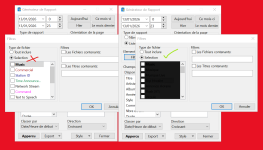
One way to achieve this would be to create separate "Commercial" file type for each provider, and then in the Report Generator select in the filters to report only this file type: https://manual.djsoft.net/radioboss/en/report_generator.htm
 
Faites attention dans mon cas, c’est différent : les publicités ne sont pas générées par le planificateur de RadioBOSS, mais par un logiciel tiers qui crée des playlists m3u8 complexes.
 

Attachments

  • Capture d’écran 2026-01-02 094246.jpg
    Capture d’écran 2026-01-02 094246.jpg
    29 KB · Views: 8
Be careful in my case, it's different the ads are not generated by RadioBOSS's ad scheduler, but by a third-party software that creates complex m3u8 playlists.
 
Be careful in my case, it's different the ads are not generated by RadioBOSS's ad scheduler, but by a third-party software that creates complex m3u8 playlists.
Then the software should be instructed to not include links to invalid items in the playlist. When RadioBOSS encounters an item that it can't play (e.g. the file does not exist) it will report an error of course.
 
Back
Top