RadioBOSS 7.2 [beta]

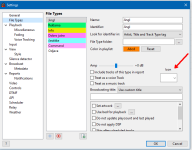
You can create a file type for such items and assign icons for them.
And how would the “tracklist” element be added? Also, some icons are missing, such as: comment, lightning bolt (I use it for IDs), etc.
I'm not sure, what this option should do? It allows you to enable work zones, it's effectively splitting the window.
Yes, splitting provides an additional workspace. This is very useful when working with two monitors, since I can have, for example, the library, the log, and the ad scheduler on the screen at the same time. In my case, it’s extremely useful, because on the main screen I would use only the playlist window.
Do you mean Auto Intro? If so, when it's playing it shows countdown.
Yes, I think it’s missing something like a text label that says “intro”.
I'm not sure about this, playlist is just scrolled (by default) when a new track starts, and nowplaying displays new track information. The Nowplaying bar can show a sort of animation, like scroll to the left, but I'm not sure about usefulness of this :)
It’s not especially useful; it’s just that, as part of the visual improvement of RadioBOSS, a smooth transition would look very nice. For the Now Playing bar, I would like that transition to be implemented; it could even be from bottom to top. In the playlist, I don’t think it’s necessary.
 
I just started testing this beta version, my first impression is that the VU meter is quite unreadable in the black skin version compared to previous versions of the RB, other impressions after detailed testing.
 
The idea is not to use two columns of icons, but instead have a single icon column, or replace the fixed icons with user-defined ones.
But what about the problem I talked before: we need to show the track state: played/unplayed, scheduled, and combinations. If only one icon is shown, the state information will be lost. And it's not practical to create a set of custom icons for all possible states as it'll easily get to 1000s of icons.

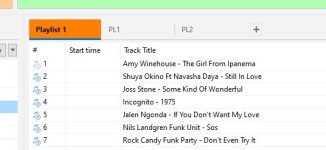
I took the time to create an idea of how all this could be implemented, and it can be done as shown in this screenshot: it displays the played status, current track, and next track, as well as a concept for scheduled elements. It looks simple, does not overload the playlist with icons, and achieves the intended goal.
What if a track is scheduled AND it's also next track? Bonus question: what if it also has a custom file type icon? That's why we decided to go with two icon columns approach. One column that's always been (note icon) and another with custom icons. The new column can show two icons, e.g. custom file type icon and also "next track" icon for example.
 
And how would the “tracklist” element be added?
Yes, indeed, a Track List doesn't have an easy identifier like network streams and other items do. We'll think of some solution for this.

Also, some icons are missing, such as: comment, lightning bolt (I use it for IDs), etc.
OK, more default icons will be added.

Yes, splitting provides an additional workspace. This is very useful when working with two monitors, since I can have, for example, the library, the log, and the ad scheduler on the screen at the same time. In my case, it’s extremely useful, because on the main screen I would use only the playlist window.
For the second monitor, you can use the "Additional work zone".

Yes, I think it’s missing something like a text label that says “intro”.
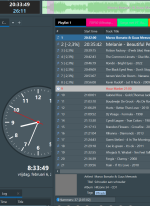
It says "Auto Intro" a small yellow box inside the Nowplaying bar:
image_2026-02-07_163622551.png


It’s not especially useful; it’s just that, as part of the visual improvement of RadioBOSS, a smooth transition would look very nice. For the Now Playing bar, I would like that transition to be implemented; it could even be from bottom to top. In the playlist, I don’t think it’s necessary.
We'll see what other users have to say about this. But the idea sounds interesting.
 
I just started testing this beta version, my first impression is that the VU meter is quite unreadable in the black skin version compared to previous versions of the RB, other impressions after detailed testing.
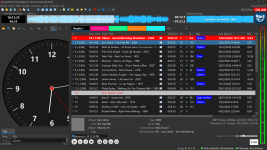
Maybe you have some sort of a custom style? In the default Black theme it looks pretty readable:
image_2026-02-07_163932533.png

Do you think the background should be made darker?
 
But what about the problem I talked before: we need to show the track state: played/unplayed, scheduled, and combinations. If only one icon is shown, the state information will be lost. And it's not practical to create a set of custom icons for all possible states as it'll easily get to 1000s of icons.


What if a track is scheduled AND it's also next track? Bonus question: what if it also has a custom file type icon? That's why we decided to go with two icon columns approach. One column that's always been (note icon) and another with custom icons. The new column can show two icons, e.g. custom file type icon and also "next track" icon for example.
So, in these cases, I think it would be better to include it in a combined column that is displayed in the following way, as shown in the next screenshot.

1770469516167.png
 
Back
Top