RadioBOSS 7.2 [beta]

I've experienced a couple of times where the "generate playlist" event doesn't generate anything. I checked the event, and it works fine manually. However, on two occasions, I've noticed that the generated (old) playlist is loaded because a new one hasn't been created. I don't know what could be happening.
Can you please provide more information on what the event does, were there any error messages in the log, and what time you have configured to create playlists earlier in Settings > Scheduler.

problems with the icons.
What is wrong with the icons?
 
There still has to be a limit, I don't think it should check what playback time was like a month or a year ago. Also this will be limited to the last 5 track launches, as this is what RadioBOSS stores for a track. So I see it essentially the same as "Do not repeat the same time as yesterday" but not limited to yesterday only and with possible different window size (before/after). Or is it not?
This is a good compromise:
  • The 15-day limit seems reasonable: it will allow for a different rotation groups to be considered;
  • Yes, the window size (before/after) will necessarily be different in this case because I will be requesting a stricter restriction: no playing within +/- 180 minutes of the last tracks launches (for example);
  • The limit for checking the number of listens: 5 seems too high in this case. I suggest 2 if possible. The exclusion time frame will be larger, and it shouldn't result in a total exclusion from the track.
 
Track Tool
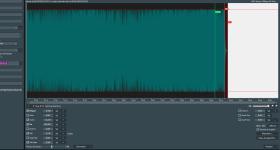
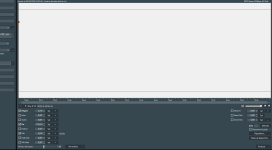
There's a display issue with the waveform: the background is white. This happens when I switch between tracks. For track A, I zoomed in. When I switch to track B, the background is either completely white or partially white (depending on the zoom level). To make the waveform for track B reappear, I have to zoom in again. Everything is normal if I don't zoom in.

Is it possible to modify the zoom view? Ideally, the zoom should be based on the middle of the vertical selection bar (like on the latest official version).
 

Attachments

  • TrackTool_Display01.png
    TrackTool_Display01.png
    162.9 KB · Views: 10
  • TrackTool_Display02.png
    TrackTool_Display02.png
    44.4 KB · Views: 10
Last edited:
This is a good compromise:
  • The 15-day limit seems reasonable: it will allow for a different rotation groups to be considered;
  • Yes, the window size (before/after) will necessarily be different in this case because I will be requesting a stricter restriction: no playing within +/- 180 minutes of the last tracks launches (for example);
  • The limit for checking the number of listens: 5 seems too high in this case. I suggest 2 if possible. The exclusion time frame will be larger, and it shouldn't result in a total exclusion from the track.
OK, this feature will be considered for the future.

Thank you for adding the "language" column. However, nothing is displayed in the column: it's empty.
Thank you, added to the list of bugs.

There's a display issue with the waveform: the background is white. This happens when I switch between tracks. For track A, I zoomed in. When I switch to track B, the background is either completely white or partially white (depending on the zoom level). To make the waveform for track B reappear, I have to zoom in again. Everything is normal if I don't zoom in.
Looks like a bug, thank you.

Is it possible to modify the zoom view? Ideally, the zoom should be based on the middle of the vertical selection bar (like on the latest official version).
Do you mean the default zoom when a track is opened? Currently it's set to show the entire track.
 
Do you mean the default zoom when a track is opened? Currently it's set to show the entire track.

This is the white vertical selection bar. It's the one that appears when you click on the waveform.
Currently (in the latest version), the zoom is around this vertical bar. This is useful for zooming in on the area to set mix points (start/end of track).
In this beta version, the zoom is towards the middle of the waveform. When we start from the general view (the entire track) towards a more specific point on the track.
 
What is wrong with the icons?
Only some are shown, as in the screenshot.

Can you please provide more information on what the event does, were there any error messages in the log, and what time you have configured to create playlists earlier in Settings > Scheduler.
I checked the event that generates the playlist. It's correct.

It seems that sometimes PLGenPro doesn't start from the scheduled event.

The event creates the playlist, obviously replacing a general playlist (a file)... So every hour a PL file is created and the file is replaced, but I don't know why the playlist isn't being generated. I don't know which version this small problem started with, but I'll keep a closer eye on it.
 

Attachments

  • 1775728027752.png
    1775728027752.png
    12.8 KB · Views: 7
Last edited:
Back
Top