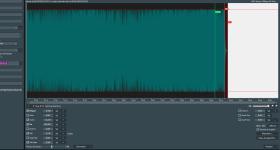
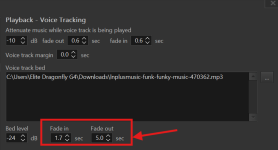
From the screenshot attached you can see that I've tried adjusting the bed fadeout settings to -5.00 seconds. My brain tells me this is supposed to make the music bed initiate a fade out 5 seconds before the end of the voicetrack, but no matter how many times I've tested it, it has not worked.
Preamble: Here are the elements in my player in order of playback:
- Track A
- Vocal track
- Track B
I've done some testing on what you're asking for and I've noticed a problem with the Fade Out (at 5 seconds in your example):
- The defined duration is correctly respected when Track B has an Intro;
- The defined duration doesn't seem to be respected when Track B doesn't have an Intro: the Bed's volume drops very quickly. There's a slight difference between a Fade Out at 0 seconds and a Fade Out at 5 seconds. But it's very fast for a Fade Out at 5 seconds.
------------------------------------------------------------------
I suggest modifying the following behavior:
Settings > Playback > Voice Tracking
"Ignore Outro point and always play voice tracks up to intro": the box is checked.
The Voice Track plays correctly up to the intro of Track B.
Problem: The Voice Track is overlapping with Track A. Track A and Track B play consecutively, and the Voice Track overlaps. Therefore, the Bed is not played.
The behavior should be different at the beginning of the action: the Voice Track should ignore the outro of Track A. The Voice Track should play after the "End" of Track A.
------------------------------------------------------------------
In the user guide (Minor correction):
Settings > Playback > Voice Tracking.
On the third line of the table, in the second column.
There is a spelling mistake: "Trea
s as a music track". It should be: "Trea
t as a music track".
------------------------------------------------------------------
I would like to know if the "trigger bed based on reading level" option will be added in this Beta version or later. Or is it no longer possible?
Here is the topic.
The answer was: added to the list of future improvements