RadioBOSS 7.2 [beta]

I've experienced a couple of times where the "generate playlist" event doesn't generate anything. I checked the event, and it works fine manually. However, on two occasions, I've noticed that the generated (old) playlist is loaded because a new one hasn't been created. I don't know what could be happening.
Can you please provide more information on what the event does, were there any error messages in the log, and what time you have configured to create playlists earlier in Settings > Scheduler.

problems with the icons.
What is wrong with the icons?
 
There still has to be a limit, I don't think it should check what playback time was like a month or a year ago. Also this will be limited to the last 5 track launches, as this is what RadioBOSS stores for a track. So I see it essentially the same as "Do not repeat the same time as yesterday" but not limited to yesterday only and with possible different window size (before/after). Or is it not?
This is a good compromise:
  • The 15-day limit seems reasonable: it will allow for a different rotation groups to be considered;
  • Yes, the window size (before/after) will necessarily be different in this case because I will be requesting a stricter restriction: no playing within +/- 180 minutes of the last tracks launches (for example);
  • The limit for checking the number of listens: 5 seems too high in this case. I suggest 2 if possible. The exclusion time frame will be larger, and it shouldn't result in a total exclusion from the track.
 
Track Tool
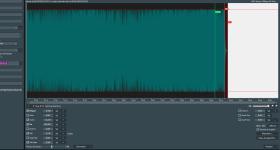
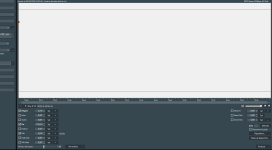
There's a display issue with the waveform: the background is white. This happens when I switch between tracks. For track A, I zoomed in. When I switch to track B, the background is either completely white or partially white (depending on the zoom level). To make the waveform for track B reappear, I have to zoom in again. Everything is normal if I don't zoom in.

Is it possible to modify the zoom view? Ideally, the zoom should be based on the middle of the vertical selection bar (like on the latest official version).
 

Attachments

  • TrackTool_Display01.png
    TrackTool_Display01.png
    162.9 KB · Views: 24
  • TrackTool_Display02.png
    TrackTool_Display02.png
    44.4 KB · Views: 23
Last edited:
This is a good compromise:
  • The 15-day limit seems reasonable: it will allow for a different rotation groups to be considered;
  • Yes, the window size (before/after) will necessarily be different in this case because I will be requesting a stricter restriction: no playing within +/- 180 minutes of the last tracks launches (for example);
  • The limit for checking the number of listens: 5 seems too high in this case. I suggest 2 if possible. The exclusion time frame will be larger, and it shouldn't result in a total exclusion from the track.
OK, this feature will be considered for the future.

Thank you for adding the "language" column. However, nothing is displayed in the column: it's empty.
Thank you, added to the list of bugs.

There's a display issue with the waveform: the background is white. This happens when I switch between tracks. For track A, I zoomed in. When I switch to track B, the background is either completely white or partially white (depending on the zoom level). To make the waveform for track B reappear, I have to zoom in again. Everything is normal if I don't zoom in.
Looks like a bug, thank you.

Is it possible to modify the zoom view? Ideally, the zoom should be based on the middle of the vertical selection bar (like on the latest official version).
Do you mean the default zoom when a track is opened? Currently it's set to show the entire track.
 
Do you mean the default zoom when a track is opened? Currently it's set to show the entire track.

This is the white vertical selection bar. It's the one that appears when you click on the waveform.
Currently (in the latest version), the zoom is around this vertical bar. This is useful for zooming in on the area to set mix points (start/end of track).
In this beta version, the zoom is towards the middle of the waveform. When we start from the general view (the entire track) towards a more specific point on the track.
 
What is wrong with the icons?
Only some are shown, as in the screenshot.

Can you please provide more information on what the event does, were there any error messages in the log, and what time you have configured to create playlists earlier in Settings > Scheduler.
I checked the event that generates the playlist. It's correct.

It seems that sometimes PLGenPro doesn't start from the scheduled event.

The event creates the playlist, obviously replacing a general playlist (a file)... So every hour a PL file is created and the file is replaced, but I don't know why the playlist isn't being generated. I don't know which version this small problem started with, but I'll keep a closer eye on it.
 

Attachments

  • 1775728027752.png
    1775728027752.png
    12.8 KB · Views: 30
Last edited:
Report > Confirmation message « Report exported successfully »

The message is permanently displayed in the report window, above "Items".​
Thank you for adding this message to the translation file. And when I click "Cancel", the confirmation window doesn't appear: so it's working correctly.​

Report_ExportSuccess.png


-------------------------------------------------------------------------

Playlist > Icon

The problem has already been reported here and I confirm:​
None of the icons defined in "File Types" are displayed in the player except for music files. In this example, there are 3 file types: the color for each file type is correctly assigned. This is not the case for the icons: they are blank.​

Playlist_Icon.png


-------------------------------------------------------------------------

Playlist Generator & Event

I have an artist whose music was played very frequently, and I don't know what caused this issue. It happened occasionally in the latest official version (7.1.6.2).​
It's as if the "artist" field validation didn't work correctly. I don't know how Playlist Generator works, but it seems like it missed a step during generation (occasionally).​
And it's very annoying: the repetition of an artist (especially a very popular one) is problematic, as is the repetition of the same track.​


Here's what happened:

12:23 => Artist A; Artist B; Artist C – Title A
12:32 => Artist A – Title B

Artist A's position in the Playlists:
  • Last position in Playlist A => 12:23
  • Second position in Playlist B => 12:32

For each Playlist (In "Settings" of each Preset):
  • "Do not repeat artist": 180 minutes
  • "Multiple Artists": The "Extract individual artist for repeat protection" box is checked. Artist separators: ";"
  • "Do not play tracks at the same time as yesterday": Checked
  • "Use the last played tag": Checked
  • "Repeat protection with consideration for tracks in the playlist window": Checked
    • "Maximum number of playlist tracks to check": 25
    • "Maximum number of minutes to check": 70
    • "Take into account expected track start time": checked
Scheduler:
  • An event is scheduled to generate playlist B: it was at 11:45 AM.
  • The log indicates:
    • "Playlist start time is: (today) 12:00:00 [Fri.]"
    • "Loaded tracks from the playlist window: 13"
    • "Playlist tracks repeat protection time shift: -15 minutes"
=> No errors.

Artist A is in the correct category. Both tracks are also in the correct category.

Playlist_Artist.png
 
Yes, looks like a bug, it looks like it moves a week ahead for some reason. The next update will fix it.


The beds were always faded out, based on the configuration, Settings > Playback > Voicetracks (for voice track beds) and Settings > General > Advanced (for MIC bed). Bed for the file type is faded out with the track itself.
What's changed is how the bed fading is implemented internally; there were several issues fixed with the Render Playlist to a File feature, as well as couple of minor bed-related bugs here and there.
The thing I've always sought clarification about is the ability let the bed fade in at the start of a voicetrack and/or fade out before the end of the voicetrack.

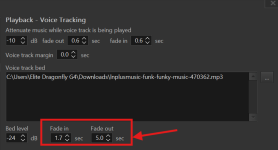
In radio presentations music beds typically do not just start simultaneously with the presenter talking. Usually (though, granted, not always) the presenter starts talking and slowly increases the bed volume to the desired level, and as he approaches the end of his segment, before transitioning into a sweeper or other song, he will fade out his bed for it to not clash with the incoming track or end too abruptly. It just sounds more natural for a bed to fade out and be at zero level by the time the next track starts playing, or that's perhaps my desired style. It shouldn't matter. From the screenshot attached you can see that I've tried adjusting the bed fadeout settings to -5.00 seconds. My brain tells me this is supposed to make the music bed initiate a fade out 5 seconds before the end of the voicetrack, but no matter how many times I've tested it, it has not worked. I have tried to explain this previously and you keep saying there's no problem and I'm wondering if maybe I've not been explaining it properly. Or am i misunderstanding the purpose of this setting altogether? And if that's not the purpose of this setting then I humbly request that the functionality I'm describing is added - and it should also be applicable to all the music beds selected for individual filetypes.
 

Attachments

  • Screenshot 2026-04-12 113251.png
    Screenshot 2026-04-12 113251.png
    25 KB · Views: 3
Back
Top