xzsaimon16
Active member
Thanks!I think yes.
This bar will have to be placed somewhere, and UI is not going to be changed again. A tooltip can be added showing the expected seeking position.

Thanks!I think yes.
This bar will have to be placed somewhere, and UI is not going to be changed again. A tooltip can be added showing the expected seeking position.
I support that idea!There's actually a feature request for cases like this, to create a tool similar to the Ads Scheduler, but instead it will create scheduled events to create and run the playlist. Effectively automating your approach to programming. The point of such a tool to reduce manual event management and see everything in a grid.
I don't recall exactly why, but it was disabled for some reason.“There should be an option to delete comments in the forum.”
This would be yet another queue, but limited to a size of one. I don't think it's necessary. Queue allows doing all that.“Mark as next” would be a one-time action: the selected track plays immediately after the current one, then playback continues normally without creating or modifying any queue.
Thank you!Nice interface refresh!
We already discussed this 3 years ago.One more concern with time-based playlist filenames (day/time in the name) is operational visibility.
With dozens of generated playlists in a folder, there is no clear or reliable way to quickly verify whether all time slots are actually covered or if a specific hour is missing.
In other words, a folder full of time-stamped playlists doesn’t provide a clear overview of schedule completeness and makes it easy to miss gaps.
I also assume that a variable-based name like sun_13.00_Rock does not actually work as a meaningful template for dayparting or preset selection, and is treated as plain text only.
That would otherwise provide a much clearer overview of all covered hours.
In practice, this means I can only end up with static names like Pop_mon_16.00, Rock_sun_13.00, Swing_sat_12.00... which again leads to a folder full of files without a clear way to verify that every hour is covered.
If I want to cover every hour of the week, that would mean 24 × 7 = 168 such time-based M3U files, right? Ufff...
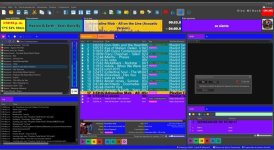
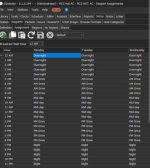
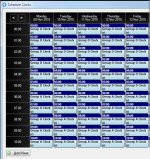
I like the overview of this tabular format where you can see the entire week. You can immediately see what is scheduled for each hour. This Myriad Playout is also good; it could also be something in the form of an Ads scheduler, for example, like the picture. On the left, all categories are listed, like in PLGen Pro, with assigned numbers that are then entered into the middle section - Clocks. The right field informatively shows us what is included in each category (rotation).
It can also be without assigned numbers, so that the grids are wider, and the category names are placed there...

Would indeed be helpful. Kind of like what you might see in some automation systems (examples attached for reference). Or what Radioboss does in ad scheduler as you said, but for clocks/presets instead of ads. Events can then be automatically created and scheduled as it would be synced with the event scheduler. Could be implemented as an extra tab in the Playlist Generator.The way I see... Playlist generator pro will just have to have a new tab just for assigning different clocks/presets to the different hours of day. Generate all playlists for the 24 hours once and they're loaded into the scheduler section to load at their play hours... Just like the Ad scheduler. Just saying.
Templates can also use folders, you can have a separate folder for each day of the week, containing only 24 playlists. Again, this is what the new tool (to manage playlists) will allow easily to do and overview.In practice, this means I can only end up with static names like Pop_mon_16.00, Rock_sun_13.00, Swing_sat_12.00... which again leads to a folder full of files without a clear way to verify that every hour is covered.
If I want to cover every hour of the week, that would mean 24 × 7 = 168 such time-based M3U files, right? Ufff...
This is a completely new tool, and all major features for this beta are already added. But about tool like this, it can be released as a part of intermediate beta, with the only new feature is this new instrument.Simply load the preset for each hour and RB takes care of the rest
I hope we can see something like this in this Beta
Please write in English.Buen día, quiero informarles que en esta versión de prueba, estoy experimentando un comportamiento aleatorio e impredecible en el software. De repente, sin realizar ninguna modificación, aparece este error: el tamaño de la fuente cambia inesperadamente y, al intentar restablecerlo, no puedo deshacer el cambio.
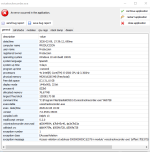
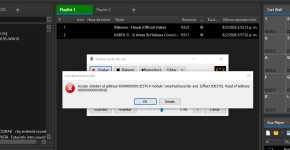
Thank you, will be fixed in the next update.Hello, I have installed version 2.7 [o 7.2]. I am encountering an error when trying to record a Voice Track; I am attaching the images so you can help me find a solution to this problem.
Yes, this is a bug, please change some other file type option to make it save the icon.Additionally, I noticed that the File Type icons are not being saved. When I change the file type of a track, the assigned icon does not remain stored after the change.
We have this feature planned for one of the future updates.Video Watermarking: It would be great to have an option to overlay the radio station logo directly onto the video playback window.
Something like this would be added too, but this is going to happen in one of the next major updates, as it requires lots of changes to video processing.Dynamic Titles: An option to display the Artist and Title of the song/video on screen. Ideally, with a timer to show the info for 10 seconds at the start and 10 seconds before the track ends.
Thank you!On another note, the segmentation in Track Tool for specific days of the week and hours is excellent. Great job on that feature!
This is not really possible now due to technical limitations on how the videos are played, especially mixing is tricky.Another great addition to the Track Tool would be ensuring that Start, Intro, Outro, End, and Mix markers are fully active for both audio and MP4 video files. Having full feature parity for video files would be a huge improvement.
This is going to be added in one of the next updates, I think it may be a separate release with this tool included. This is going to be available in Ultimate only.Would indeed be helpful. Kind of like what you might see in some automation systems (examples attached for reference). Or what Radioboss does in ad scheduler as you said, but for clocks/presets instead of ads. Events can then be automatically created and scheduled as it would be synced with the event scheduler. Could be implemented as an extra tab in the Playlist Generator.

That's normal; your column width isn't wide enough to display the tag.Some of my Tags don't seem to be setting for example my new Clean Tag sets fine, but the new EXPLICIT tag i created won't set atleast visually its there in the tags when viewing track editor/track properties but not visually there in Music LibraryView attachment 15302
No, nothing was changed, at least not directly. Does it show any error messages?There's a problem with the `writetag` command. Has something changed in its structure? My programs aren't working in this beta version. But they work when I try the latest stable version.
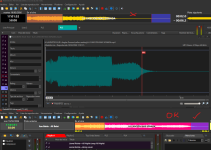
I think this is due to audio buffering, the playback is delayed. Please ensure that "Prelisten" device in RadioBOSS's playback settings uses WASPI or ASIO driver, this is to reduce the latency.In this version, the waveform display appears slightly shifted to the right compared to the actual audio position. As a result, the waveform does not visually align correctly with the real playback position and mix point.

Will the new playlist management tool be available in the Standard version, or Ultimate only?(this is also to prepare it for the new tool to manage playlist creation, as it would be easier to manage one event per preset, than two events per preset).