RadioBOSS 7.2 [beta]

AutoIntro is very useful — the new interface is great, but it would be interesting to be able to see the file name in the interface.

Also, does the new function “Do not play at the same time as yesterday” make use of “Ignore global no-repeat rules” for the station imaging?

The icon configuration is lost for file types.

In the additional workspace area, it would be useful to duplicate the On Air and Next panels so the presenter can have that information visible on another monitor.

Lastly, with the new mixer, it’s very difficult to select 0 dB after moving it.
 
I understand this, but it’s necessary to implement the icons (previous, current, and next). Where will they be added? Inside the “icon” column, or will there be another column called “status”?
I think inside the Icon column, just add a second icon to the right. Adding a third column seems too much I guess.

I fully support the idea of making it possible to choose the position of the countdown timer. So far, I have not encountered any errors in the operation of RB. I like the new clock display option in the menu.
This should be implemented soon.
 
I understand, but it would be possible to set one color for the intro time and another for the outro, to distinguish them.
It doesn't really separate them because this timer is a sum of both. You see if it's intro or outro in the nowplaying bar (if it's the end of a track, it's outro, if a new track had already started, it's intro).

Additionally, I would like to be able to edit the color of the “intro and outro” marker within Now Playing.
This can be added.

I would also like the position marker’s movement to be smoother. On short tracks, it’s noticeable that the sliding movement is abrupt.
The nowplaying bar is set to 20 frames per second. Making it update more often will consume more CPU/GPU with no real noticeable improvement (we tested it). This is how it's going to be for shorter tracks.
 
I created the event correctly as well:
run PlaylistGeneratorPro.exe "-preset=Funky" "-out=C:\Users\tomim\Documents\Funky 2.m3u8"
However, every time I generate the playlist, all jingles appear in the clock, including the weekday ones.
This command does not specify the start time and day, so dayparting will not work in this case, as the Playlist Generator doesn't know when the playlist is going to launch. Please use the Wizard in the Scheduler to create a command that will include this information.
 
Clock uses the system time format. 24-hour clock can be enabled from Settings > View.
Hello,
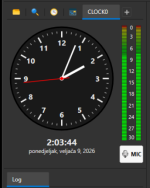
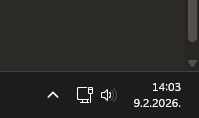
I checked the box, but the clock is still in 12-hour format. It would be helpful to be able to change the date format.

Regards
 

Attachments

  • Capture.PNG
    Capture.PNG
    41.3 KB · Views: 70
The nowplaying bar is set to 20 frames per second. Making it update more often will consume more CPU/GPU with no real noticeable improvement (we tested it). This is how it's going to be for shorter tracks.
Is it possible to add an advanced option to increase the FPS between 20, 30, 45, and 60? I believe that, in my case, it does not affect performance that much due to my PC’s specifications.


Another feature regarding Now Playing: is it possible to add another seek/status bar? This bar would indicate the estimated time it will jump to when hovering the mouse cursor over it.
 
I checked the box, but the clock is still in 12-hour format. It would be helpful to be able to change the date format.
Hello,
Your screenshot shows the time as of this Monday morning, and you posted it this Monday morning. I don't think it's not working… We'd have to wait until 1 PM to be sure ;) And I think that if the 12-hour clock system is set (depending on your PC's configuration), an "AM" or "PM" indication would appear next to the time.
 
Hello,
Your screenshot shows the time as of this Monday morning, and you posted it this Monday morning. I don't think it's not working… We'd have to wait until 1 PM to be sure ;) And I think that if the 12-hour clock system is set (depending on your PC's configuration), an "AM" or "PM" indication would appear next to the time.
My PC clock is in a 24hour format. Radioboss playlist shows in 24 hours format. It's only the clock that remains in 12hour clock format... Even after forcing the 24 hour setting.
 
The way I see... Playlist generator pro will just have to have a new tab just for assigning different clocks/presets to the different hours of day. Generate all playlists for the 24 hours once and they're loaded into the scheduler section to load at their play hours... Just like the Ad scheduler. Just saying.
 
I checked the box, but the clock is still in 12-hour format. It would be helpful to be able to change the date format.
I can confirm the problem (the afternoon has just begun as I write this).
Furthermore, when the time is adjusted in the display settings (view), the change is not applied. However, it is correctly applied in the window next to "On Air".
 
Hello,
I checked the box, but the clock is still in 12-hour format. It would be helpful to be able to change the date format.

Regards
True, same thing here.
 

Attachments

  • Snimka zaslona 2026-02-09 140410.png
    Snimka zaslona 2026-02-09 140410.png
    53.1 KB · Views: 70
  • Snimka zaslona 2026-02-09 140342.png
    Snimka zaslona 2026-02-09 140342.png
    2.6 KB · Views: 66
They can add the option “mark as next” on double-click. (Only mark as next, without adding it to the queue.)

1770644655085.png
 
Thanks for the explanation, but after reading this several times, I still don’t see how this would work in my case.

My station does not use a single generic hourly structure.
I have different clocks for different hours — different music categories, different jingle sets, different rules, sometimes different program logic. In total, there are around 77 different clock variations.

With that in mind, I don’t understand how a single repeating “create” event (or a template-based approach) is supposed to handle this.
If every hour has a different clock and different rules, how can one repeating event — or even a repeat every 60 minutes setup — reliably generate the correct playlist for each specific hour without manually mapping and maintaining all those dependencies?

From my perspective, this still looks like replacing a clear and explicit workflow (each event clearly represents what happens in that hour) with a more abstract one, where the actual behavior depends on naming conventions, variables, and implicit assumptions. That makes it much harder to verify and control in real daily radio operation.

Could you please explain concretely, step by step, how a station with many different hourly clocks (not a uniform hourly structure) is supposed to implement this using the proposed approach?
At the moment, I understand the theory, but I don’t see a practical, safe way to apply it to a real-world radio setup like mine.
I like how thorough and clear you are in explaining the issues. You are able to clearly put into words the questions I have in my head. As a fellow radio programmer, thanks!
 
Thank you for your reply. The idea would be to be able, via the API, to enable or disable an input, and it would be even better if a fade parameter could be added. That’s why the mixer would be perfect for this.
Maybe in the future, but for now we'll need allow the mixer to evolve and then probably add API support there.

It’s impossible for me to save an icon in this file type. I select an icon in the file type settings and click OK, but when I go back, the icon is gone. It seems like the change is not being saved.
Yes, this is a bug, change some other option for a file type to make it save the icon.

I've had the suspicion that alot of the repeat protections seem based on the creation of 24 hour playlists in which repetitions can more easily be prevented. Since Radio boss has no overall day part music clock scheduling system (like most other radio scheduling systems), it means for some of us we have to create events to generate playlists every hour. The result is that, in my case at least, it is not uncommon for the same song to be inserted by the playlist generator an hour later when it generates the next hour's playlist. Or am I doing it wrong?
It doesn't matter if you create a single 24-hour playlist or 24 one-hour playlists, or something else, repeat protection also checks the "Last played" tag to avoid repeats. Unless you disable it of course (Settings tab in the playlist generator; it's enabled by default). It also has an option to check tracks that present in the playlist and not played yet. This option is also located in the same Settings tab.

So there are tools to avoid repeats no matter how many playlists you create and when.

I too am curious about this process and would like to know how to implement it.
Please see my reply to @tomimatko here: https://www.djsoft.net/community/threads/radioboss-7-2-beta.13899/post-57318
 
One more question: if I set “do not repeat track for 6 hours”, will this rule apply to all next clock rotations?
Any repeat protection rules defined in the preset, are applied when a playlist is created using this preset.

-the “On Air” and “Next” panels could be combined so the crossfaders are visible in real time — something like a live segue editor.
Interesting idea - noted for the future, we'll consider it, thank you.

AutoIntro is very useful — the new interface is great, but it would be interesting to be able to see the file name in the interface.
You can see it in the log where it says "Inserting auto intro ...".

Also, does the new function “Do not play at the same time as yesterday” make use of “Ignore global no-repeat rules” for the station imaging?
Currently not, it's checked separately. I think this can be considered as a bug and it must take into account the "Ignore ..." option.

The icon configuration is lost for file types.
This is a bug, change some other option for a file type to make it save the icon.

Lastly, with the new mixer, it’s very difficult to select 0 dB after moving it.
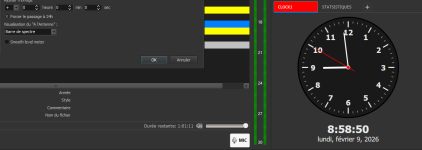
Right-click the slider to reset it to zero.
 
I checked the box, but the clock is still in 12-hour format. It would be helpful to be able to change the date format.
Probably a bug, we'll check it.

Is it possible to add an advanced option to increase the FPS between 20, 30, 45, and 60? I believe that, in my case, it does not affect performance that much due to my PC’s specifications.
I think yes.

Another feature regarding Now Playing: is it possible to add another seek/status bar? This bar would indicate the estimated time it will jump to when hovering the mouse cursor over it.
This bar will have to be placed somewhere, and UI is not going to be changed again. A tooltip can be added showing the expected seeking position.
 
The way I see... Playlist generator pro will just have to have a new tab just for assigning different clocks/presets to the different hours of day. Generate all playlists for the 24 hours once and they're loaded into the scheduler section to load at their play hours... Just like the Ad scheduler. Just saying.
Yes, this is an existing feature request and this will be possible in the future.
 
I can confirm the problem (the afternoon has just begun as I write this).
Furthermore, when the time is adjusted in the display settings (view), the change is not applied. However, it is correctly applied in the window next to "On Air".
Thank you, this will be fixed.

They can add the option “mark as next” on double-click. (Only mark as next, without adding it to the queue.)
The playback queue if, effectively, a "mark as next" feature.
 
The playback queue if, effectively, a "mark as next" feature.
The “Add to queue” function is not the same as “Mark as next”.
The queue creates an additional list with one or more tracks and requires management, which becomes tedious when you want to quickly change the next track.
“Mark as next” would be a one-time action: the selected track plays immediately after the current one, then playback continues normally without creating or modifying any queue.
 
Last edited:
Back
Top