Gender filter already presents there, and it can also be implemented in a different way using the Tags and then setting up filters/constraints.One of the features I really could use... Is more scheduling options for various track attributes like gender, tempo etc using Max/Min in a row method.
But for now time to play with day parting.

You are using an out of date browser. It may not display this or other websites correctly.
You should upgrade or use an alternative browser.
You should upgrade or use an alternative browser.
RadioBOSS 7.2 [beta]
- Thread starter djsoft
- Start date
- Status
- Not open for further replies.
Interesting, because the request date is in 2023 in our records. I think it can be added in this 7.2 release.Thank you, I requested this feature approximately 3 years ago.
There's no text, when it's an intro(+outro) countdown, it's shown in green color (or whatever color is configured in styles) while default track timers are black.In this case, is it possible to set the text “INTRO + OUTRO”?
When you seek, it's not always possible to calculate intro timer, so sometimes it was off, that's why it's hidden now.One observation: when seeking within the intro or outro zone: , the intro/outro bar and counter are not shown or disappear; they only appear again when the track is restarted. In the previous version, this worked correctly.
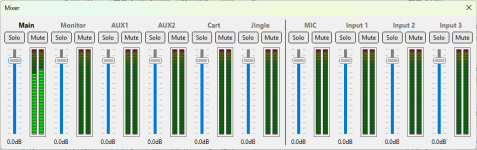
Thank you!I’ve been testing this 7.2 beta version for a few hours now, and what a success! The interface is beautiful, the dayparting is brilliant, and the virtual mixer is a fantastic idea.
API may be added but may be later once the mixer settles in - otherwise we will spent more time doing then redoing the API in case mixer needs to be changed considerably for some reason. Maybe you can achieve the same using the existing API commands - depending on what exactly needs to be switched on/off.Regarding the virtual mixer, would it be possible to control it via an API? The idea would be to switch to an external source (the stream of a remote host) using an HTTP request, and then switch back to the main input once the show is over. This would be amazing for my radio station.
The user manual is not yet updated. The mixer simply allows to control the levels of inputs and outputs that RadioBOSS has.Is there a way for us on Standard to see what the virtual mixer looks like? I may be interested but I'd like to see how it looks/works first. Is it already in the manual?
Can Gender be added to the constraints then... Thank you.Gender filter already presents there, and it can also be implemented in a different way using the Tags and then setting up filters/constraints.
Another observation... The new clock tab is cooool.. Can the weather and hour count down be shifted to the clock tab too and upper one can be turned on or off because there's a cooler clock.
It's not yet implemented, will be added in the next update.I don't see those previous, next, and now icons. How can I see them or add them?
It's not only for dayparting, the main issue is that it's unknown when the playlist will launch. And with growing complexity of the Playlist Generator, when many features are enabled and with a huge track database, it may take 30+ minutes to create a playlist. But as I said in the previous reply, I think we'll add a new (or extend the 'generate' command) to allow generate-and-start as well as support new features.Forcing the same two-step “generate + start” workflow on the Standard version, which does not include dayparting, does not make sense.
Yes.Can Gender be added to the constraints then... Thank you.
This is an interesting idea, noted for the future updates.Another observation... The new clock tab is cooool.. Can the weather and hour count down be shifted to the clock tab too and upper one can be turned on or off because there's a cooler clock.

xzsaimon16
Active member
I understand this, but it’s necessary to implement the icons (previous, current, and next). Where will they be added? Inside the “icon” column, or will there be another column called “status”?This is why we added the new Icon column. You can move it after the Track Title column to have the same visual appearance as if the icon was placed in the Track Title column itself. And separate column approach allows to place the icon anywhere, based on where one wants to see those icons.
An option can be added to hide those default icons, but I honestly do not see any point in it. Not much space will be saved (16px icon + 4px margin) plus you lose indication on what tracks are scheduled/played.
Custom file type icons can't replace the default icons completely as it will require creating a full set of all possible states (played scheduled, unplayed scheduled, etc.) - way too much icons in all those combinations.
I think it would be better to have a separate column, since it can also be moved to wherever it looks best. But I’m not sure what you have in mind; in any case, I’m glad this is being added one way or another.
CharlyPoss
New member
Realmente no veo ninguna mejora visual; es el mismo diseño.Por favor escriba en inglés.
Por favor escriba en inglés.

IvanVK
Member
I fully support the idea of making it possible to choose the position of the countdown timer. So far, I have not encountered any errors in the operation of RB. I like the new clock display option in the menu.I'll see what can be done. Maybe we'll run a limited promotion to allow upgrading with a discount instead. Standard and Advanced already have lots of features, especially for this price point.
OK, more style options will be added to control how the tabs look.
There's a bug that you also need to change some other option (and change it back), this will trigger it to save the icon.
I'm not sure about this, the logical position is to the right. I added this to the list, maybe an option will be added.
xzsaimon16
Active member
I understand, but it would be possible to set one color for the intro time and another for the outro, to distinguish them.There's no text, when it's an intro(+outro) countdown, it's shown in green color (or whatever color is configured in styles) while default track timers are black.
When you seek, it's not always possible to calculate intro timer, so sometimes it was off, that's why it's hidden now.
Additionally, I would like to be able to edit the color of the “intro and outro” marker within Now Playing. I would also like the position marker’s movement to be smoother.
On short tracks, it’s noticeable that the sliding movement is abrupt.
Last edited:

tomimatko
Active member
I tried to test Dayparting.
For testing:
I created a clock rotation with a jingle every three songs. I have 10 jingles in total:
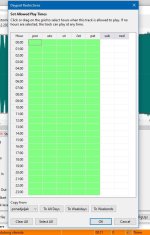
I set 9 jingles to weekdays (green) and 1 jingle to weekend (today is Sunday).
I also enabled the no-repeat rule.
I created the event correctly as well:
run PlaylistGeneratorPro.exe "-preset=Funky" "-out=C:\Users\tomim\Documents\Funky 2.m3u8"
However, every time I generate the playlist, all jingles appear in the clock, including the weekday ones.
For testing:
I created a clock rotation with a jingle every three songs. I have 10 jingles in total:
I set 9 jingles to weekdays (green) and 1 jingle to weekend (today is Sunday).
I also enabled the no-repeat rule.
I created the event correctly as well:
run PlaylistGeneratorPro.exe "-preset=Funky" "-out=C:\Users\tomim\Documents\Funky 2.m3u8"
However, every time I generate the playlist, all jingles appear in the clock, including the weekday ones.
Attachments
Thank you for your reply. The idea would be to be able, via the API, to enable or disable an input, and it would be even better if a fade parameter could be added. That’s why the mixer would be perfect for this.Thank you!
API may be added but may be later once the mixer settles in - otherwise we will spent more time doing then redoing the API in case mixer needs to be changed considerably for some reason. Maybe you can achieve the same using the existing API commands - depending on what exactly needs to be switched on/off.
I've had the suspicion that alot of the repeat protections seem based on the creation of 24 hour playlists in which repetitions can more easily be prevented. Since Radio boss has no overall day part music clock scheduling system (like most other radio scheduling systems), it means for some of us we have to create events to generate playlists every hour. The result is that, in my case at least, it is not uncommon for the same song to be inserted by the playlist generator an hour later when it generates the next hour's playlist. Or am I doing it wrong?Yes, there are users who run a single 24-hour playlist, and for them this approach is easy. But a serious radio station runs many playlists, depending on the day, time of day, weekends, and special programming.
I too am curious about this process and would like to know how to implement it.1. One event generating many playlists
You said that all playlists can be generated in one event.
How exactly would this work if I have 77 different playlists?
Do I need one long command with many presets and output files, or is there a simpler and more practical method for real radio use?
tomimatko
Active member
I didn’t know about this at first either. The key is the “Create Multiple Playlists” option — it’s a bit hidden, so check the Help section for instructions on how to use it.I too am curious about this process and would like to know how to implement it.
It’s still more complex than the old workflow, but it allows you to generate all playlists with a single event instead of many separate ones.
- Status
- Not open for further replies.
Similar threads

- Replies
- 18
- Views
- 7K
- Replies
- 527
- Views
- 182K