Hi,I updated RadioBOSS to version 7.2.3 and noticed that the Next Track display issue is still present.The changelog says:“Fixed the Next Track display occasionally showing information for the wrong track.”Unfortunately, it still occasionally shows information for the wrong upcoming track on my system, exactly as before the update.I had reported this issue previously as well, so I wanted to let you know that it does not appear to be fully fixed in 7.2.3.Thanks!

You are using an out of date browser. It may not display this or other websites correctly.
You should upgrade or use an alternative browser.
You should upgrade or use an alternative browser.
Next Track display issue still present in RadioBOSS 7.2.3
- Thread starter Flashh
- Start date
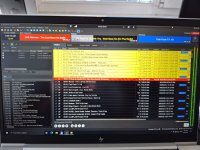
Sometimes I do manually remove or add tracks to the playlist, but the issue also happens when I make no manual changes at all.
There are no scheduled events starting before it happens either. The Previous Track and Next Track displays can still show the wrong tracks during normal automatic playback with the playlist left untouched.
There are no scheduled events starting before it happens either. The Previous Track and Next Track displays can still show the wrong tracks during normal automatic playback with the playlist left untouched.
We were unable to reproduce the issue, so we'd need more information on this.
Please open Settings > General, click Advanced Configuration button, go to Logging, enable "Playback debug log" and "Main player debug log" options and restart RadioBOSS.
When this happens again, in the menu click Settings > Open Settings Folder, send mainplayer.log and playbackdebug.log files, from there we'll be able to better understand what happens.
Please open Settings > General, click Advanced Configuration button, go to Logging, enable "Playback debug log" and "Main player debug log" options and restart RadioBOSS.
When this happens again, in the menu click Settings > Open Settings Folder, send mainplayer.log and playbackdebug.log files, from there we'll be able to better understand what happens.
By email?We were unable to reproduce the issue, so we'd need more information on this.
Please open Settings > General, click Advanced Configuration button, go to Logging, enable "Playback debug log" and "Main player debug log" options and restart RadioBOSS.
When this happens again, in the menu click Settings > Open Settings Folder, send mainplayer.log and playbackdebug.log files, from there we'll be able to better understand what happens.
Email sentBy email?
The files received, thank you. Please check if this still happens in the latest RadioBOSS 7.2.4.Email sent
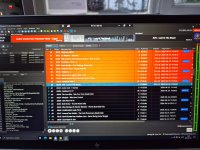
From the logs you have send we were unable to confirm the problem - the displayed next track and actually played next track were always in sync. It looks like the problem is somewhere else, e.g., you use remote desktop connection and maybe it doesn't redraw the next track part properly.
What happens if you click the Next Track box, does it jump to the correct track?
What happens if you click the Next Track box, does it jump to the correct track?
I noticed something that may help reproduce the issue.
If I minimize the Remote Desktop connection to the taskbar for a while and then restore it, the Next Track display often shows the wrong track.
If I then minimize the RadioBOSS window itself on the VPS and restore/maximize it again, the Next Track display immediately becomes correct.
So it seems that the actual next track is correct, but the Next Track panel is sometimes not redrawn/refreshed properly after restoring the Remote Desktop session.
If I minimize the Remote Desktop connection to the taskbar for a while and then restore it, the Next Track display often shows the wrong track.
If I then minimize the RadioBOSS window itself on the VPS and restore/maximize it again, the Next Track display immediately becomes correct.
So it seems that the actual next track is correct, but the Next Track panel is sometimes not redrawn/refreshed properly after restoring the Remote Desktop session.
Yes, this is what we thought the reason was, as there seems to be no way for actual next track/next track UI box to go out of sync.So it seems that the actual next track is correct, but the Next Track panel is sometimes not redrawn/refreshed properly after restoring the Remote Desktop session.
I don't think there's a solution for this (and it also doesn't happen here when we test it with RDP connection); the Next Track box properly updates its state (e.g., "needs redraw") and then it's up to system to handle this state. Looks like RDP has some sort of caching/optimization/bug that prevents it from properly redrawing. Maybe it'll get resolved in one of the next Windows updates.
Thanks for checking. I also tried disabling persistent bitmap caching in the Remote Desktop settings, but unfortunately it did not make any difference.
The issue still appears after minimizing the RDP session for a while and restoring it. Minimizing and restoring the RadioBOSS window itself still immediately refreshes the Next Track display correctly.
So it does seem to be related to the RDP/Windows redraw behavior rather than the actual Next Track logic.
The issue still appears after minimizing the RDP session for a while and restoring it. Minimizing and restoring the RadioBOSS window itself still immediately refreshes the Next Track display correctly.
So it does seem to be related to the RDP/Windows redraw behavior rather than the actual Next Track logic.
I did another test with the Remote Desktop session running in a smaller window instead of full screen.
In this case the issue became even more obvious: the Next Track display got completely stuck and kept showing the information of a track that had already played earlier.
So changing the RDP window size does not solve the issue and may actually make the stale display behavior worse.
In this case the issue became even more obvious: the Next Track display got completely stuck and kept showing the information of a track that had already played earlier.
So changing the RDP window size does not solve the issue and may actually make the stale display behavior worse.
Looks like it caches the RadioBOSS window (or its part) and does not update it, until the window itself is changes (minimized/restores, or its size changed, etc.).The issue still appears after minimizing the RDP session for a while and restoring it. Minimizing and restoring the RadioBOSS window itself still immediately refreshes the Next Track display correctly.
Why RDP does it and why other parts of the window don't get stuck like this, is unknown.
We'll see if RadioBOSS can force redrawing this somehow.

Guillaume
Active member
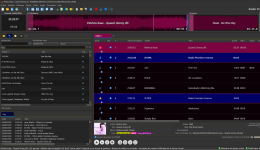
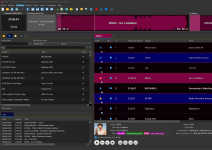
I am experiencing the same display issue: the items in "Coming up next" do not match the next track in the playlist player.
The same applies to "Last track": the displayed items do not match the track actually playing in the playlist player.
I have just enabled the "Playback debug log" and "Main player debug log" options and restarted RadioBOSS. I will send you the files if the issue recurs.
RadioBOSS 7.2.4.0
These issues appeared when I woke up my computer screen (it had been in sleep mode).
This is happening on my local computer (not a remote one).
When the items in "Coming up next" and "Last track" do not match the tracks in the playlist player, the waveforms sometimes fail to display.
-----//-----
Another observation: after restarting RadioBOSS, the logo in the top right corner appears smaller. It returns to its normal size after moving the separator bar located below the waveforms (e.g., "On Air").
The same applies to "Last track": the displayed items do not match the track actually playing in the playlist player.
I have just enabled the "Playback debug log" and "Main player debug log" options and restarted RadioBOSS. I will send you the files if the issue recurs.
RadioBOSS 7.2.4.0
These issues appeared when I woke up my computer screen (it had been in sleep mode).
This is happening on my local computer (not a remote one).
When the items in "Coming up next" and "Last track" do not match the tracks in the playlist player, the waveforms sometimes fail to display.
-----//-----
Another observation: after restarting RadioBOSS, the logo in the top right corner appears smaller. It returns to its normal size after moving the separator bar located below the waveforms (e.g., "On Air").
Attachments
Last edited:
The next RadioBOSS update will perform refresh of those boxes on sleep and RDP events.RadioBOSS 7.2.4.0
These issues appeared when I woke up my computer screen (it had been in sleep mode).
This is happening on my local computer (not a remote one).
Maybe it's for the same reason, if the box wasn't refreshed, it does not display the correct title and there's no or wrong waveform.When the items in "Coming up next" and "Last track" do not match the tracks in the playlist player, the waveforms sometimes fail to display.
What image size (in pixels) is uploaded for the logo?Another observation: after restarting RadioBOSS, the logo in the top right corner appears smaller. It returns to its normal size after moving the separator bar located below the waveforms (e.g., "On Air").
Similar threads
- Replies
- 1
- Views
- 988
- Replies
- 7
- Views
- 2K
- Replies
- 815
- Views
- 255K
- Replies
- 366
- Views
- 127K