
RadioBOSS should automatically detect the date within the filename and schedule each audio file on the corresponding calendar without manual intervention.
 System Logic
Filename Reading
Expected Format:
DD-MM-YY Audio Name
Example:
23-04-25 Song 1.mp3
24-04-25 Song 2.mp3
Date Extraction
The system should identify:
Day → 23
Month → 04
Year → 25 (→ 2025)
Automatic Scheduling
Each file should be scheduled for:
 The exact date detected
 (Optional) a time defined by a rule or template
Intelligent Bulk Upload
When uploading multiple files:
The system analyzes them all
The system automatically distributes them on the calendar
Esto evita la programación manual uno por uno.
Optional Rules (Recommended)
To prevent it from running on autopilot:
If there's no time → assign a default (e.g., 8:00 AM) or ask what time that segment will be broadcast.
If there are multiple files on the same day:
Sort them by name or number
If the format doesn't match:
Add it to a "revision list"
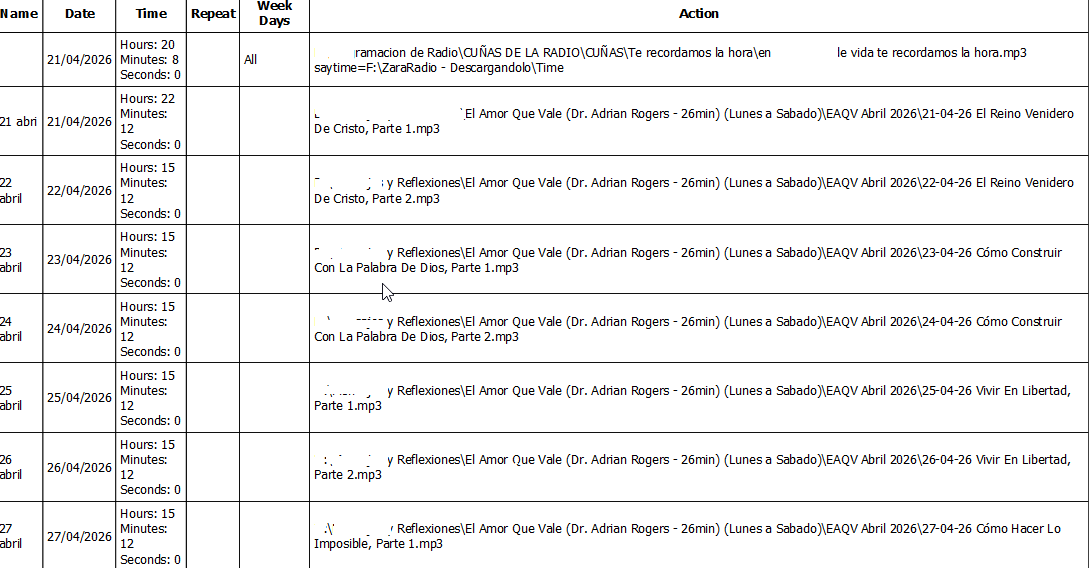
System LogicFilename Reading
Expected Format:
DD-MM-YY Audio Name
Example:
23-04-25 Song 1.mp3
24-04-25 Song 2.mp3
Date Extraction
The system should identify:
Day → 23
Month → 04
Year → 25 (→ 2025)
Automatic Scheduling
Each file should be scheduled for:
The exact date detected (Optional) a time defined by a rule or templateIntelligent Bulk Upload
When uploading multiple files:
The system analyzes them all
The system automatically distributes them on the calendar
Esto evita la programación manual uno por uno.
Optional Rules (Recommended)
To prevent it from running on autopilot:
If there's no time → assign a default (e.g., 8:00 AM) or ask what time that segment will be broadcast.
If there are multiple files on the same day:
Sort them by name or number
If the format doesn't match:
Add it to a "revision list"
